
Objective
I have a subscription to the local newspaper, my goal is to automate the recovery of the PDF file of this newspaper and then distribute it on Teams
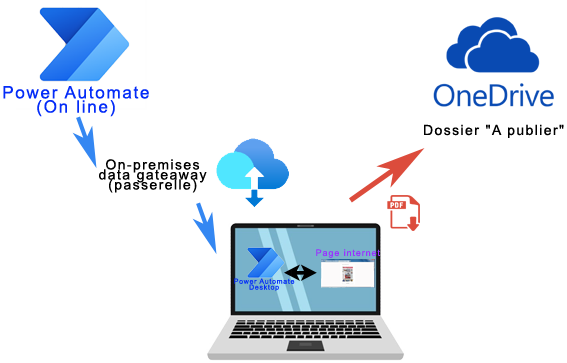

I have a subscription to the local newspaper, my goal is to automate the recovery of the PDF file of this newspaper and then distribute it on Teams
⚠New version of this tutorial available
For example, I use this method to connect a non-WIFI IP camera to the wireless Wi-Fi network in my home. The same technique can be used to connect a TV or any Ethernet equipment, non-wifi.
Here is the principle:
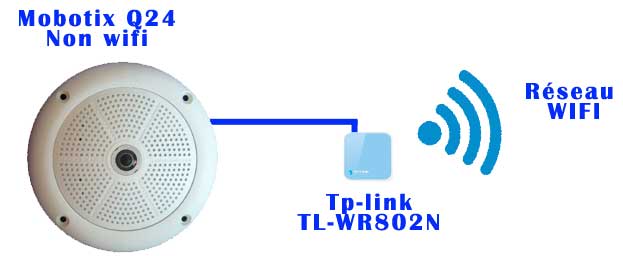
 |
|
Alexa, good night
The aim here is to use an Alexa routine and then a scene from the Alexa plugin and then a screenplay. Read More

Note that any home automation equipment would do the trick from the moment you have an order available in Jeedom. Read More
Note that any home automation equipment would do the trick from the moment you have an On order and an Off order available in Jeedom. Read More
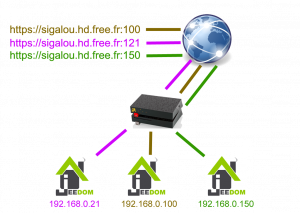
In this feedback, I use my DNS Reverse from Free. I imagine it is even easier to use a domain name, but with the functionality offered by Free, the domain is not indispensable.
In the rest of this page, I will use the following reverse DNS: sigalou.hd.free.fr. Please note that this name is an example and does not exist; For security reasons, I do not give here the reverse DNS that I actually use.
I have 3 Jeedoms installed on my local network:
 |
|
|
|


 English
  French
  Spanish
  Chinese
  German