

Objective
- Alexa, open the portal
- Alexa, close the portal.
Equipment used
- a script that sends an opening command to the portal
- the Script Plugin

Note that any home automation equipment would do the trick from the moment you have an order available in Jeedom.
Give a Generic Type to Your Orders
This is mandatory for the Alexa plugin to detect the function to perform.
I use the Light format (even for the portal) because I do not have a failed status return with this format.
As my portal opens and closes with the same order, I simply copied the order.
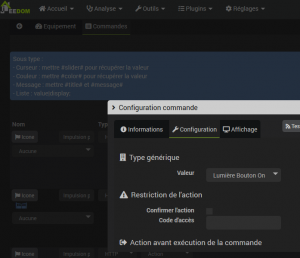
You have to go to the commands to specify a Generic type, as in the screenshot below.
- On the first order: Light Button On
- On the second order (copy of the first): Light Button Off
Add Portal equipment in Alexa
This step will make the link with the Amazon server
On the Equipment tab, tick Transmit, Specify type Light, put a Pseudo (portal in the example) and Save.

Detect equipment in Alexa
In the Alexa app on the phone or on https://alexa.amazon.fr
Connected home then Detect
Result
The portal can be controlled by voice
- Alexa, open the portal
- Alexa, close the portal.
 English
  French
  Spanish
  Chinese
  German