

 |
|
Presentation of the plugin
[Doc under preparation]
Installing the Plugin
Very important, Alexa-Fire TV needs the Alexa-API plugin (free) to talk to your Alexa:
Step 1: Install the Alexa-API plugin
Step 2: Install the Alexa-Fire TV Plugin
from the Market, Multimedia category or by typing its name in the search field
You have the choice between the version Stable or version beta.
Many new features are always more present on the Beta than on the Stable but they are in test.
If you are a gamer and curious, you can install the Beta version.
Note: You do not need to install Jeedom en Beta (this is not recommended for that matter) to install the Beta plugin.
You can switch from a Beta version to a Stable version quite easily and vice versa, just reinstall over the other version.
Step 3: Activate Plugin
Step 4: Install dependencies
Step 5: Go back to the Alexa-API plugin
Step 6: Relaunching the SCAN
Fire TV devices will be generated automatically
Go to Alexa-Fire TV to view them
Allow ADB access on each Fire-TV
This section is not documented yet, use the excellent AtlasWeb tutorial to retrieve the IP address of your Fire-TV and activate ADB.
https://www.atlasweb.net/installer-et-configurer-adblink-pour-amazon-fire-tv-et-stick/
Note that some beta testers had an "unauthorized" message and had to disable and reactivate 1 or 2 times for it to work.
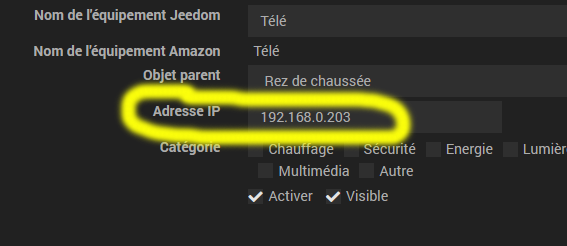
Enter the IP of your Fire-TV
The IP address is given by the procedure described in the previous paragraph or by your router.
In case of concern
Test a simple connection to ADB in SSH
Open an SSH connection on your Jeedom (Puty, Moxaxterm, …)
Check the list of connected devices:
adb devices
Try to connect your Fire TV (replace with the IP of your Fire TV)
adb connect 192.168.0.50
Re-check the list of connected devices:
adb devices
If your Fire TV appears with the mention device, it's okay
If you have an error message Connection Failed, because the ADB authorisation is not operational, repeat the paragraph Allow ADB access on each Fire-TV
Documentation Beta-Testers and Developers
This part allows developers or beta testers to have memory support
adb shell dumpsys window windows | grep -E 'mFocusedApp' | cut -d / -f 1 | cut -d ' -f 7
- firetv reception: com.amazon.tv.launcher
- kodi: org.xbmc.kodi
- netflix: com.netflix.ninja
- disney+: com.disney.disneyplus
- amazon video: com.amazon.firebat
- molotov: tv.molotov.app
- YouTube: com.amazon.firetv.youtube
- amazon music: com.amazon.bueller.music
Media Controls
adb shell media dispatch pause
with:
play, pause, play-pause, mute, headsethook,
stop, next, previous, rewind, record, fast-forword.
sudo adb -s 192.168.0.38:5555 shell dumpsys power -h
POWER MANAGER (dumpsys power)
Power Manager State:
mDirty=0x0
mWakefulness=Awake
mWakefulnessChanging=false
mIsPowered=true
mPlugType=2
mBatteryLevel=100
mBatteryLevelWhenDreamStarted=100
mDockState=0
mStayOn=false
mProximityPositive=false
mBootCompleted=true
mSystemReady=true
mHalAutoSuspendModeEnabled=false
mHalInteractiveModeEnabled=true
mWakeLockSummary=0x0
mUserActivitySummary=0x2
mRequestWaitForNegativeProximity=false
mSandmanScheduled=false
mSandmanSummoned=false
mLowPowerModeEnabled=false
mBatteryLevelLow=false
mLastWakeTime=14066670 (296411 ms ago)
mLastSleepTime=14041490 (321591 ms ago)
mLastUserActivityTime=14066670 (296411 ms ago)
mLastUserActivityTimeNoChangeLights=9264189 (5098892 ms ago)
mLastInteractivePowerHintTime=14066670 (296411 ms ago)
mLastScreenBrightnessBoostTime=0 (14363081 ms ago)
mScreenBrightnessBoostInProgress=false
mDisplayReady=true
mHoldingWakeLockSuspendBlocker=false
mHoldingDisplaySuspendBlocker=trueSettings and Configuration:
mDecoupleHalAutoSuspendModeFromDisplayConfig=false
mDecoupleHalInteractiveModeFromDisplayConfig=false
mWakeUpWhenPluggedOrUnpluggedConfig=true
mWakeUpWhenPluggedOrUnpluggedInTheaterModeConfig=false
mTheaterModeEnabled=false
mSuspendWhenScreenOffDueToProximityConfig=false
mDreamsSupportedConfig=true
mDreamsEnabledByDefaultConfig=true
mDreamsActivatedOnSleepByDefaultConfig=true
mDreamsActivatedOnDockByDefaultConfig=true
mDreamsEnabledOnBatteryConfig=false
mDreamsBatteryLevelMinimumWhenPoweredConfig=-1
mDreamsBatteryLevelMinimumWhenNotPoweredConfig=15
mDreamsBatteryLevelDrainCutoffConfig=5
mDreamsEnabledSetting=true
mDreamsActivateOnSleepSetting=true
mDreamsActivateOnDockSetting=true
mDozeAfterScreenOffConfig=false
mLowPowerModeSetting=false
mAutoLowPowerModeConfigured=false
mAutoLowPowerModeSnoozing=false
mMinimumScreenOffTimeoutConfig=10000
mMaximumScreenDimDurationConfig=7000
mMaximumScreenDimRatioConfig=0.20000005
mScreenOffTimeoutSetting=300000
mSleepTimeoutSetting=1200000
mMaximumScreenOffTimeoutFromDeviceAdmin=2147483647 (enforced=false)
mStayOnWhilePluggedInSetting=0
mScreenBrightnessSetting=107
mScreenAutoBrightnessAdjustmentSetting=0.0
mScreenBrightnessModeSetting=0
mScreenBrightnessOverrideFromWindowManager=-1
mUserActivityTimeoutOverrideFromWindowManager=-1
mTemporaryScreenBrightnessSettingOverride=-1
mTemporaryScreenAutoBrightnessAdjustmentSettingOverride=NaN
mDozeScreenStateOverrideFromDreamManager=0
mDozeScreenBrightnessOverrideFromDreamManager=-1
mScreenBrightnessSettingMinimum=10
mScreenBrightnessSettingMaximum=255
mScreenBrightnessSettingDefault=171Sleep timeout: 1200000 ms
Screen off timeout: 300000 ms
Screen dim duration: 7000 msWake Locks: size=0
Suspend Blockers: size=4
PowerManagerService.WakeLocks: ref count=0
PowerManagerService.Display: ref count=1
PowerManagerService.Broadcasts: ref count=0
PowerManagerService.WirelessChargerDetector: ref count=0Display Power: state=ON
Wireless Charger Detector State:
mGravitySensor=null
mPoweredWirelessly=false
mAtRest=false
mRestX=0.0, mRestY=0.0, mRestZ=0.0
mDetectionInProgress=false
mDetectionStartTime=0 (never)
mMustUpdateRestPosition=false
mTotalSamples=0
mMovingSamples=0
mFirstSampleX=0.0, mFirstSampleY=0.0, mFirstSampleZ=0.0
mLastSampleX=0.0, mLastSampleY=0.0, mLastSampleZ=0.0
 English
  French
  Spanish
  Chinese
  German