I spend a lot of time monitoring, securing and understanding what is happening on my home network. Between the internet box, the unintentionally exposed equipment and the permanent scans from the internet, I once wondered one simple thing: Is my public IP known as “noisy” or suspicious on the internet?
That is, malicious tools use my network (pc, NAS, router, HA, …) ??
That’s how I came across GreyNoise, a really interesting service that makes it possible to know whether an IP address is part of the “noise” of the Internet, i.e. whether it is observed in scanning, polling or malicious traffic activities.
GreyNoise rightly describes its approach as a way to qualify the background noise of the Internet and contextualise an observed IP.
And as often with me, after a few tests, I thought: “Well, it would still be convenient to have this directly in Home Assistant”.
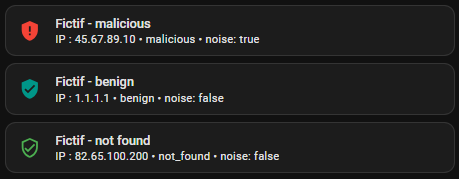
Initially, I thought I would do something very simple with a classic HTTP request. On paper, it seemed trivial. In practice, the most obvious method did not work for me as I had hoped. So I changed my approach and finally switched to a command line sensor. In this article, I tell you all this step by step, as I actually set it up at home, with the Lovelace cards for the final display.
Read More









 English
  French
  Spanish
  Chinese
  German