I'm testing the smoke detector Zigbee US E8

🎯 My objectives

I need to monitor my house for fire risks as soon as the first smokes appear.

The Zigbee Smoke Detector We E8 is ideal for this mission, it is part of the 3 Zigbee equipments of the consumer range. In order to decide between them, I made a comparison:

The data of the E8 enable accurate alerts in Zigbee2MQTT and Home Assistant, such as sirens, push notifications and automatic ventilation.

The security of my home is thus strengthened in a simple and effective way.

This device complies with European standards EN14604 for autonomous smoke detectors (DAAF), as well as CE and RoHS certifications, ensuring its compliance with European safety standards.

The Photoelectric Smoke Detector We E8 home ZigBee detects a fire by detecting smoke in the air and triggers an audible and luminous alarm as soon as a certain concentration threshold is reached. It is designed for residential buildings and its single-source detection chamber is protected against false positives caused by dust, insects or moisture.

The internal ‘maze’ design allows for rapid fire detection, while limiting undesirable triggers. The case is made of fireproof plastic with a glossy finish. Read More

Domotizing your mailbox 3.0

Objective and approach: how I domotize my mailbox

In this article, I share all the steps to domotise my mailbox and easily track the receipt of mail or parcels, from the first set-ups to the latest developments. My aim is to explain to you step by step, in a simple and detailed way, how I have modernised the monitoring of my mailbox to receive accurate notifications, use appropriate sensors and automate the management of arrivals and withdrawals of mail.

Whether you want to reproduce all or part of this project, or simply take inspiration from certain solutions, I detail each step, each technical choice, and I illustrate all the steps with photos and configuration extracts. I also explain the mistakes to avoid and the possible alternatives so that even a beginner can successfully domotise their mailbox.

This is how I went from a simple installation to a complete, reliable and connected solution, adapted to today’s needs.

Former DS12A 433MHz sensor
Ancient Home Automation Mailbox Installation

Read More

Sigalou Farmhouse

Garage vacuum (or garage vacuum) in progress …

On this page, two types of products. Either products that I no longer use or new products (mainly in Zigbee).

Indeed, when I do tests to feed this blog, I order lots to lower the unit price. I keep the equipment in prod at home somewhere to check its lifespan and I resell the rest of the lot at cost price, which makes it possible to benefit the home automation community at a lower price. You have therefore understood that the price is not negotiable, even in lots.

Sometimes there are price variations after product launches. I do not change the price, I actually resell on my purchase price. If the price goes up, so much the better for you, if the price goes down, so much the worse for me, I may not sell it, but I keep my buying price logic and the products remain in my personal stock.

I can be reached on the Jeedom and HA-CF forums or on Viber, Discord, Slack and primarily via the contact form.

All shipments are made at your expense via Mondial Relais, which is the most economical (from €4.10), here are the prices:

https://www.mondialrelay.fr/envoi-de-colis/tarifs-expeditions/

Read More

Jeedom migration to Home Assistant, create MQTT link between them

When migrating from Jeedom to Home Assistant, it is sometimes necessary to retrieve information from Jeedom, such as the elements of Presence from Bluetooth sensors.

In this tutorial, we will see how to retrieve presence information provided by NUTS devices.

Using jMQTT on Jeedom

To establish the link on the Jeedom side, first install the jMQTT plugin.

jMQTT icon

Adding a broker

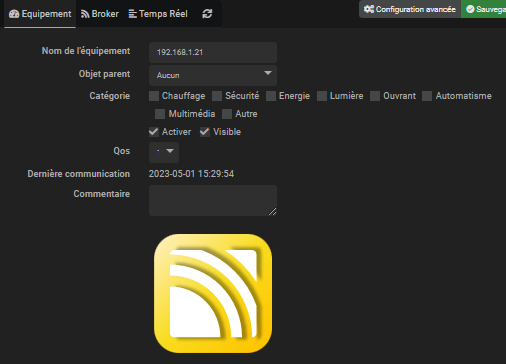
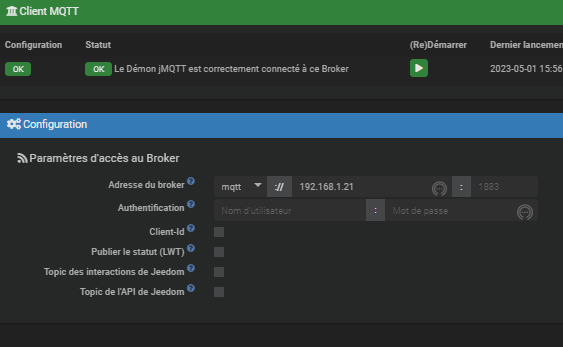
Add the broker located at 192.168.1.21. To simplify, name this broker explicitly.

Broker configuration
Broker details

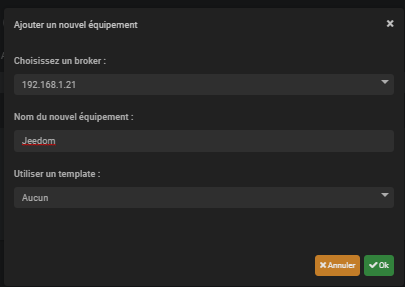
Addition of new jMQTT equipment

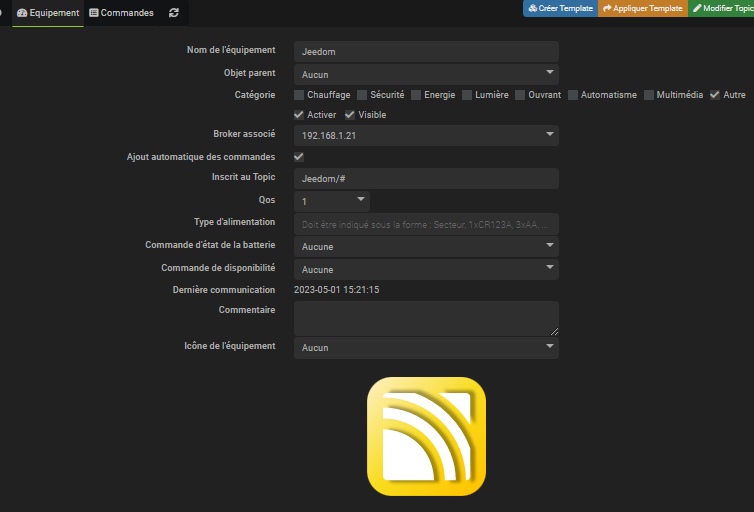
You can choose to add all the items in one piece of equipment, or to separate them according to your preferences. In this example, we add everything in a named equipment Jeedom.

Adding equipment
Equipment Details
Adding a Lionel Presence command
Lionel Presence Command

Whenever the value of #\[Alarm Intrusion \]\[Presences \]\[Lionel \]# changes, the corresponding MQTT frame is updated:

Trame MQTT

Manual addition of binary_sensor to the Home Assistant configuration

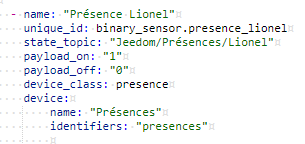
In the file /config/mqtt.yaml, add the following configuration in the section binary_sensor :

– Name: Lionel Presence
single _id: binary_sensor.presence_lionel
state_topic: Jeedom/Presences/Lionel
payload_on: "1"
payload_off: ‘0’
device_class: presence
device:
name: Presences
Identifiers: "Presences"

Configuration Home Assistant

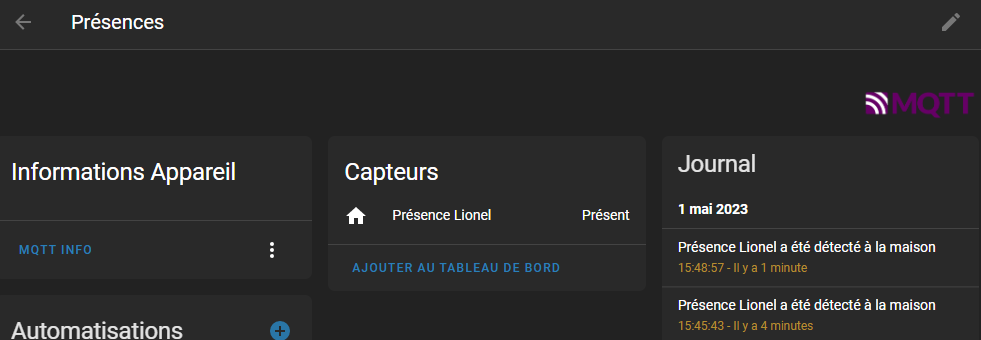
Result in Home Assistant

Result in Home Assistant