In Home Assistant, a Nabucasa coordinator (SkyConnect, ZBT-1, ZBT-2, …) can either Zigbee, or Thread, but not as a universal radio to do everything at once. In this test, a first key remained dedicated to the Zigbee in production, and a second key was reconfigured for Thread to prepare a Matter over Thread network without breaking the existing one.
Here is the full HTML code of the article, already written in the first person and with the descriptive titles:
📌 Context
My goal was simple: check if a second SkyConnect could become a Thread adapter directly from Home Assistant, without plugging the key into a PC and without touching the already operational Zigbee. I chose this cautious approach because my home automation installation was already working properly, and I did not want to shake everything up.
To avoid any risk, I left the Zigbee key intact. The new key served as a test bed for me, which allowed me to clearly document the behaviour of Home Assistant and to keep my own feedback.
💡 Difference Between Thread and Matter
Thread and Matter They don't mean the same thing. Thread is the radio network used by some low-power devices, while Matter is the standard that allows these devices to speak the same language in Home Assistant. SkyConnect therefore does not “do” Matter on its own: it provides the Thread radio layer, and Home Assistant then manages the Matter integration.
🚦 I start from a SkyConnect already in production
Initially, a SkyConnect was already in service for the Zigbee. I had a second, new key that had never been used before. It was this second key that I plugged into my Home Assistant machine for the experiment.
The choice to separate roles allowed me to clearly compare behaviours: on the one hand the production Zigbee, on the other a radio dedicated to Thread. It was also, in my view, the safest way to test a protocol change without a service interruption.

🔎 I let Home Assistant detect the new key
Once plugged in, Home Assistant detected my new SkyConnect in the Integrations page, in the Discoveries section. The card displayed “Home Assistant SkyConnect / Home Assistant Connect ZBT-1” with a button Add.

At the same time, the other SkyConnect remained present in the configured integrations. This confirmed to me that production was not impacted and that Home Assistant already managed the two instances as two separate devices.
🖱 I start adding from the dashboard
The new map appeared in the ‘Discoveries’ area. I clicked on Add to launch the configuration wizard for this second key.
We can see with this simplicity invented by Nabucasa, I did not need to go through a manual flash or an external tool. The configuration started directly from the Home Assistant web interface.
🧭 I choose the protocol of the key
After clicking on Add, Home Assistant asked me to choose the protocol of the key. Two options were proposed: Use as Zigbee Adapter and Use as Thread Adapter.
This choice confirmed an important point for me: The SkyConnect is assigned to a specific role. I had to choose either Zigbee for a classic network or Thread to prepare Matter over Thread.
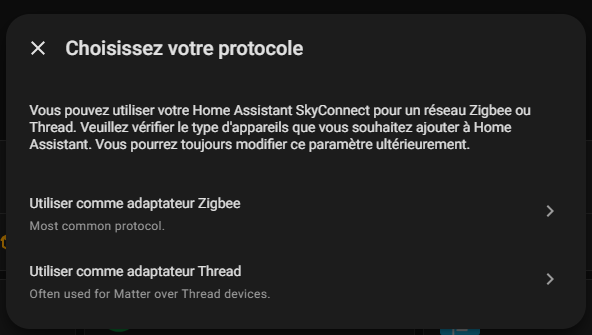
🧵 Why I choose Thread
I chose Thread to test the Matter over Thread use case. My objective was not to replace the existing Zigbee, but to validate the creation of a dedicated Thread radio in Home Assistant.
It is also, in my view, the right logic if we want to maintain a stable installation: one dongle keeps the Zigbee in production, the other serves as the basis for Thread.
⚙ I let Home Assistant install OpenThread
Once Thread was selected, Home Assistant launched the adapter update.
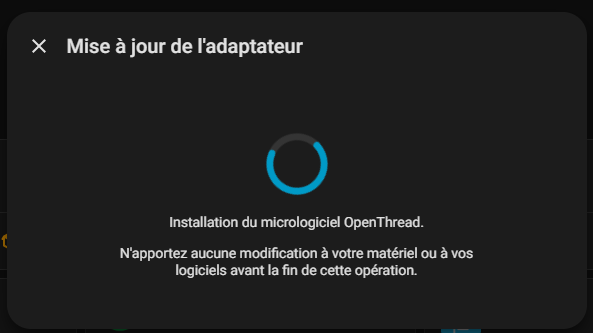
At this point, my key was being transformed into a Thread adapter. The procedure advanced in Home Assistant without outside intervention.
📈 I monitor the progress of the flash
The progress bar showed the progress of the installation, in particular at 5 %. This confirmed to me that the key was indeed being flashed with the OpenThread firmware.
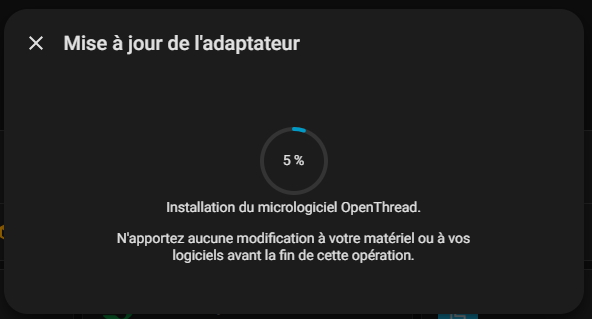
🛠 I complete the configuration of Thread
After the flash, Home Assistant went to the “Configuration of Thread” step.

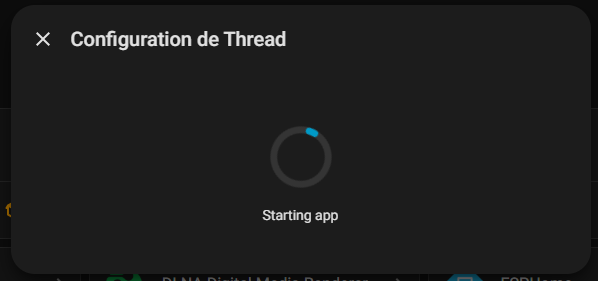
I then saw messages like “Installing app” and then “Starting app”, signs that the Thread stack was being deployed.
This is when Home Assistant orchestrates the OpenThread Border Router service. In practice, my key becomes the system’s Thread radio, and Home Assistant takes care of the associated network layer.
The Thread network is not just a cosmetic setting. This is a real network setup, with a radio adapter that becomes able to play the role of border router for Matter-enabled Thread devices.
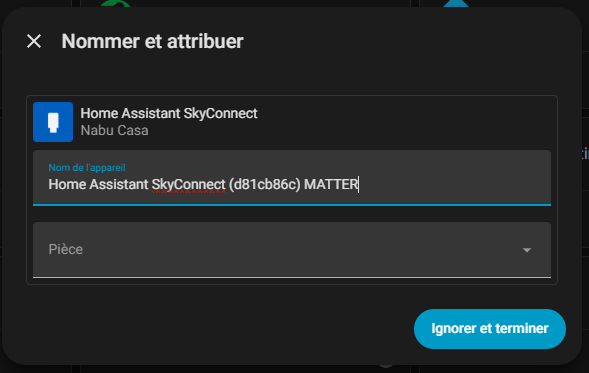
At the end of the procedure, I add the MATTER information so as not to confuse the keys.
My new key appeared with the firmware OpenThread RCP 2.7.2.0. This confirmed that the Thread reconfiguration was successful.
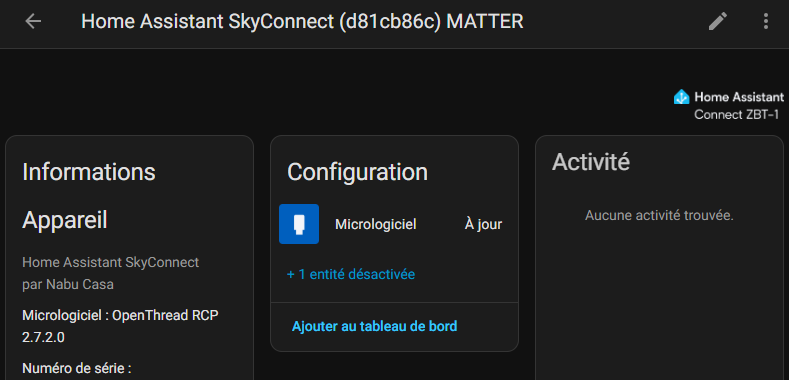
Home Assistant then displayed two separate devices in the Devices tab: a classic ‘Home Assistant SkyConnect’ and a ‘Home Assistant SkyConnect MATTER’. The integration map also indicated “2 devices”.

🧠 I read what it teaches me
This separation is convenient because it visually shows both roles. One key remains associated with historical use, the other becomes the radio dedicated to Thread/Matter.
For feedback, this is a strong point: The reader immediately understands that the migration created a second logical instance in Home Assistant, without breaking the first use.
🔬 What this test proves to me
This experience has shown me that it is possible to convert a second SkyConnect to a Thread adapter directly from Home Assistant. The procedure is integrated, guided, and does not require complex manipulations outside the interface.
She also showed me that Home Assistant knows how to manage the separation between Zigbee and Thread in a clear way. This is particularly reassuring when a Zigbee plant is already in production.
⚠ I keep a limit in mind
However, it should be borne in mind that a SkyConnect does not become a stand-alone hub Matter. Matter remains managed by the Matter integration of Home Assistant; The key here provides Thread connectivity, not all Matter logic alone.
In other words, SkyConnect fulfils for Thread the role that a coordinator fulfils for Zigbee: It opens and connects the network to Home Assistant. The difference is that Zigbee talks about a coordinator, while Thread relies on a border router, and Home Assistant then manages Matter above.
📝 Review and conclusion
Perhaps the most interesting thing about this test is the simplicity of the flow. I kept a key in Zigbee for stability, added the second one as a discovery, then reconfigured it into Thread with just a few clicks.
For someone who wants to test Matter over Thread without touching their existing installation, it is a clean and reassuring method. It avoids disassembly, manual flash and the risk of shutdown on the main Zigbee network.
In the end, the transformation worked as expected. Home Assistant detected my new SkyConnect, offered me the choice of Zigbee or Thread, installed OpenThread, and then showed me a key switched to MATTER/Thread mode with OpenThread RCP firmware.
Above all, this feedback shows me that it is possible to organise your radio roles properly in Home Assistant: one key for Zigbee production, another for experimenting with Thread and preparing Matter over Thread.




 English
  French
  Spanish
  Chinese
  German