

📘🔐 Special file: Nuki Smart Lock Ultra
This article is part of my complete file from installation to accessories to home automation.
- I replace my Danalock V3 with a Nuki Smart Lock Ultra
- I connect the Nuki Smart Lock Ultra to my home automation ← you are here 🎯
- I add a Nuki Keypad 2 NFC to my Smart Lock Ultra
- I add a Door Sensor to my Nuki Smart Lock Ultra
When I installed the Smart Lock Ultra At home, I quickly had this pleasant feeling: “Okay, there I switched to another category of connected lock”.
With the Keypad 2 NFC, I settled the question of everyday life: how to enter the house without taking out your phone, without a key, without instructions for use.
There was one outstanding point, the most interesting for me: How can I make sure that my lock is not “just” connected, but really integrated into all my home automation? How do I get her to talk with my scenarios, my sensors, my automations, in short, everything I have already built around Home Assistant and my ecosystem?
This is exactly what this article is about: the three possible paths, what I tested, what I kept … and what I will not do again.
🧭 Three paths for a single lock
When you go into the lock settings, into “Functions & Configuration” and then “Smart Home”, Nuki offers three main integration families:
- Connection via Matter (Apple Home, Google Home, Amazon Alexa, Samsung SmartThings, Homey, Home Assistant…)
- Local integration via MQTT, for advanced home automation platforms (Home Assistant, Homebridge, Jeedom, Loxone, OpenHAB, etc.)
- Integration web via Nuki Web, initially designed for old hubs and some cloud integrations
On paper, Nuki ticked all the boxes: open standard (Matter), home automation geek protocol (MQTT) and more “classic” web integration.
In real life, these three paths do not make the same experience at all. I therefore decided to approach them one by one, with one question in mind: “does it fit neatly into my ecosystem, and does it remain consistent with my search for local-first and sovereignty?”
🏠 Matter: the “official” multi-ecosystem pathway
✨ Why I started with Matter

Matter is the new grand standard meant to unify Apple Home, Google Home, Alexa, SmartThings and others.
The Smart Lock Ultra supports it natively, via Thread, with the following idea: a single integration, and behind all ecosystems know how to speak to the lock.
On the Home Assistant side, Nuki even joined the Work with Home Assistant programme, which means that the Matter integration has been tested and validated by the HA team.
For someone like me who has:
- Home Assistant in the heart of the house,
- some connected speakers,
- one-off uses with Google / Alexa,
So Matter looks like the natural way to start.
🔌Connection via Matter
The Matter pairing is done globally as for any other equipment: one activates Matter/Thread in the Nuki app, one goes through the compatible hub (Home Assistant, Apple Home, Google Home, etc.) and the lock appears with its entities (state, locked/unlocked, battery, door sensor according to configuration).
I check my hub Matter
I check that my hub is compatible, the List of compatible hubs is given in the documentation.
I have a ZBT-1, it is perfect, I am surprised that the ZBT-2 is not present in this table.
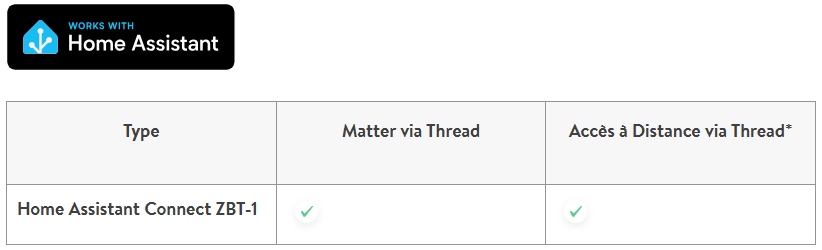
There are two modes of dialogue, as the table shows, I take two minutes to understand.
🏠 Matter via Thread: integrate the lock into my home automation
The first mode is the one I really use to bring Nuki into my home automation world.
Matter via Thread allows me to attach the lock to Home Assistant and see it as a full-fledged piece of equipment in the house.
The interest is simple: I can control the lock, know its condition, integrate it into my automations and have it interact with the rest of my installation.
This is the most logical solution if integration is to be clean, standardised and compatible with several ecosystems.
📡 Remote Access via Thread: more direct remote access
The second mode is remote access via Thread.
In principle, it does not serve to better integrate the lock into the home automation, but to make it reachable remotely without going through the built-in Wifi of the lock.
Interest is a more direct, modern and potentially energy-efficient architecture, with Thread as the basis for communication.
On the other hand, this method imposes certain technical conditions: Nuki requested that the hub provide internet access and support NAT64. Nuki even states that Thread devices will only have access to the Internet if NAT64 is activated on the hub.
In practical terms, this means that Home Assistant must not only manage the lock locally: it must also be able to act as a Thread border router and bridge the gap between the Thread network, which runs on IPv6, and the necessary Internet access for the remote service.
This requires installing the OpenThread Border Router add-on in Home Assistant, enabling NAT64, and verifying that the correct border router is being used by the lock.
Attention should also be paid to the network itself: if more than one Thread border router is present, the lock may be associated with the wrong one, which may block access to the Internet.
In practice, therefore, it requires a clean configuration, a single active Thread router or at least clearly defined as the preferred network, and a network stack that correctly accepts IPv6 and NAT64 translation.
⏳ What I do now
For my part, I have decided not to go further than Matter via Thread for the time being.
I would like to finish the three-mode test before going deeper into Matter.
I prefer to keep this evolution for later, when I will have more time to put it in place properly and above all to derive a real concrete benefit from it.
The Nuki application

On the Remote Access switch button, I understood that it corresponds to Remote Access via Thread, it is really not easy to understand if you do not dive into this issue.
When I try to activate it, the button returns to the disabled state, so the conditions for activating Remote Access via Thread are not met.
On Home Assistant
The equipment has therefore arrived well in the list of Matter Devices.
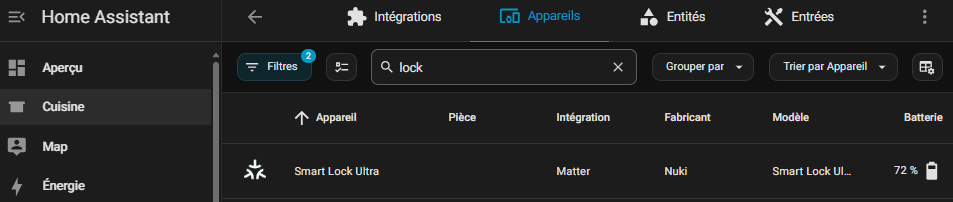
The sensor proposal is complete.
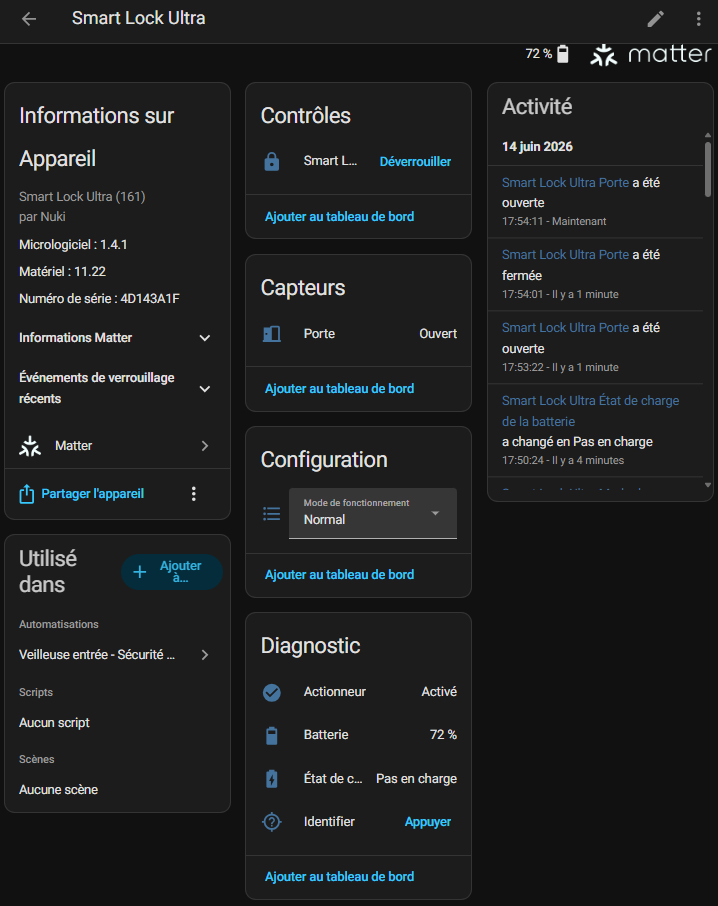
The main sensor that drives the lock was created in lock.smart _lock _ultra, I will rename it and turn the sensor into lock.smart _lock entere

I have a Nuki sensor Door Sensor which makes it possible to know if the door is open or not. I don’t mention it here either, but I can see the state of the (open/closed) door here.
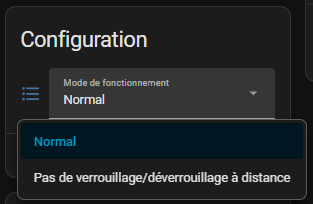
The select.smart _lock _ultra_mode_de_functioning sensor is a particularly relevant configuration parameter, bravo to developers. For those who do not want to be able to unlock their lock remotely, simply change this sensor.
Both options speak for themselves, I tested and quickly understood. I'll leave it to normal. As I will not touch this configuration, I disable this sensor in HA.
Finally, the diagnostic tools framework will be able to create automations or notifications if something goes wrong.

I played with the button Identifier, the sensor button.smart _lock _ultra _identifier at home, which flashes the lock, it is just a pity that the flashing does not reflect the state of the lock. This would allow the status to be visually checked via this command.
Benefits that I quickly noticed:
- Everything is managed locally, no need for Nuki cloud to control the lock from my home automation server.
- The integration in Home Assistant is clean, recognised, and the entities go back correctly.
- Voice assistants can follow, each on their own, without me having to multiply the specific integrations.
In short, Matter does what he promises: it simplifies multi-ecosystem integration, with a “once and for all” logic.
⚖ Where Matter shows its limits
For mainstream integration and for the WAF, Matter is fine. But for a homebuilder who likes to drive everything by the millimetre, it is less flexible:
- The granularity of events is more limited than what can be achieved with MQTT (e.g. the last precise action, some fine states, etc.).
- We remain dependent on how each hub implements Matter and exposes entities and events.
- Advanced diagnostics, for debug or fine-tuning of automations, are more difficult to obtain than with a detailed MQTT flow.
To sum up, I kept Matter as a “universal” compatibility layer (and for voice uses), but this is not where I found the finest finesse for my advanced home automation.
📡 MQTT: the Path of Demanding Domoticians

🔍 Why I turned to MQTT
Alongside Matter, Nuki offers MQTT integration directly from the lock, via Wi-Fi or Thread. The idea is simple: the lock publishes its status (locked, unlocked, open door, battery, etc.) on MQTT topics, and accepts commands to open or close.
The advantages, on the home automation side:
- Widespread protocol, supported by Home Assistant, Jeedom, Homebridge, Loxone, OpenHAB and company.
- Local integration, real-time, without going through the Nuki cloud.
- Automatic discovery in Home Assistant possible (auto-discovery), which makes integration much simpler than you might initially imagine.
On forums and blogs, there is also a lot of very positive feedback: Some have even built 100 installations. % local with Nuki + MQTT + Home Assistant, without ever opening any port to the outside.
⚙ How I integrated it into my installation
In the Nuki App, activation takes place via:
‘Lock settings’ → ‘Functions & Configuration’ → ‘Integrations’ → ‘Smart Home’ → ‘Configure MQTT’.

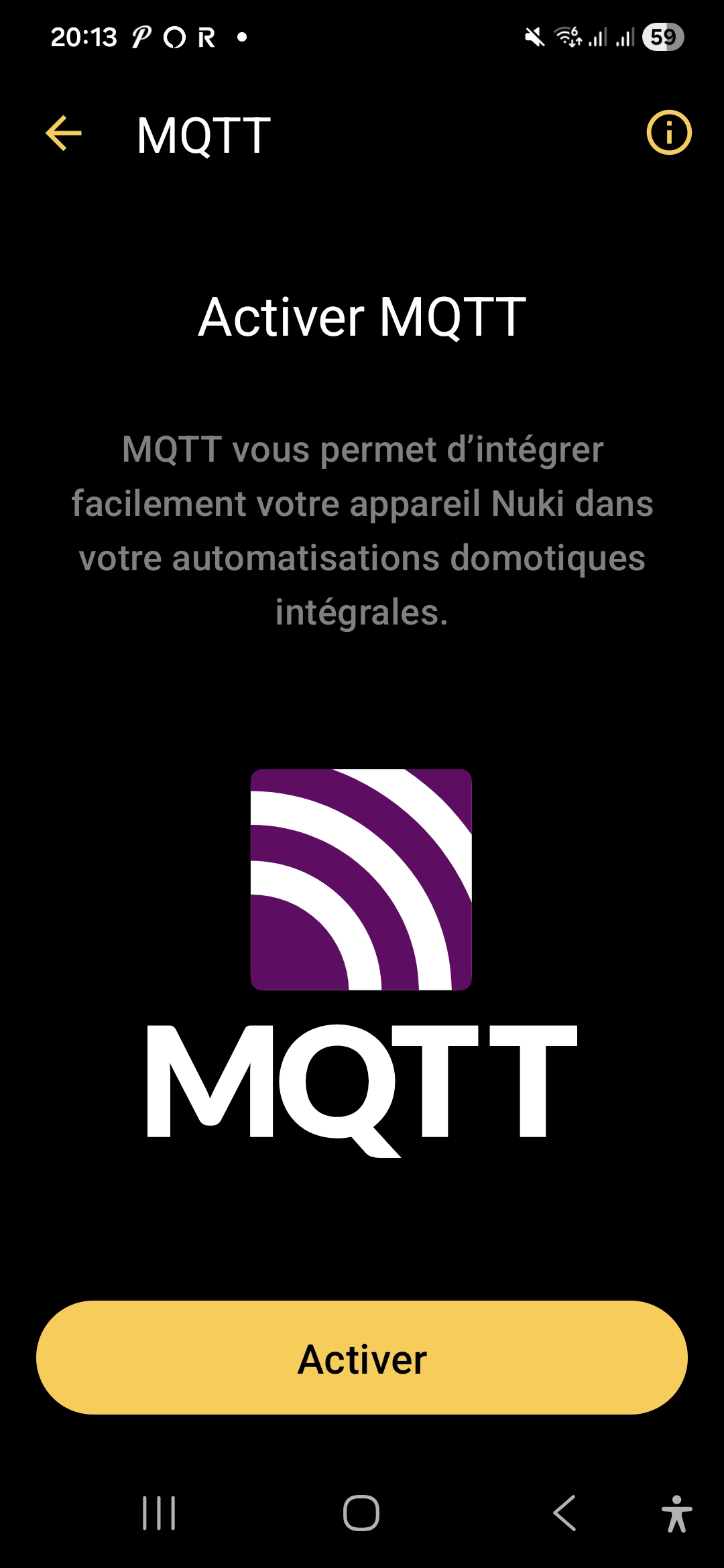
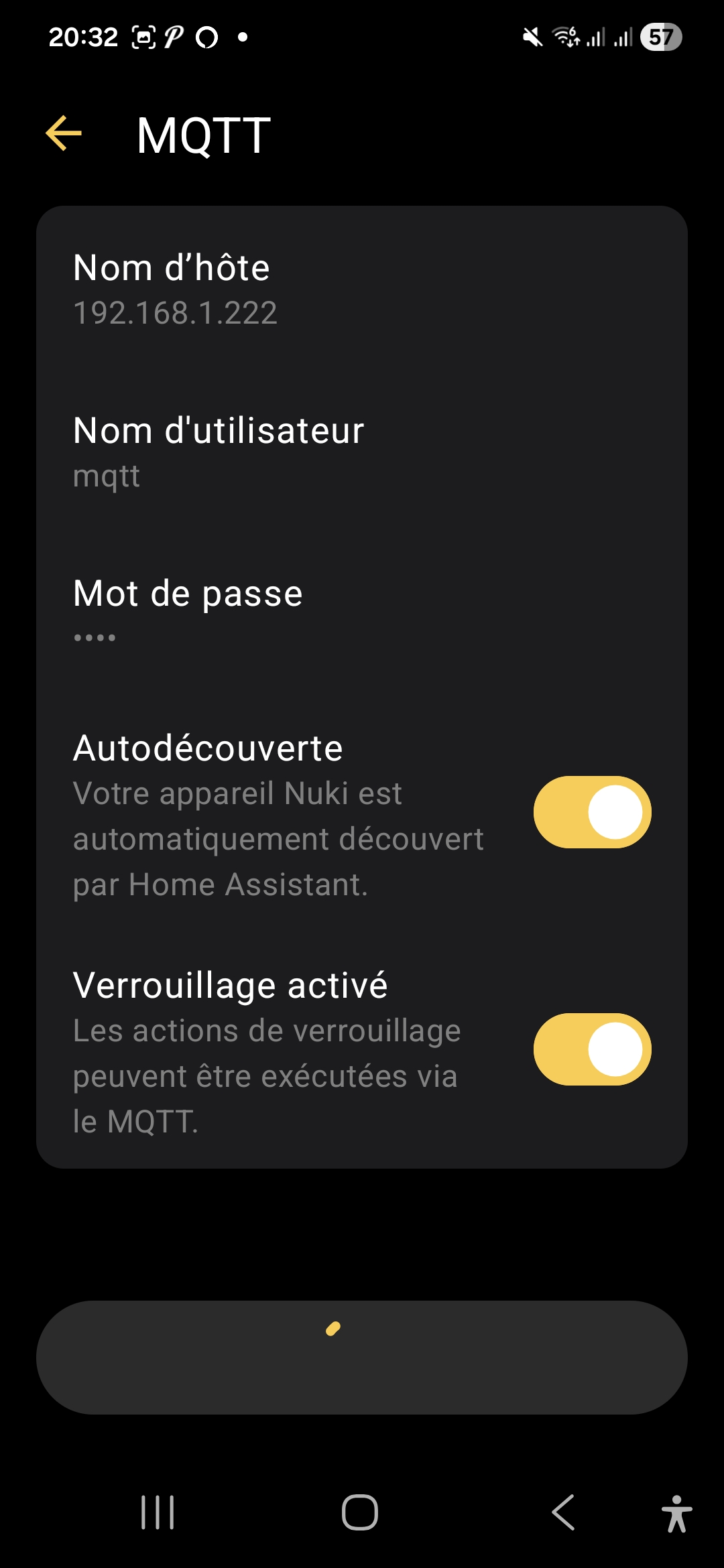
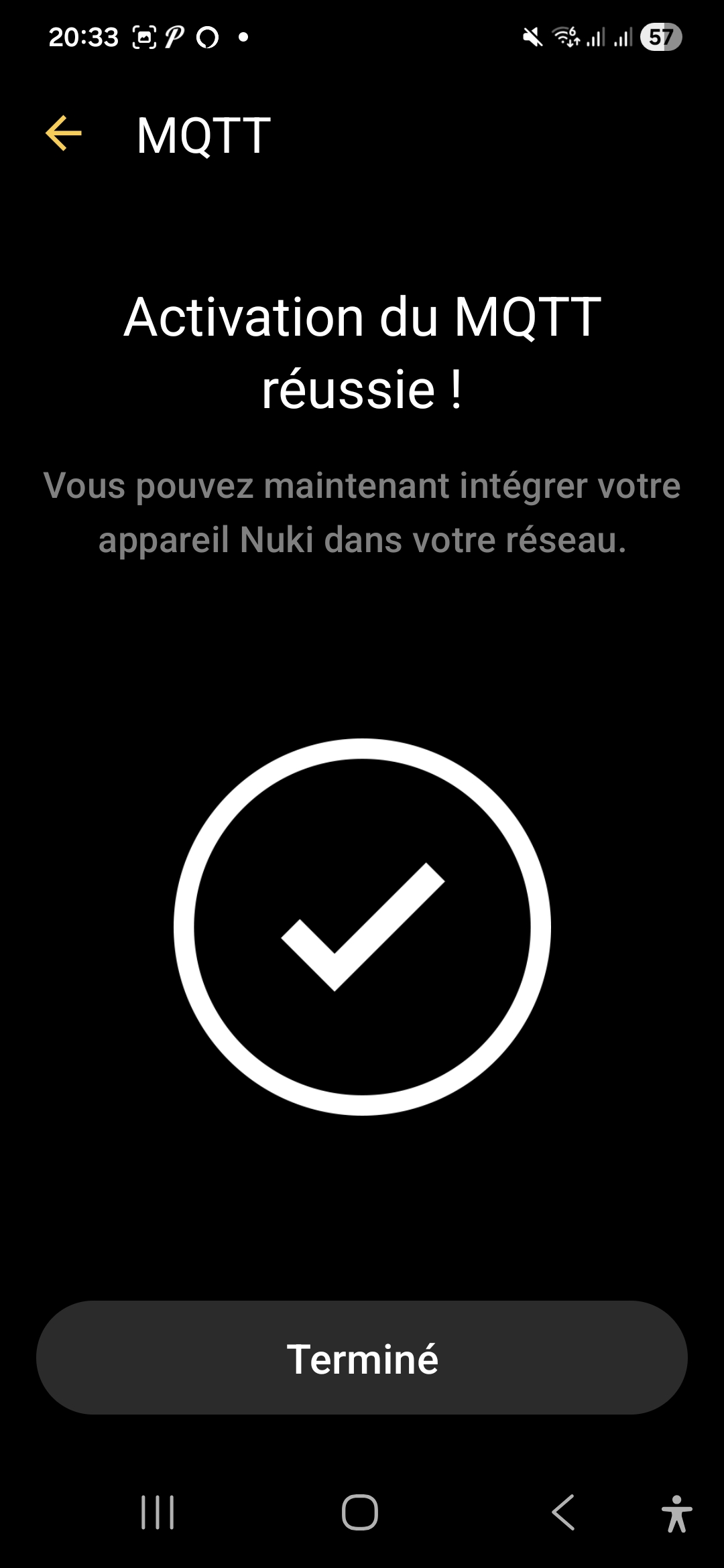
On the Home Assistant side, with the auto-discovery enabled, the lock goes up on its own as an MQTT entity, just like a Zigbee2MQTT module for example.
To check this, I used to use MQTT Explorer, here is the result.
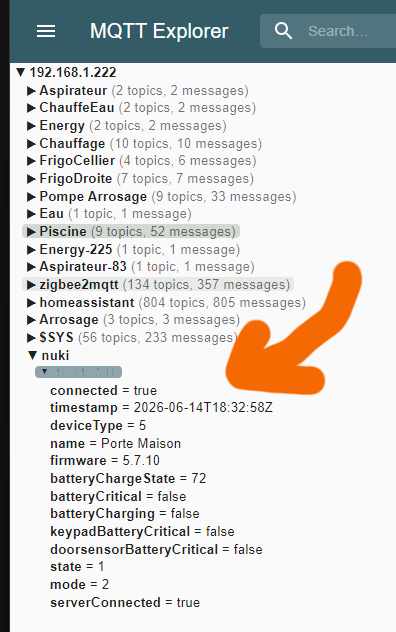
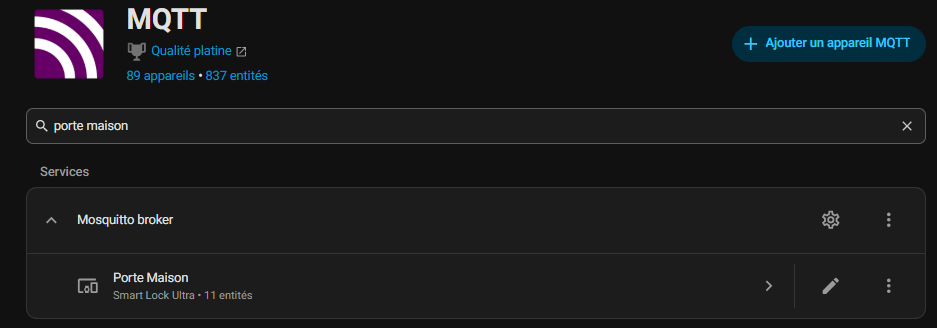
The name sent to MQTT is the one I put on the ‘Door House’ lock, which is how the new MQTT device was named. I note that there are 11 entities that date back.
🔧 The 4 controls
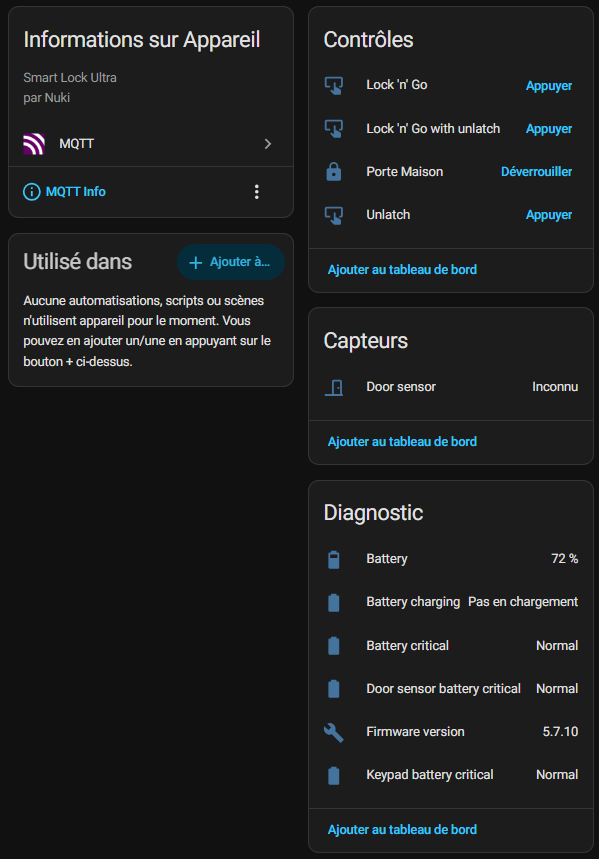
When I open the MQTT integration of my Nuki in Home Assistant, I find 11 entities, including 4 commands.
These first 4 commands are not all useful for all users.
They depend mainly on how the door opens and the Exterior Hardware Store : handle, knob, bar, or other configuration.
Nuki explains that the behaviour changes depending on the type of external handle:
- with a handle, Nuki unlocks the door and you still have to press the handle to enter;
-
with a button / knob / bar, Nuki can also pull the bolt and open the door more completely.
🚪 Gate House
lock.porte _maison
This is the main action of the lock. This is the one I use every day to lock or unlock the door normally. If I had to take only one check, it would be that one.
🏃 Lock 'n' Go
button.door _house _lock _n _go
This mode serves me when I leave home. I trigger the action, the lock lets me out, then it automatically locks again after a few seconds. It’s convenient when I want to make sure I don’t forget to close behind me.
🚪 Lock 'n' Go with unlatch
button.porte_maison_lock_n_go_with_unlatch
This is the fuller version of the previous mode. There, the lock does not only automatically lock after exit, it also releases the door during action. This is useful when a clearer opening is needed, depending on the configuration of the door.
🔓 Unlatch
button.door _maison _unlatch
This action is used to open the door “for real”, releasing the mess. It is not just a simple unlock: it is the mode that allows the door to open immediately, without any additional effort.
🔧 The Sensor
🚪 Door sensor
It is the sensor that tells me whether the door is open, closed or in an uncertain state. This is very useful because it allows me to know not only if the lock is locked, but also if the door is actually closed.
🔧 Diagnosis
🔋 Battery
This one simply indicates the battery level of the lock. This is basic information, but essential to avoid unpleasant surprises.
⚡ Battery charging
This entity tells me whether the lock is charging or not. It is useful to quickly check if the feeding is going well.
🚨 Battery Critical
It is an alert indicator. If it turns red or critical, it means that the battery is too low and must be intervened.
🚨 Door sensor battery critical
Same logic, but this time for the battery of the door sensor. If this sensor is battery powered, this entity warns me when it becomes too weak.
🧠 Firmware version
This entity displays the firmware version of the lock. This is especially useful for technical monitoring, updates and diagnosis.
🚨 Keypad battery critical
This concerns the battery of the keypad. If I use an input keyboard, this entity lets me know when its batteries start to fade.
🛡 Limits and Precautions on the MQTT Side
Not everything is perfect either, and there are a few things to keep in mind:
- The MQTT communication is not encrypted by default: it is based on network security (Wi-Fi / Thread) and user/password authentication.
- The MQTT broker must be considered as a sensitive point of the infrastructure, to be seriously protected (no broker open on the Internet, management of ACLs, network segmentation, etc.).
However, for a house already equipped with an MQTT broker and a well-established Home Assistant, this is probably the best compromise between flexibility, performance and sovereignty.
☁ Web integration: the ‘Historical Cloud’ mode
🌐 Nuki Web, what's the point?
Before Matter and MQTT, Nuki already offered Nuki Web, a cloud gateway to remotely control the lock, have access logs and integrate certain external services (Alexa, Google Home, some older hubs, etc.).
🧪 Why I chose to keep it in the background
Web integration remains interesting for:
- certain remote management functions (journal consultation, management of users on the move),
- environments where you do not want to enter MQTT or where Matter is not available.
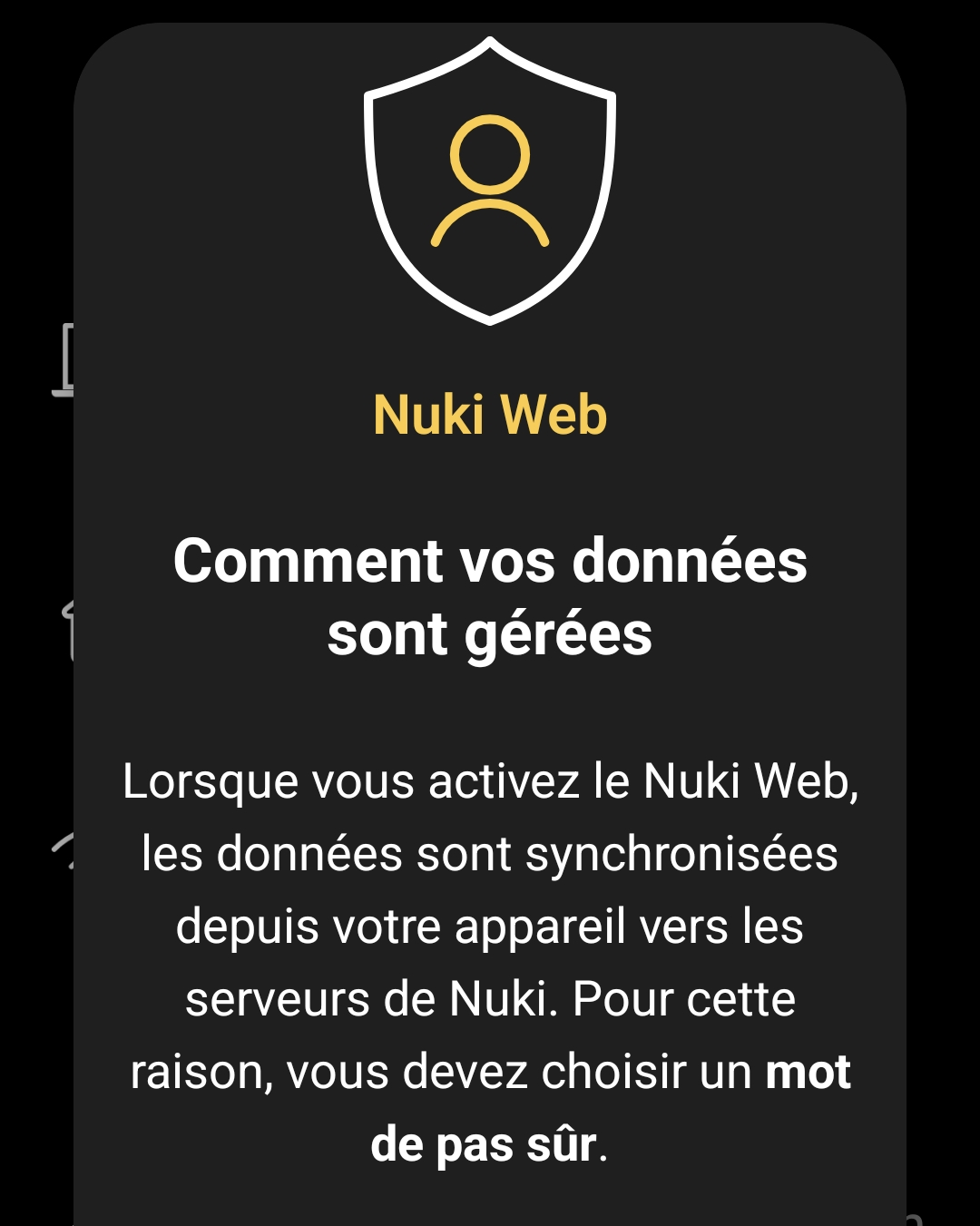
This message makes it clear that my data will go to Nuki’s cloud server when that is precisely what I am trying to avoid.
So, in my case, there are two things that make me treat it more like a spare wheel:
- I prefer mostly local control, with as little dependence as possible on a third-party cloud service.
- Matter and MQTT already cover most of my integration and automation needs.
As a result, Nuki Web remains disabled at home, but I think my architecture as if everything should continue to work even if the Nuki cloud is cut, so that nothing can be sent outside.
🧪 I compare Matter and MQTT
📡 Sensors available
For this part, I mainly look at what each integration actually goes back to in Home Assistant, because this is often where the difference can be seen right away.
Matter gives me the essential information to control the lock and track its condition, while MQTT reassembles more diagnostic sensors and technical information.
| Sensor / Entity | 🥈 Matter | 🥇 MQTT | Reading |
|---|---|---|---|
| Door | ✅ | ✅ | Both integrations can be traced back to the opening or closing state of the door. |
| Battery | ✅ | ✅ | In both cases, I find the battery level of the lock. |
| State of charge | ✅ | ✅ | Both solutions indicate whether the lock is loaded or not. |
| Critical battery | ✖ | ✅ | MQTT exposes a finer level of diagnosis on the state of the battery. |
| Critical Door Sensor Battery | ✖ | ✅ | MQTT also raises an alert dedicated to the door sensor. |
| Firmware version | ✖ | ✅ | MQTT provides useful technical information for monitoring and diagnosis. |
| Critical Keypad Battery | ✖ | ✅ | MQTT also tracks the critical state of the keypad battery. |
| Mode of operation | ✅ | ✖ | Matter exposes here an interesting configuration parameter directly in Home Assistant. |
| Identify | ✅ | ✖ | Matter also allows the lock to react visually to identify it. |
On a daily basis, Matter is more than enough for simple, clean and immediate use.
On the other hand, MQTT clearly goes further as soon as I want to monitor the lock in detail, recover more complete diagnoses or exploit ancillary information such as that of the keypad or door sensor.
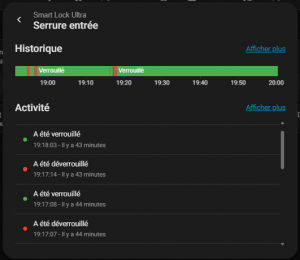
⚡ The speed of reaction
Historically, the difference between Matter and MQTT is quite telling.
Matter mostly goes back to the final state, while MQTT also displays intermediate transitions such as “locks” and “unlocks”, giving a finer reading of the lock’s behaviour.
 |
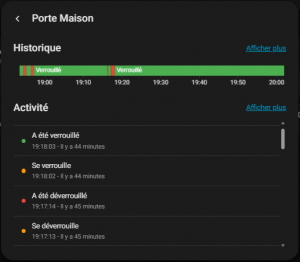 |
| Event | 🥈 Matter | 🥇 MQTT | Reading |
|---|---|---|---|
| Locks | — | 19:18:02 | MQTT displays the transition first, before the final state. |
| Has been locked | 19:18:03 | 19:18:03 | Both then go back to the final state at the same time. |
| Unlocks | — | 19:17:13 | MQTT displays the transition first, before the final state. |
| Has been unlocked | 19:17:14 | 19:17:14 | Both then go back to the final state at the same time. |
| Unlocks | — | 19:17:04 | MQTT displays an additional transition at the same second. |
| Is open | 19:17:06 | 19:17:06 | Both go up the state of the door at the same time. |
| Has been unlocked | 19:17:04 | 19:17:04 | Both then go back to the final state at the same time. |
| Locks | — | 19:16:22 | MQTT displays the transition first, before the final state. |
| Has been locked | 19:16:23 | 19:16:23 | Both then go back to the final state at the same time. |
| Unlocks | — | 18:56:28 | MQTT displays the transition first, before the final state. |
| Has been unlocked | 18:56:29 | 18:56:29 | Both then go back to the final state at the same time. |
| Locks | — | 18:55:09 | MQTT displays the transition first, before the final state. |
| Has been locked | 18:55:10 | 18:55:10 | Both then go back to the final state at the same time. |
🏁 My verdict
What I remember most of all is that Matter is clean and legible, but MQTT gives a more talkative and lively history.
On transitions, MQTT reveals a level of detail that Matter does not show, which makes it more interesting if I want to analyze precisely the reaction of the lock.
But the difference is really minimal, both are immediate and give full satisfaction. Neither protocol is ahead of the other.
🧭 What I keep
For my part, I will keep Matter and MQTT in parallel for a while. The idea is simple: compare the speed of reassembly of states, fluidity on a daily basis, and see which protocol suits me best over time.
In substance, the two approaches are close, and that is precisely what makes the choice interesting. Matter gives me a clean and standardised integration, while MQTT retains the advantage of a finer and more advanced home automation-oriented approach.
So I prefer not to decide too quickly. As long as both work well, I'll let them co-exist to observe what suits me best in my actual setup.
🎯 My Feeling
Honestly, at this point, both Matter and MQTT solutions are close enough for everyday use.
The real difference will be in the comfort of use, perceived responsiveness and how each fits into my Home Assistant automations.
Nuki Web remains an option, but clearly in the background for my use. I keep it as a backup solution or for more cloud / remote access needs, without making it the heart of my installation. Simply sending my personal information to a cloud blocks me at this stage.
In the immediate future, I therefore retain this dual local approach, with a slight advantage for the one that will seem to me the most natural to use.
And if the deviations remain minimal, I will probably choose mainly according to the simplicity of maintenance and the evolution of my installation.
🏁 Conclusion
In the end, the Nuki Smart Lock Ultra ticks exactly what I expect from a modern connected lock: real local integration, several communication options, and above all the possibility of adapting it to an already well-built home automation system.
What I appreciate most is not being locked in a single model.
Matter and MQTT give me the freedom to test, compare, and then keep the solution most consistent with my usage and my vision of the connected home.
Nuki Web completes the table, but for my use it remains in the background, as a complementary option rather than an integration base.
For now, I do not want to go too fast: I let both work, I observe, and then I will see which one will remain as the main solution.
 English
  French
  Spanish
  Chinese
  German