Switch Jeedom to https

Explanations, prerequisites

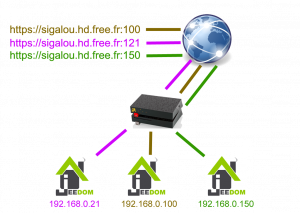
In this feedback, I use my DNS Reverse from Free. I imagine it is even easier to use a domain name, but with the functionality offered by Free, the domain is not indispensable.

In the rest of this page, I will use the following reverse DNS: sigalou.hd.free.fr. Please note that this name is an example and does not exist; For security reasons, I do not give here the reverse DNS that I actually use.

I have 3 Jeedoms installed on my local network:

  • Jeedom Master in 192.168.0.100 (the main production Jeedom)
  • Jeedom Slave in 192.168.0.21 (the Secondary Jeedom of Development)
  • Jeedom Heating in 192.168.0.150 (a Jeedom dedicated to heating)
Read More

Comparison Alexa-AmazonMusic Alexa-Spotify Alexa-Deezer

Features

Features
Alexa-AmazonMusic
alexaamazonmusic icon

Alexa-Spotify
alexaspotify icon

Alexa-Deezer
alexadeezer icon
Button Play
Screenshot 2020 04 18 Dashboard Jeedom3
check check check
Button Pause
Screenshot 2020 04 18 Dashboard Jeedom2
check check check
Button next
Screenshot 2020 04 18 Dashboard Jeedom1
check check check
Button Previous
Screenshot 2020 04 18 Jeedom Dashboard
check check uncheck
Detection of music provider
Screenshot 2020 04 18 Dashboard Jeedom4
check check check
Volume adjustment + and –
Screenshot 2020 04 18 Dashboard Jeedom5
check check check
Volume display
Screenshot 2020 04 18 Dashboard Jeedom6
check check check
Display of the Artist’s name
Screenshot 2020 04 18 Dashboard Jeedom18
check check check
Display of the name of theAlbum
Screenshot 2020 04 18 Dashboard Jeedom17
check check uncheck
Display of the name of the Musical Track
Screenshot 2020 04 18 Dashboard Jeedom19
check check check
Display Album Pouch
Screenshot 2020 04 18 Dashboard Jeedom20
check check check
Button Repeat (action)
Screenshot 2020 04 18 Dashboard Jeedom10
check check uncheck
Button Repeat (Info going back) check check uncheck
Button shuffle (action)
Screenshot 2020 04 18 Dashboard Jeedom11
check check uncheck
Button shuffle (Info going back) check check uncheck
Launch Radio (TuneIn)
Screenshot 2020 04 18 Dashboard Jeedom13
check check check
Icon of Reading in progress
Screenshot 2020 04 18 playing png Image GIF 86 86 pixels1
check check check
Launch Playlists
Screenshot 2020 04 18 Dashboard Jeedom14
check uncheck
(For now) *
uncheck
(For now) *
Launch Musical tracks
Screenshot 2020 04 18 Dashboard Jeedom15
check uncheck
(For now) *
uncheck
(For now) *
Playlist view currently playing
Screenshot 2020 04 18 Dashboard Jeedom16
check uncheck
(For now) *
uncheck
(For now) *

* The link with the APIs is being developed, which should make it possible to interface with Spotify and Deezer as is already the case with Amazon-Music.