
My goal

I appreciate Nabu Casa’s own work and it’s an opportunity to pay tribute to them by installing the SkyConnect on their Green Box.
I discover the SkyConnect

The key is really tiny, the smallest one I have used. Read More


I appreciate Nabu Casa’s own work and it’s an opportunity to pay tribute to them by installing the SkyConnect on their Green Box.
The key is really tiny, the smallest one I have used. Read More

The NEO Outdoor Intelligent Siren NAS-AB06B2 offers a reliable Zigbee alarm to secure a garden or terrace. Compatible with Zigbee2MQTT and Home Assistant, it combines powerful ringtone, stroboscope and solar panel. This detailed test explains its unpacking, installation and use over more than a year to guide home automation beginners.

NEO is a trademark of a Chinese company specialising in home automation products and smart home solutions. The company offers a diverse range of connected equipment, including smart plugs, sensors and alarms. I have known NEO for a long time for the reliability of its Zigbee sockets, which allows me to approach this siren with confidence. The NAS-AB06B2 model (reference SR01-ZB) uses the Zigbee 3.0 protocol, ensuring wireless range up to 55 metres outdoors and extended compatibility with home automation hubs.
Here is the link to the page dedicated to NAS-AB06B2. I referenced the sellers and prices.


A label specifies the reference SR01-ZB, confirming the model NAS-AB06B2. The box contains the siren with its battery installed, a USB-C cable for charging and sometimes an optional solar panel. Always check the polarities of the battery when replacing it in the future: The + and – signs are small, close to the barcode.

The rechargeable 18650 grey battery dominates the back: This standard lithium-ion format offers a large capacity (usually 2000-3500 mAh) and is easily found as a replacement. It ensures a long battery life, rechargeable via USB-C 5V/1A or a 132×62 mm solar panel producing about 5V in full sun. A burglary (anti-sabotage) sensor is at the top, triggering the alarm if the siren is removed from the wall. Under the battery, the Type-C port allows fast charging and a reset button for pairing.
For ZHA users, note that this siren is not yet fully supported; Zigbee2MQTT remains the recommended solution for all features. I activate the pairing mode in Zigbee2MQTT, remove the battery protection tab: Nothing happens initially. I plug the USB-C cable into a 5V charger: the bottom of the siren lights blue and then turns off. I press the reset button for a long time: it blinks blue, successful pairing signal.


The siren appears as NAS-AB06B2, corresponding to the label. The battery percentage flashes red: Normally, sirens often take 24 hours to report the exact value. The integration succeeds in seconds, the smoothest of all the Zigbee sirens tested.

Alarm state : Indicates the initial state ‘no _alarm’, changing to ‘alarm _sound’, ‘alarm _light’ or ‘alarm _sound _light’ depending on the configuration.
Alarm_switch : Simple ON/OFF button. ON triggers the alarm, OFF stops it immediately – a rare simplicity compared to other Zigbee sirens.
Tamper alarm switch : Activates anti-sabotage. The alarm is triggered instantly if the siren is removed from the stand.
Tamper alarm : State of sabotage, ON in case of break-in, OFF otherwise.
Alarm Melody : 3 melodies available (melody_1, melody_2, melody_3). Choose one to vary the sounds and avoid habituation.
Alarm Mode : sound (sound alone), light (stroboscope alone) or sound+light. Combined mode effectively deters.
Alarm time : Duration from 1 to 60 minutes (cursor per minute). In France, limit to 3 minutes maximum to comply with the regulations.
Charging : True if USB-C plugged in, False otherwise. The solar panel doesn't always trigger this live info.
Battery : Percentage in % (updated every 24 hours). Edited one year later: no reliable lift, but impeccable operation.
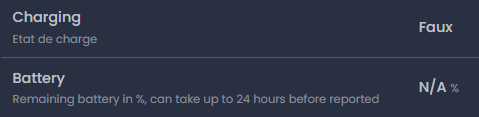
The official Zigbee2MQTT page confirmed all presentations: alarm_state, alarm_switch, tamper, melody, mode, time, charging and battery. No surprise, everything is documented precisely.
I rename the siren in Zigbee2MQTT for clear identification.

The entities first appear dispersed in Home Assistant; a restart aligns everything via MQTT. The equipment is displayed correctly with all controls.

All buttons work perfectly: ON/OFF, tamper, modes and durations. The alarm reaches approximately 95 dB at 1m (90 dB at 3m), strong and non-adjustable volume, IPX5 waterproofing for the outside (-10°C at 60°C).
This NEO NAS-AB06B2 siren at a mini price (less than €35) excels: Perfect integration Zigbee2MQTT/Home Assistant, durable 18650 battery, practical solar panel, reactive anti-sabotage, 3 melodies and modes. Powerful volume (95dB), deterrent stroboscope. She dominates my Classification of outdoor Zigbee sirens.


To choose the best outdoor alarm, check out my detailed comparison.

I am to the angels, I have just received my Nabu Casa Green, the NC-GREEN, this brand new box 400% compatible with Home Assistant since designed and produced by Nabu Casa.
They have achieved the feat of offering an all-in-one product, oriented towards pre-installed Home Assistant, all for less than €100, go for the friends. Read More

I have been using KeepassXC for months, it works perfectly, I had done a Retex on it. I set up my password manager on all my computers and smartphone
I have a problem with Keepass, which is sharing passwords. Some passwords are to be shared between me and my wife, this is not possible with Keepass. We use one database each because we have two authentication modes to open the database.
So I'm looking for a solution and Bitwarden offers it, we can create an "organization" that corresponds to the family and we can have passwords specific to each or shared passwords. Perfect, that’s what I’m looking for.
So I'm going to install Vaultwarden on my Synology NAS in a Container Manager docker. Configure a domain name for this, give it a certificate to exploit the https, choose a port other than 443 to secure a little more. Configure my router with port redirects and then configure Vaultwarden, allow it to send emails and secure use with Yubikey and Microsoft Athentificator (TOTP) … authentication. Read More


Meian Technology is a high-tech company founded in 2014 in Shenzhen, China. It specializes in research and development, production and sales of consumer electronics and smart home solutions. Read More

This page serves as an aide-memoire but can be useful for others.
I would like to test changes on Home Assistant cards, in order to propose improvements to developers.
In this page, I will edit a map of the series of cards of Pronote de delphiki. Read More

I would like Home Assistant to send me on my phone the photo of the camera filming the entrance to my house when someone rings the doorbell.


In the context of training for IT users, it is crucial to raise their awareness of the risks associated with the use of unknown USB sticks.
To make a difference, a practical demonstration is often more effective than a simple speech. That is why I want to get a USB stick capable of simulating damage on a computer, in order to show concretely the dangers involved.
Rubber Duckys are USB sticks used by hackers, but their cost is often prohibitive. I am therefore looking for a more economical solution to create this awareness tool.
In short, I want to find an affordable alternative to Rubber Ducky to make users aware of the risks associated with the use of unknown USB sticks, using a USB stick capable of simulating damage to a computer. Read More

I want to use Immich and to do so, I will install it on a Docker on my Synology NAS.
I install (or open) Container Manager in the Package Center.

 English
  French
  Spanish
  Chinese
  German