

My goal
I want to use Immich and to do so, I will install it on a Docker on my Synology NAS.
I launch Container Manager
I install (or open) Container Manager in the Package Center.

I will need a folder on the NAS, I add the imich-app folder to the docker folder.

On https://github.com/immich-app/immich/tree/main/docker I retrieve the files:

- I open the example.env file in a text editor and add a password to DB_PASSWORD (obviously, it is fictitious)

- I rename example.env in .env

- I check that I have the latest version of docker-compose.yaml by retrieving the version on
https://github.com/immich-app/immich/releases/latest/download/docker-compose.yml

For some reason, some folders are not created by the installation script, so I have to add them manually before starting the project creation. I therefore add a file library and a file postgres.

In Container Manager, I will create a new imich-app project

I define the file imich-app which I created in docker in path.


I don't link to Web Station at this point to avoid port or other conflicts.

The creation of the project starts … I can follow the creation on the terminal that has just opened.

I get a very nice little popup:

The terminal ends with Exit Code: 0 which is a good sign and the imich-app project goes green!

All the containers needed for the application are also well launched.

I will then enter the IP address of my added nas of port 2283, which is that of immich:

I launch Immich for the first time
Perfect, here I am on the first page of immich

I continue the last phase of configuration

I re-identify as …

I am updating Immich
The update is quite an adventure, perhaps because I don’t have a good command of Container Manager, but I struggled quite a bit to figure out how to do it.
I thought that putting IMMICH_VERSION=release in the environment variables (.env file) would always give me the right version, and no, if I restart the creation of the project, the release must be cached and the new version does not load. I did not understand why.
I have therefore tried several things, including specifying the version number. It works, manually so but it works.
I will look for the number of the latest version available on Github and I note this number: 1.111 for example
I'm going to File station, to the docker's folder.
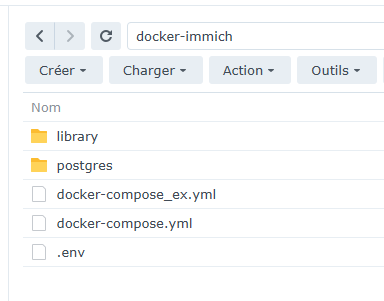
I rename .env to env.txt
This allows you to have the option to edit the file
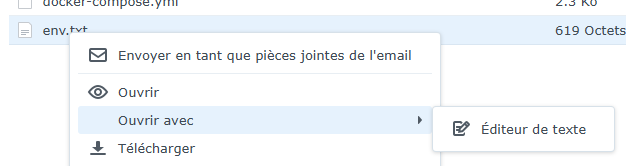
So, to install version 1.111, I will edit the .env file and specify:
IMMICH_VERSION="v1.111.0"

I save and rename the file as .env
Then I'll clean up the imich-app project and then recreate it.
The containers are therefore version 1.111

And when I launch Immich, I have the right version:

 English
  French
  Spanish
  Chinese
  German