


When you are predictive, you back up your data regularly and when you have an SD card that drops, you will look for your last small backup to leave. Except that from theory to practice, there are times when a backup is not launched and the Raspberry no longer wants to start, probably an SD card glitch.
If you have spent hours and hours configuring your plugins, devices and scenarios, it is just dramatic. This happened to me, I read and reread more forums that my eyes were able to read, until I found (a bit by chance on a method that allowed me to recover my self-generated backup file on the SD card in /var/www/html/backup
The difficulty is that the Raspberry micro-sd is running Linux and is not read when you put it in your PC.
I found the tool that will allow us to read SD cards under Linux with the PC. These are: DiskInternals Linux Reader
- Step 1: Install DiskInternals Linux Reader
- Step 2: Put your SD card in the computer
- Step 3: Launch DiskInternals Linux Reader
- Step 4: Light a candle so that the card is a readable minimum
- Step 5: Navigate through your map to find the folder /var/www/html/backup
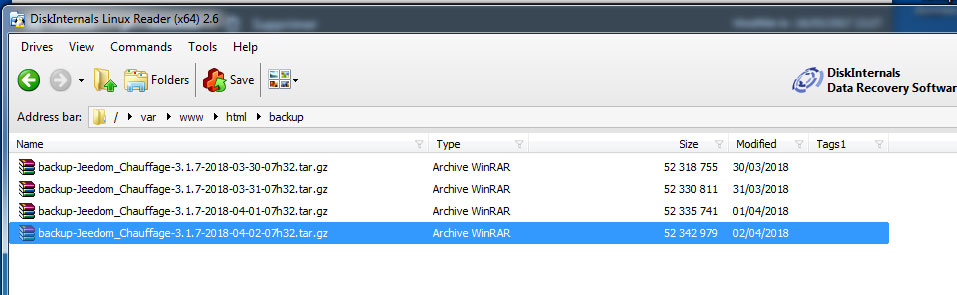
- Step 6: Recover a backup file (by Save)
And yes, Jeedom does backups without telling you, but it is ultimately a very good thing.
- Step 7: Optional, check the integrity of the compressed file by decompressing it on the PC
- Step 8: Preparing a brand new SD card with Raspbian
- Step 9: Install Jeedom on SD card
- Step 10: Restore the recovered backup (xxx.tar.gz) on the map in Jeedom
 English
  French
  Spanish
  Chinese
  German