

Principle of Decluttering Card
We all use the same configuration block several times in our lovelace configuration and we don't want to change the same things in a hundred places in our configuration every time we want to change something.
This card allows you to reuse the same configuration multiple times in your lovelace configuration to avoid repetitions and supports default variables and values.
Map reference
https://github.com/custom-cards/decluttering-card
Map model definition (in UI)
The model declaration is done by adding a block decluttering _templates:
To add it: 3-point menu at the top right => Edit dashboard => RE 3-point menu at the top right => Configuration editor.
The block is to be placed BEFORE views:
For this example, I made it very very simple, I use only one variable, it is the id entity of the zone that will appear as [[zone]].
decluttering _templates:
  image_zone:
    element:
      type: image
      entity: '[[area]]'
      style:
        width: 100%
        top: 50%
        left: 50%
      state_image:
        'on': /local/house/1920x1000/[[zone]].png
        'off': /local/house/1920x1000/transparent.png
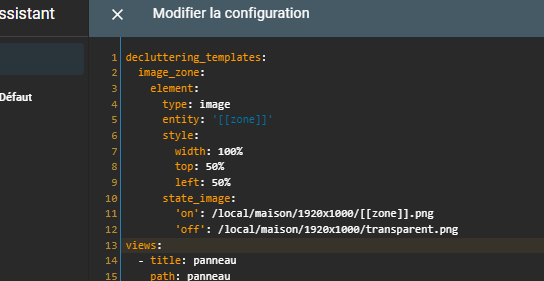
Call my _zone image model from the decluttering map
It is therefore sufficient to use 4 lines instead of 11 to display the map of an area; as I have 12 areas, the interest is obvious.
- type: custom:decluttering-card template: image_zone variables: - area: light.light_chambre_parents
Edit / Bonus, evolution
Since the creation of the tutorial, I have further improved my decluttering cards, here are the codes.
decluttering _templates: image_zone: element: type: image entity: '[[zone]]' style: width: 100% top: 50% left: 50% state_image: 'on': /local/house/1920x1000/[[zone]].png 'off': /local/house/1920x1000/transparent.png image_binary _sensor: default: - bonuson: '' - bonusoff: '' - zoneoff: transparent element: type: image entity: '[[zone]]' tap_action: action: none style: width: 100% top: 50% left: 50% state_image: 'on': /local/house/1920x1000/[[zone]][[bonuson]].png 'off': /local/house/1920x1000/[[zoneoff]][[bonusoff]].png image_lock: default: - bonuson: '' - bonusoff: '' - zoneoff: transparent element: type: image entity: '[[zone]]' tap_action: action: none style: width: 100% top: 50% left: 50% state_image: locked: /local/house/1920x1000/[[zone]][[bonuson]].png unlocked: /local/house/1920x1000/[[zoneoff]][[bonusoff]].png
Then on the views:
- For the lights
- type: custom:decluttering-card template: image_zone variables: - area: light.light_chambre_parents - type: custom:decluttering-card template: image_zone variables: - area: light.eclairage _ staircase_corridor - type: custom:decluttering-card template: image_zone variables: - area: light.light _de _la _salle _a _manger
- For lock or binary _sensor
- type: custom:decluttering-card template: _lock image variables: - area: lock.porte - zoneoff: lock.porte - bonuson: _close - bonusoff: _open - type: custom:decluttering-card template: image_binary _sensor variables: - area: binary_sensor.porte_dentree_contact - type: custom:decluttering-card template: image_binary _sensor variables: - area: binary_sensor.salle_de_bains_porte_contact - bonuson: _grise - type: custom:decluttering-card template: image_binary _sensor variables: - area: binary_sensor.volet_de_la_cuisine_contact - zoneoff: binary_sensor.volet_de_la_cuisine_contact - bonusoff: _close - type: custom:decluttering-card template: image_binary _sensor variables: - area: binary_sensor.petit_volet_de_la_salle_a_manger_contact - zoneoff: binary_sensor.petit_volet_de_la_salle_a_manger_contact - bonusoff: _close - type: custom:decluttering-card template: image_binary _sensor variables: - area: binary_sensor.grand_volet_de_la_salle_a_manger_contact - zoneoff: binary_sensor.grand_volet_de_la_salle_a_manger_contact - bonusoff: _close
 English
  French
  Spanish
  Chinese
  German