

I look at the data retrieved from the Wallbox integration
Here is a small recap of the data that will allow me to save the data from the last charging session in sensor.wallbox _charges.
I have already described all the Wallbox integration entities on this Retex:
The trigger
So I'm going to use sensor.wallbox_portal_status_description as the trigger for recording the last charging session.
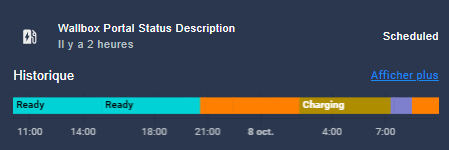
I will therefore use the change of status from Charging to something else to trigger the recording.
Data

- Wallbox Portal Added Energy (sensor.wallbox_portal_added_energy) will give me the number of kWh added to the car's battery during the last charge
- Wallbox Portal Added Range (sensor.wallbox_portal_added_range) will give me an estimate of the number of km added that can be achieved with the last load.
- Wallbox Portal Energy Price (sensor.wallbox_portal_energy_price) will give me the price per kWh, I will use it to calculate the cost of the load
I add the integration that will store the load data
I found the integration hass-variables, absolutely great. Thanks to Ankama and Snuffy2 for this work and follow-up.
It allows you to create a sensor that is not connected to anything (not a template). This sensor keeps its values even at the relaunch of HA. Exactly what I needed without using an external data backup mode (json, other … database).


The new sensor is called: sensor.wallbox _charges
I add a sensor detecting the start of the load
Indeed, the integration does not give me the time and start date of the last load. To calculate the duration, I find it interesting to have this information. So I'm going to create it.
I rely on the sensor.wallbox _portal _added _range entity and I will fetch the start time/date of charging (thus its minimum value over the last 5 hours)

In my sensors.yaml file, I add this entity:
- platform: statistics name: "Wallbox Portal Added Range Min" entity_id: sensor.wallbox _portal _added _range state _characteristic: datetime _value _min max_age: hours: 5
This will create for me the entity: sensor.wallbox _portal _added_range _min

I will use this entity to record the start of charging and to calculate the charging time.
I add the automation that will save the data
It is quite complex, I imagine it is simplifiable, I will explain it step by step
Here is the full code first
alias: Saves a load session description: "" trigger: - platform: state entity _id: - sensor.wallbox_portal_status_description from: Charging to: null alias: When the charge ends condition: [] action: - alias: >- Initialize the first conso, to be launched only once (by disabling the other actions) then disable service: variable.update _sensor data: replace _attributes: true value: INIT attributes: sessionsload: null target: entity_id: sensor.wallbox _charges enabled: false - service: variable.update _sensor data: replace _attributes: true value: >- {{ as_timestamp(states('sensor.wallbox _portal _added_range _min')) | int | timestamp _custom('%d/%m/%Y %H:%M:%S', true)}} attributes: sessionsload: > {% set sessioncharge = {'consumption': 2.14, 'cost': 0.43, 'duration': '00:27', 'beginning': '19/09/2023 20:36', 'end': '21:03', 'km': 17, 'saved_at': 1695150359} %}{{ sessionload }},{% set sessioncharge = {'consumption': 23.29, 'cost': 4.66, 'duration': '04:19', 'beginning': '21/09/2023 21:06', 'end': '01:25', 'km': 192, 'saved_at': 1695323159} %}{{ sessionload }},{% set sessioncharge = {'consumption': 7.68, 'cost': 1.54, 'duration': '01:23', 'beginning': '22/09/2023 08:45', 'end': '10:08', 'km': 63, 'saved_at': 1695409559} %}{{ sessionload }},{% set sessioncharge = {'consumption': 23.8, 'cost': 4.76, 'duration': '04:26', 'beginning': '23/09/2023 16:57', 'end': '21:23', 'km': 196, 'saved_at': 1695495959} %}{{ sessionload }},{% set sessioncharge = {'consumption': 23.64, 'cost': 4.73, 'duration': '04:05', 'start': '26/09/2023 20:59', 'end': '01:04', 'km': 195, 'saved_at': 1695755159} %}{{ sessionload }},{% set sessioncharge = {'consumption': 24.04, 'cost': 4.81, 'duration': '05:17', 'beginning': '28/09/2023 21:21', 'end': '02:38', 'km': 198, 'saved_at': 1695927959} %}{{ sessionload }},{% set sessioncharge = {'consumption': 17.3, 'cost': 3.46, 'duration': '03:51', 'beginning': '30/09/2023 21:31', 'end': '01:22', 'km': 143, 'saved_at': 1696100759} %}{{ sessionload }},{% set sessioncharge = {'consumption': 22.18, 'cost': 4.44, 'duration': '04:25', 'beginning': '03/10/2023 20:43', 'end': '01:08', 'km': 183, 'saved_at': 1696359959} %}{{ sessionload }},{% set sessioncharge = {'consumption': 23.86, 'cost': 4.77, 'duration': '05:26', 'beginning': '05/10/2023 21:03', 'end': '02:29', 'km': 197, 'saved_at': 1696532759} %}{{ sessionload }},{% set sessioncharge = {'consumption': 23.43, 'cost': 4.69, 'duration': '05:07', 'beginning': '07/10/2023 20:34', 'end': '01:41', 'km': 193, 'saved_at': 1696705559} %}{{ sessionload }},{% set sessioncharge = {'consumption': 23.32, 'cost': 4.66, 'duration': '04:40', 'beginning': '10/10/2023 20:57', 'end': '04:40', 'km': 192, 'saved_at': 1696964759} %}{{ sessionload }},{% set sessioncharge = {'consumption': 25.19, 'cost': 5.04, 'duration': '04:39', 'beginning': '12/10/2023 19:53', 'end': '00:32', 'km': 208, 'saved_at': 1697137559} %}{{ sessionload }},{% set sessioncharge = {'consumption': 8.61, 'cost': 1.72, 'duration': '01:32', 'beginning': '13/10/2023 21:05', 'end': '22:37', 'km': 71, 'saved_at': 1697223959} %}{{ sessionload }},{% set sessioncharge = {'consumption': 27.76, 'cost': 5.55, 'duration': '04:46', 'beginning': '16/10/2023 02:11', 'end': '06:57', 'km': 231, 'saved_at': 1697474976} %}{{ sessionload }},{% set sessioncharge = {'consumption': 24.18, 'cost': 4.84, 'duration': '04:12', 'beginning': '18/10/2023 02:11', 'end': '06:23', 'km': 201, 'saved_at': 1697657509} %}{{ sessionload }},{% set sessioncharge = {'consumption': 20.17, 'cost': 4.03, 'duration': '03:38', 'beginning': '19/10/2023 02:11', 'end': '05:50', 'km': 168, 'saved_at': 1697688628} %}{{ sessionload }},{% set sessioncharge = {'consumption': 23.08, 'cost': 4.62, 'duration': '04:13', 'beginning': '21/10/2023 02:12', 'end': '06:25', 'km': 192, 'saved_at': 1697867735} %}{{ sessionload }},{% set sessioncharge = {'consumption': 12.19, 'cost': 2.44, 'duration': '03:21', 'beginning': '22/10/2023 02:13', 'end': '05:34', 'km': 101, 'saved_at': 1697946854} %}{{ sessionload }} target: entity_id: sensor.wallbox _charges enabled: false alias: >- Initialize the first conso, to launch only once (by disabling the other actions) then disable - service: variable.update _sensor data: replace _attributes: true value: >- {{ as_timestamp(states('sensor.wallbox _portal _added_range _min')) | int | timestamp _custom('%d/%m/%Y %H:%M:%S', true)}} attributes: sessionsload: >- {% set diff_seconds = now().timestamp() - states.sensor.wallbox _portal _added _range _min.state | as_timestamp %} {% set hours = (diff _seconds / 3600) | int %} {% set minutes = ((diff_seconds % 3600) / 60) | int %} {% set sessioncharge = { 'consumption': states('sensor.wallbox _portal _added _energy') | float | round(2), 'cost': (states('sensor.wallbox _portal _energy _price') | float * states('sensor.wallbox _portal _added _energy') | float | round(2)) | round(2), 'duration': 'd:d' | format(hours, minutes) , 'beginning': as_timestamp(states('sensor.wallbox_portal_added_range_min')) | int | timestamp_custom('%d/%m/%Y %H:%M', true), 'end': now().strftime(')%H:%M') , 'km': states('sensor.wallbox _portal _added _range') | int, 'saved_at': now().timestamp() | int } %} {% if state_attr('sensor.wallbox _charges', 'sessionscharge') is not none %} {{ state_attr('sensor.wallbox _charges', 'sessionscharge') }}, {{ sessioncharge }} {% else %} {{ sessionload }}, {{ sessionload }} {% endif %} target: entity_id: sensor.wallbox _charges enabled: true alias: Saves the load session that just ended mode: single
Explanation part by part

- The trigger: this is when the load is finished
- Action 1 (disabled by default) is to be activated only once thinking of disabling the other 2 actions, it is to initialise to ‘null’ once the entity that records the data.
- Action 2 (disabled by default) should only be activated once when thinking about disabling the other 2 actions, this is to initialise some previous data. Indeed, I did not want to lose the charging data since the purchase of the car, so I stored it there.
- Action 3 (to be activated by default) is the action that calculates and records load data.
Explanation of the trigger code

This trigger is based on the "state" platform of Home Assistant. It monitors the status of a specific entity, in this case, ‘sensor.wallbox _portal _status _description’. Specifically, it is configured to react when a change in the state of that entity occurs. The configuration details are as follows:
– ‘entity _id’: It specifies the entity whose status is monitored. In this case, it is ‘sensor.wallbox _portal _status _description’. Multiple entities can be monitored by providing a list of entities in the form of a list. However, in this example, only one entity is monitored.
– “from: Charging’: This means that the trigger reacts when the previous state of ‘sensor.wallbox _portal _status _description’ was ‘Charging’. This is a condition for triggering automation. The trigger only reacts if the previous state was ‘Charging’.
– `to: null“: This means that the trigger reacts when the current state of ‘sensor.wallbox _portal _status _description’ has changed from ‘Charging’ to any other state, including ‘null’. This is the new condition for triggering automation. The trigger reacts when the state changes from Charging to any other state.
– ”alias: When the load ends: This is an alias for the trigger, a name that makes it easier for you to recognise it. In this case, it simply indicates that the automation will be triggered when the load ends.
In summary, this automation is triggered whenever the state of ‘sensor.wallbox_portal_status_description’ changes from ‘Charging’ to any other state, which means that it is designed to react when the electric car load ends.
Explanation of Action 1
This action is intended to initialize the first consumption (charge) for a sensor called "sensor.wallbox _charges" using the "variable.update _sensor" service of Home Assistant. Here is a detailed explanation of each component of the action:
– ‘alias’: It is simply a name or description of the action to make it more understandable. In this case, it indicates that this action is intended for the initialisation of the first consumption and that it should only be performed once. It also suggests disabling further actions after its execution.
– `service: variable.update_sensor“: This row specifies the service to be used to perform the action. The variable.update _sensor service is used to update or initialise the attributes of an entity (in this case, ‘sensor.wallbox _charges’).
– "data": This section contains the data to be sent with the service. In this case:
– ‘replace _attributes: true’: This indicates that the attributes of the existing entity need to be replaced by the new data. If "replace _attributes" is set to "true", the existing attributes of "sensor.wallbox _charges" will be replaced by the new data.– Value: INIT’: This indicates the value to be assigned to the ‘sessionload’ attribute of ‘sensor.wallbox _charges’. In this case, the value "INIT" is assigned.
– Attributes: sessionsload: null“: This row indicates that the ‘sessionload’ attribute of ‘sensor.wallbox _charges’ must be initialised to ‘null’.
– “target”: It specifies the target entity, i.e. the entity whose attributes are updated. In this case, the target entity is sensor.wallbox _charges.
– ’enabled: true’: This indicates that this action is enabled and can be executed.
In summary, this action is used to initialise the ‘sessionload’ attribute of the ‘sensor.wallbox _charges’ entity with the value ‘null’ using the service ‘variable.update _sensor’. It is intended to be executed only once to perform this initialization, after which it is recommended to disable this action. This could be useful for getting started with specific initial values in your automations or entities.
Explanation of Action 2
This action aims to initialise the ‘sessionload’ attribute of an entity called ‘sensor.wallbox _charges’ with a series of pre-existing load session data. Here is a detailed explanation of each element of the action:
– `service: variable.update_sensor“: This is the service used to update or initialise an entity’s attributes in Home Assistant.
– "data": This section contains the data to be sent with the service. In this case:
– ‘replace _attributes: true’: This indicates that the existing attributes of the sensor.wallbox _charges entity will be replaced by the new data.– "value": This part is used to define the value of the sessionload attribute of the sensor.wallbox _charges entity. The value is generated dynamically using Jinja2 models. It uses the timestamp of the first charging session (i.e. ‘sensor.wallbox _portal _added _range _min’) to obtain a date and time, and then formats it in the style ‘day/month/year hour:minute:second’. This means that the value ‘sessionload’ will be initialised with the date and time of the first charging session.
– "attributes": This is where the data for each charging session is defined. Each load session is defined in a specific format using Jinja2 templates. These charging sessions are separated by commas.
– “target”: It specifies the target entity, i.e. the entity whose attributes are updated. In this case, the target entity is sensor.wallbox _charges.
– ’enabled: true’: This indicates that this action is enabled and can be executed.
The purpose of this action is to initialise the ‘sessionload’ attribute of ‘sensor.wallbox _charges’ with simulated data from load sessions. This can be useful for testing or starting with fictitious load data. After initialisation, it is recommended to disable this action, as indicated in the alias, as it does not need to be repeated.
Explanation of Action 3 – Main Action
This action aims to update the ‘sessionload’ attribute of the ‘sensor.wallbox _charges’ entity with the data from the load session that has just ended. Here is a detailed explanation of each element of the action:
– `service: variable.update_sensor“: This is the service used to update or initialise an entity’s attributes in Home Assistant.
– "data": This section contains the data to be sent with the service. In this case:
– ‘replace _attributes: true’: This indicates that the existing attributes of the sensor.wallbox _charges entity will be replaced by the new data.– "value": This part is used to define the value of the sessionload attribute of the sensor.wallbox _charges entity. The value is generated dynamically using Jinja2 models. It includes:
– The conversion of the time stamp of ‘sensor.wallbox_portal_added_range_min’ into a specific date and time format using the ‘timestamp_custom’ function.– "attributes": This is where the load session data is defined. Those data are calculated from various entities, in particular ‘sensor.wallbox _portal _added _energy’, ‘sensor.wallbox _portal _energy _price’, ‘sensor.wallbox _portal _added _rangemin’, ‘sensor.wallbox _portal _added _range’, and the current timestamp (obtained via ‘now()ʼ). The data shall include the consumption, cost, duration, start, end, kilometres and timestamp of the charging session.
– Duration is calculated by subtracting the start timestamp of the charging session from the current timestamp (expressed in seconds). Then these seconds are converted into hours and minutes.
– In section `{% if … %}“, the code checks whether the ‘sessionload’ attribute of the ‘sensor.wallbox _charges’ entity is already defined. If this is the case, the existing data shall be retained. Otherwise, new load session data is added.
– “target”: It specifies the target entity, i.e. the entity whose attributes are updated. In this case, the target entity is sensor.wallbox _charges.
– ’enabled: true’: This indicates that this action is enabled and can be executed.
The objective of this action is to record the data of each load session that has just ended in the ‘sessionload’ attribute of the ‘sensor.wallbox _charges’ entity. This keeps track of each charging session performed.
Result
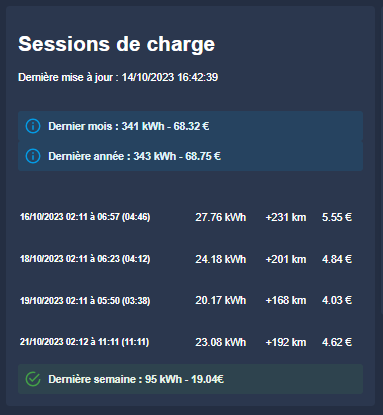
Thus, at each end of the load, a new record is added to the sensor.wallbox _charges entity.
Its content is as follows:

Added a map that displays all charging sessions

<div>Charging sessions</div>
Last update: {{ state_attr('sensor.sessions_de _charge','updated_at')}} <br><br>
{% set items = state_attr('sensor.wallbox _charges', 'sessionscharge') %}
<table width='100%'>
<tbody>
{% for i in range(0, items | count, 1) %}
<tr>
<td>{{ items[i].start }} to {{ items[i].fin }} ({{ items[i].duration }})</td>
<td>{{ items[i].consumption }} kWh</td>
<td>+{{ items[i].km }} km</td>
<td>{{ items[i].cost }} €</td>
</tr>

{% endfor %}
</tbody>
</table>
Addition of a map showing a summary by year, month, week

Type: markdown content: >-
<div><h1>Charging sessions</div> {%- set default _language = 'en' %} Latest update: {{ state_attr('sensor.wallbox _charges','updated _at')}} <br><br>
{% set items = state_attr('sensor.wallbox _charges', 'sessionscharge') %} {% set septjours = now() - timedelta(days=7) %} {% set power_semaine = namespace(value=0) %} {% set cout_semaine = namespace(value=0) %} {% set unmois = now() - timedelta(days=30) %} {% set power_months = namespace(value=0) %} {% set cout_mois = namespace(value=0) %} {% set uneannee = now() - timedelta(days=365) %} {% set power_annee = namespace(value=0) %} {% set cout_annee = namespace(value=0) %} {% for i in range(0, items | count, 1) %} {% if items[i].saved_at | int >= as_timestamp(uneannee) %} {% set power_annee.value = power_annee.value + items[i].consumption %} {% set cout_annee.value = cout_annee.value + items[i].cost %} {% if items[i].saved_at | int >= as_timestamp(unmonth) %} {% set power_mois.value = power_mois.value + items[i].consumption %} {% set cout_mois.value = cout_mois.value + items[i].cost %} {% if items[i].saved_at | int >= as_timestamp(sevendays) %} {% set power_semaine.value = power_semaine.value + items[i].consumption %} {% set cout_semaine.value = cout_semaine.value + items[i].cost %} {% endif %} {% endif %} {% endif %} {% endfor %}
</ha-alert> <ha-alert alert-type="info" title="Last month: {{ power _mois.value | int }} kWh - {{ cost _mois.value | float | round(2) }} €"></ha-alert> <ha-alert alert-type="info" title="Last year: {{ power_annee.value | int }} kWh - {{ cout _annee.value | float | round(2) }} €"></ha-alert>
<br>
{% set items = state_attr('sensor.wallbox _charges', 'sessionscharge') %} {% set septjours = now() - timedelta(days=7) %}
<table width='100%'> <tbody> {% for i in range(0, items | count, 1) %} {% if items[i].saved_at | int >= as_timestamp(sevendays) %} {% set datetime _obj = strptime(items[i].start, '%d/%m/%Y %H:%M') %}
<tr> <td><h5>{{items[i].start }} to {{ items[i].fin }} ({{ items[i].duration }})</td> <td>{{ items[i].consumption }} kWh</td> <td>+{{ items[i].km }} km</td> <td>{{ items[i].cost }} €</td> </tr> {% endif %} {% endfor %} </tbody> </table>
<ha-alert alert-type="success" title="Last week: {{ power_semaine.value | int}} kWh - {{ cost_semaine.value | float | round(2) }}€">
style: .: | ha-card { margin: 0px 0px 0px 0px; box-shadow: none; } ha-markdown: $: | h5 { font-size: 15px!important; font-weight: normal!important; padding: 0px 0px 0px 8px!important; border-left: 3px solid #429f46; }
Bonus: Save data to a CSV file
For future use (and not to lose data in case of a glitch), I decided to save each load session without a CSV file. At each session, a line is added.
Here is how I realised this.
I add a sensor ‘file’ which corresponds to the CSV file
I use a file notify.yaml which is in the configuration.yaml folder that is declared in this file by the command Notify: !include notify.yaml

I declare this new sensor with this code:
- name: _de_charge _CSV platform sessions: file filename: /config/www/csv/sessions_de _charge.csv timestamp: false
Thus, when I would like to write to the file, it will be enough for me to execute the service notify.sessions_de _charge_CSV

I add an action
I add an action in the automation presented above that will write a line to each record of a load session
Service: notify.sessions_de _charge _CSV data: data: {} message: >- {% set diff_seconds = now().timestamp() - states.sensor.wallbox _portal _added _range _min.state | as_timestamp %} {% set hours = (diff _seconds / 3600) | int %} {% set minutes = ((diff_seconds % 3600) / 60) | int %} {% set sessioncharge _string = "" + states('sensor.wallbox _portal _added _energy') | round(2) | replace('.', ',') | string + "; " + (states('sensor.wallbox _portal _energy _price') | float * states('sensor.wallbox _portal _added _energy') | float | round(2)) | round(2) | replace('.', ',') | string + "; " + 'd:d' | format(hours, minutes) | string + "; " + as_timestamp(states('sensor.wallbox_portal _added_range_min')) | int | timestamp_custom('%d/%m/%Y', true) | string + "; " + as_timestamp(states('sensor.wallbox_portal _added_range_min')) | int | timestamp_custom('%H:%M', true) | string + "; " + now().strftime('%H:%M') | string + "; " + states('sensor.wallbox _portal _added _range') | int | string + "; " + now().timestamp() | int | string %} {{ sessioncharge _string }} enabled: true alias: Add a line to the _de_charge.CSV sessions file
 English
 French
 Spanish
 Chinese
 German