


🔍 I check the received model
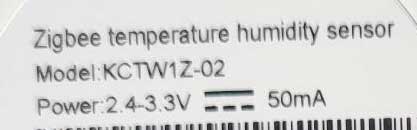
The technical sheet indicates the model ZSS-KB-TH-LF-C-MS. On the cardboard, it is written in tiny and almost illegible, but on the back of the sensor, the model is perfectly visible:
Good surprise: the battery is included. So I can test the sensor immediately, without having to buy a specific model. The supplied battery is new, protected by a tab.


Installation is very simple: the sensor stands, sits on a piece of furniture or sticks to the wall with the supplied double-sided (or not depending on the batch). I have nothing to break through: it is clean and reversible.
📊 Express comparison: Moes vs. competitors
| Model | Average price | Battery type | LCD display | Compatibility | Reassembly battery |
|---|---|---|---|---|---|
| Moes TS0201 | 18-23 € | CR2032 | Yes | Zigbee2MQTT / HA | Yes (deadline) |
| Sonoff SNZB-02 | 18-22 € | CR2450 | No | Zigbee2MQTT / HA | Yes |
| Aqara T/H | 22-26 € | CR2032 | No | Zigbee2MQTT / HA | Yes |
| Lidl Silvercrest | 10-15 € | AAA | Yes | Zigbee2MQTT / HA | Yes |
🛒Where to buy this equipment?
Here is the link to the page dedicated to KCTW1Z-02. I referenced the sellers and prices.
📦 Unpacking and First Impressions
I shall immediately check the presence of the CR2032 battery: it is new, protected by a tab, so the sensor is ready to use as soon as it is received.
The sensor is compact, the display is readable, the finish is correct. I can install it standing, hang it with a notch on the back or glue it with a double-sided.
🔧 Opening the housing for the battery
The only thing that is a bit tricky is the access to the battery. I use a small tool (trombone or thin blade) to rotate the back circle. It is necessary to force a little but the lid is removed, proof in pictures:


🏡 Where to place the sensor for good readings?
To obtain reliable measurements, I choose the location:
- I don't put it under a window or in front of a radiator or a lamp
- I aim about 1.5 m from the ground, in the center of the room
- I avoid wet corners and areas exposed to the sun
- I leave it in the open, never locked in a piece of furniture
A good positioning makes it possible to have realistic and actionable values in my home automation scenarios.
🔗 Integration in Zigbee2MQTT
I'm switching Zigbee2MQTT to pairing mode. As a reminder, Zigbee2MQTT is the reference tool for integrating Zigbee equipment into Home Assistant or any open home automation system.
I remove the label from the battery: the screen directly displays temperature and humidity, even if the Zigbee logo does not appear immediately.
I then press the black button on the back for 3 seconds: the Zigbee logo flashes and then remains fixed when pairing is successful.

The sensor is recognized as Tuya TS0201, a compatible classic. Attention: the battery is not displayed immediately, it is often necessary to wait 24 hours for the value to appear.

Everything works as planned. Before joining Home Assistant, I rename to be easily found in my home automation interface.

🏠 Integration in Home Assistant
I immediately find the sensor in Home Assistant, which centralizes all my connected devices. Temperature, humidity and battery values (after synchronisation) are visible very quickly.
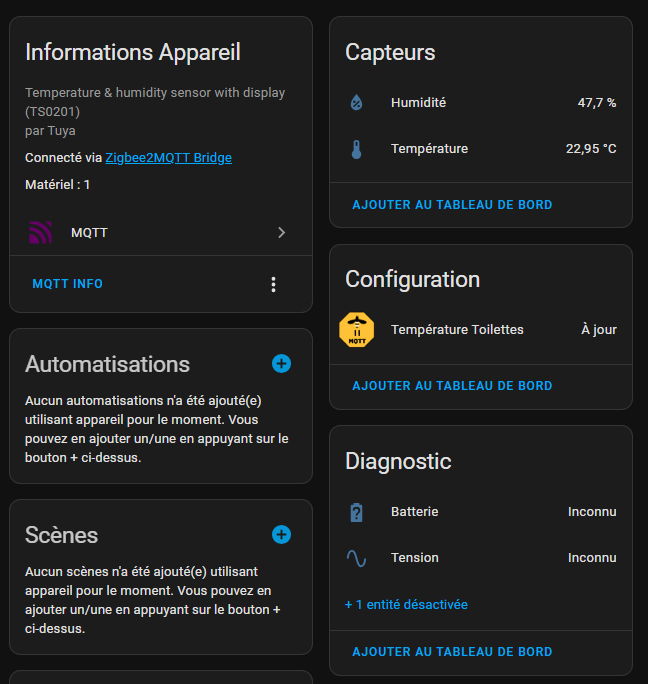
The sensor works perfectly: all relevant information is present, the upswing is fast and reliable.
⚙ Examples of easy automations
Thanks to this sensor, I can create automations in Home Assistant, such as:
- Humidity Alert : notification if humidity exceeds 70 % (bathroom, … laundry room)
- Heating management : turn on the radiator if the temperature drops below 18 °C
- History and graphic : visualise the evolution of the measurements per piece over a month
All these automations can be accessed in a few clicks in Home Assistant, without any line of code.
💡 Good to know: tips and troubleshooting
- Battery missing in Home Assistant? I wait 24 hours, the value eventually appears automatically.
- Capricious pairing? I move the sensor closer to the Zigbee coordinator, or I remove/return the battery and start over.
- Inconsistent values? I remove the battery for 30 seconds and then restart the synchronization.
💬 My opinion after commissioning
For less than €20, this sensor does exactly what I expect: easy installation, Zigbee2MQTT and Home Assistant compatibility, battery supplied and good readability. It is robust and reliable for indoor use.
I recommend renaming each sensor as soon as it is installed, especially if I put more than one sensor in the house. It really makes it easier to manage and automate per room.
Small tip: I always leave the sensor in place for at least 24 hours to validate the stability of the battery and measurements over time.
📑 Archive: the official instructions for use
📅 Installation and monitoring of batteries
🗓 1 sensor installed in the toilet on 24/04/2025 (original new battery)
- Battery changed on 08/11/2025 (changed to 3%)
- Battery changed on 22/11/2025 (changed to 3%)
- Battery at 1% 01/01/2026
- Equipment removed from production, battery life unacceptable.
✅ Conclusion
To equip an entire house at a low price, this Moes Zigbee sensor is a solution.
Easy to integrate, efficient for temperature and humidity, it delivers.
Finally the holding of the batteries eliminated this product from my home.
 English
  French
  Spanish
  Chinese
  German