


Objective
On a proposal from the manufacturer, I agreed to test this lock, which can be easily integrated into a domotised house.
The tested model is a model with coded keyboard suitable for doors between 50 and 100mm wide. The manufacturer's range has several models, it will be necessary to choose the one that corresponds to the width of the door.
Who is Welock??

WELOCK is a company specialising in smart access solutions for homes, combining more than 10 years of experience in developing, manufacturing and marketing smart locks. Founded in 2013, WELOCK quickly established itself as a major player in the connected locks sector, with a particular focus on security and convenience. Their mission is to popularize high-quality smart home products, providing users with a safer and more convenient life experience.
Innovation is at the heart of WELOCK’s strategy, with flagship products such as smart lock cylinders and fingerprint lock cylinders. The company marked the industry by being the first in the world to integrate biometric fingerprint technology into lock cylinders. This technological advance allows modern, secure and simplified access control without the need for physical keys.
WELOCK has expanded its influence globally, building partnerships in Europe, North America, the Middle East and Australia to provide localised services and support to its users. The company is based in Shenzhen, China, under the name MYHAND IN CHINA LIMITED, located in an important technology center of the country.
My interlocutor WELOCK is located in Germany, which confirms the European involvement of the brand.
The WELOCK website is available on https://www.welock.com/ The whole range of its products is presented.
Where to buy this lock?
Here are the links to the PCB41 version, there is a version with the wifi box (the one I'm testing)

- On the website of WELOCK, €149 public price, thanks to the code given to me by the manufacturer FD40 the price drops to 109€
- Amazon (119€)
Be careful not to be mistaken at the time of ordering, check the necessary barrel.

Unboxing and product discovery

The product is delivered in a particularly strong and protective box, this is reassuring and gives good clues about the quality of the product.
I remove the small self-cut strip, the designers have added small mirror effects very nice, superb packaging.

Inside, everything is tidy, protected I will take everything out to make a beautiful photo of each component.

It seems quite complete, I'll see what each element is for.
I am impressed by this small toolbox, other brands would have put this in a simple bag.

Documentation explains the contents of this box

I'm trying to turn on the lock.
I see that the end of the lock opens (behind the qr-code), so I lower the hood.
It was explained that the lock should not be loaded with the Micro-B connector, so I do not connect it, but I press everywhere to find how the lock is turned on, I do not find it. Nothing does.

I am very surprised by the presence of a Reset button that is so easily accessible?!
Does this mean that the lock can be reset from the outside? To see later …

Right next to Reset, there is a logo reminiscent of an icon symbolising ignition (or extinction), so I try to press it, nothing happens.
I take the instructions for use and look for …

So I have the explanation, “Please buy it yourself”, so the batteries are not provided. This is surprising for this type of product, rather a negative point. Even when you buy a TV remote control, batteries are provided.
A supplier of another brand to whom I had made the same remark had explained to me that for international air transport, the shipment of batteries was a concern. I'm going to put this on the back of that reason.
I put batteries in the lock
I am not angry, I will look for 3 AAA batteries and put them in the lock, as explained in the instructions for use.

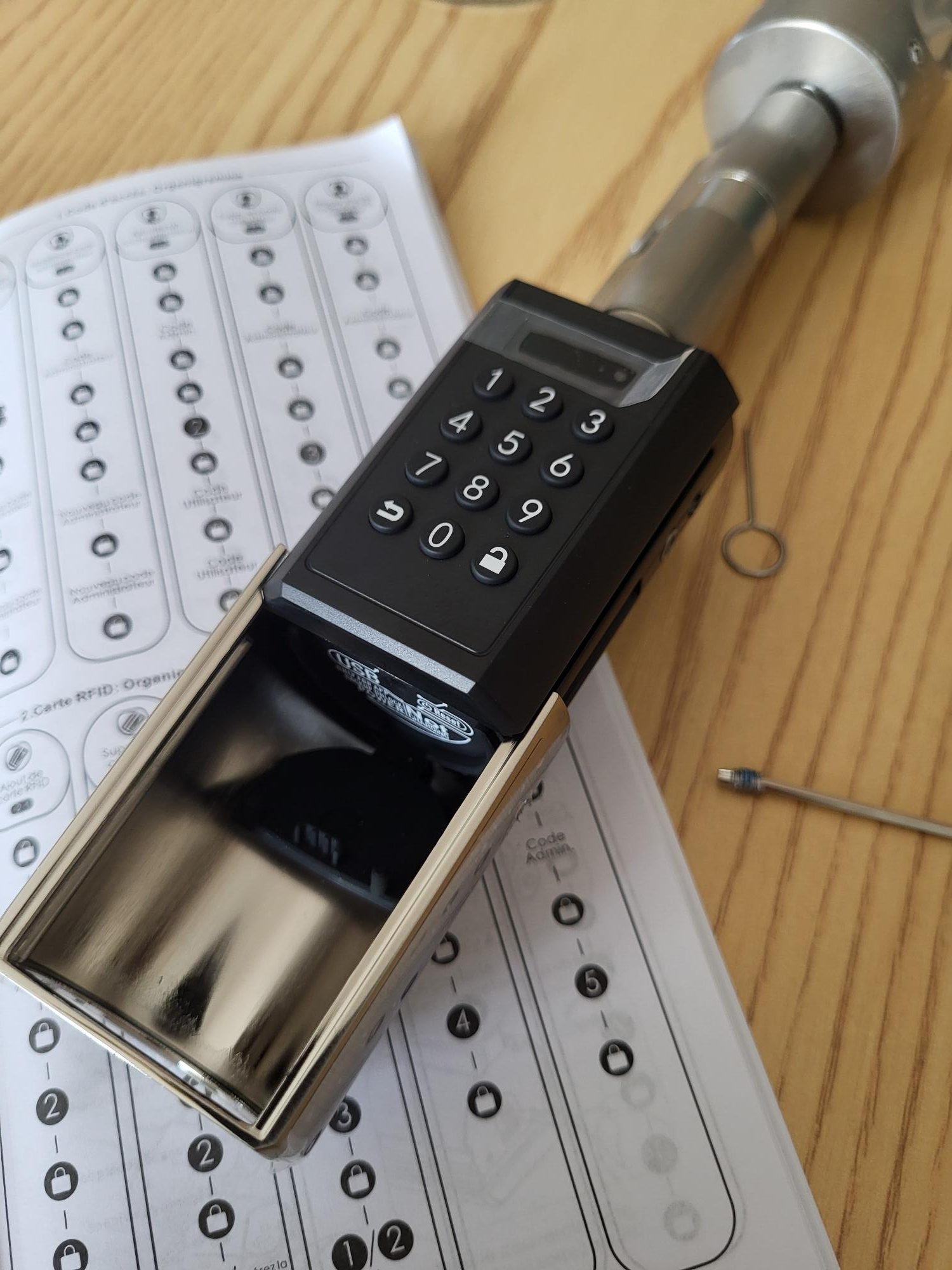
There it is quite surprising but particularly ingenious, under the hatch there is a hatch!! 😉
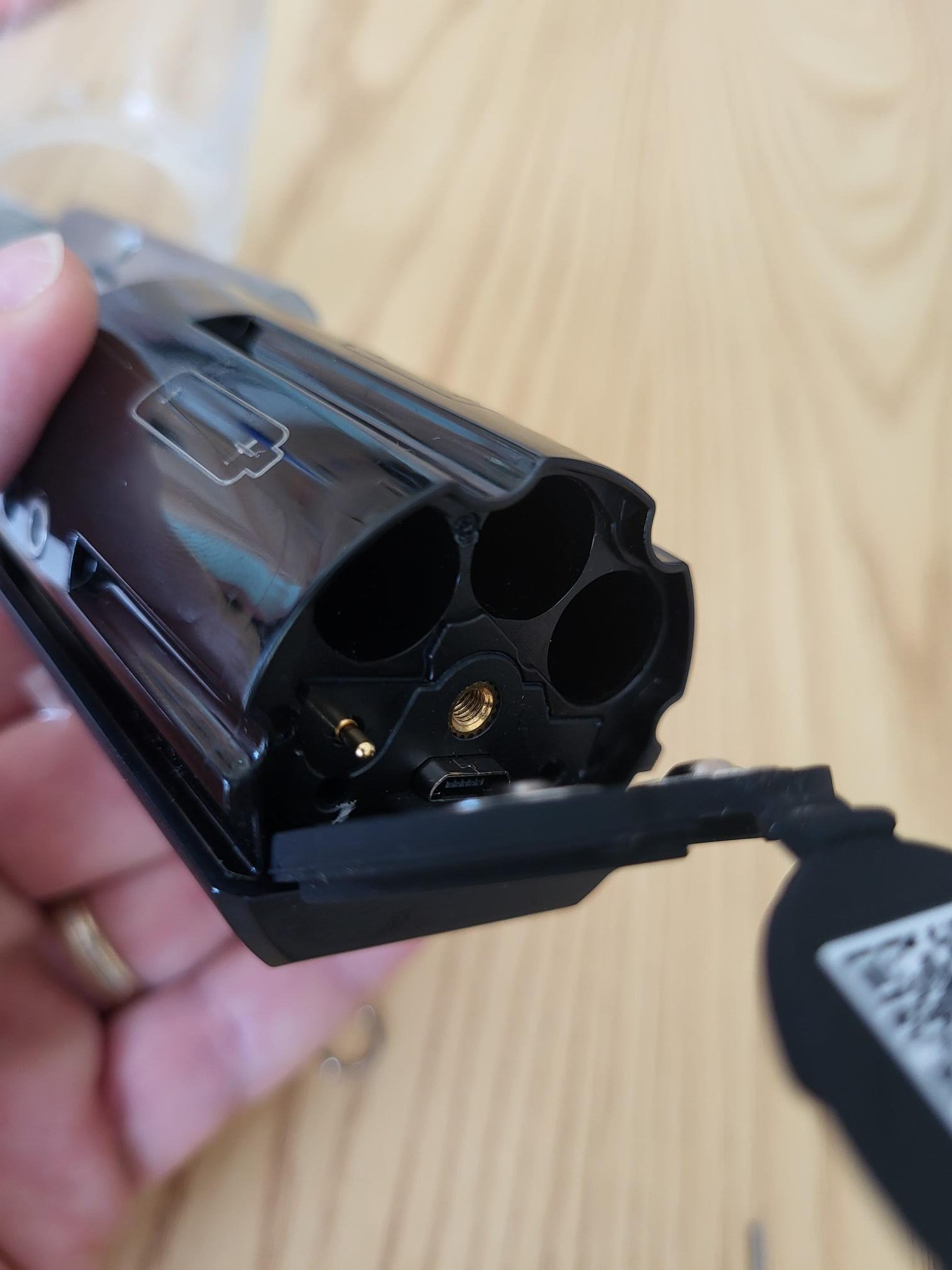

I add the small screw of the plastic box and it is perfect, everything should work well.

I press a button, the lock turns on, perfect, I see that the time and date are wrong, it must be configured later.


My first attempt to unlock the lock
I read in the user manual that the default code was 123456, so I will enter this code followed by the key with the padlock open at the bottom right, and it is perfect, it works, the lock works for a few seconds.
I will initialise the lock with the Android app
To do this, it is very simple, just scan the QR code of the lock and let yourself be guided on the smartphone.

The first blue icon at the top right corresponds to the application, I click on it.


As a security reflex, I never install apps via APK files, so I will instead click on Google Play, this will install the Android app for me.

Once installed, it is classic, we will create an account.

Then, and it is quite clear on the screen, you have to press More, I am not worried, I found it right away, otherwise I would have asked for an appointment at my ophthalmo.

I therefore add a lock.
An ID is requested, it is on the side of the lock


Once the app is installed, I synchronize the time, it works. I also try to press the big button at the bottom of the centre, it unlocks the lock, as would have been the case with entering the code.
In the settings, I can update the application, I have the latest version. I also find an option to update the firmware, I go to it, the application looks for … and then a version level is displayed: 23520678 version 4-8 and that is it. A small message saying that this is the latest version would have been welcome, a shame not to go through with the development of user interfaces.
The application is generally well translated into French, which is nice; some translation dumplings, but nothing incomprehensible.
I'm testing an RFID card
The lock comes with 3 cards, they are of very good quality. Pleasant to touchdown, well finished, to see hanging on car keys how long they hold but at this stage, beautiful realization.

On the back, a QR code will allow the card to be integrated.
On the app, I naturally go to ‘Add a card’, it launches a QR code reader, I scan the card, then you can give a period of validity of the card, it is great to have thought about it. So I can give someone temporary access.

That’s all, then just touch the top of the lock with the card after pressing any key to turn on the keyboard. The lock is unlocked instantly, no latency, perfect.
I want to change the default code
As previously tested, by default, code 123456 unlocks the lock, so I would like to change it.

I noticed that the user manual gives manual control flowcharts that can be used to program the main features, which is perfect, but I will try to change the password on the application.
I am surprised that the user manual does not explain how to change the default code, the risk is that users add a code thanks to the ‘Add password’ command but forget that a default code exists and therefore anyone who recognises the lock can type 123456 to open it.
If in doubt to check this, I will add a new code by tapping on ‘Add password’, add code 333333, valid for 1 year and register, this is sent to the lock.
- So I test 333333, it works.
- I test 123456, it also works.
I'm looking, I'm looking but I can't figure out how to change the default password via the Android app, so I'm going to look for the job word to do this with the manual procedure.

So, frankly, this is a bit incomprehensible. Reading these two columns, I do not understand the difference between what the manufacturer calls ‘master code’ and what he calls ‘administrator code’?!
Knowing that in the first column "Change the master code", it is specified "new administrator code"?! I imagine that this is a matter of translation. As always in these cases, I will look for the English version of the instruction manual. Well, surprise, it’s the same, Master and Admin are mixed together, so I don’t know any more.
Let's go a bit at random, I'll try to follow the first column:
- I press padlock twice
- I type 123456
- I press padlock
- I type 456789
- I press padlock
- I type 456789
- I press padlock
This is done, so the new administrator code is 456789
I have just understood, in the mind of the person who wrote the instruction manual, that 123456 is the default ‘master code’. And when it is changed, it no longer calls it ‘master code’ but ‘Administrator code’. It is quite complex for nothing, I do not see why the header of the first column is not ‘Change administrator code by default’, it would be much simpler to understand.
I'm testing the change:
- So I test 333333, it works. This is the user code created previously.
- I test 456789, it works. This is the new Administrator code
- I'm testing 123456, it's not working anymore, it's perfect.
I'm testing the Reset button.
Above, I was concerned about the presence of a RESET button accessible from the outside.
Having just changed the default unlock code, I will test this button to see if it resets the lock and this code.
I take the small dedicated and provided tool, press the button for a few seconds, it works, the lock asks me to choose the language, I type 1 to stay in English. (2 is German)
With a little apprehension, I test 123456, and wow!! the lock answers me that the code is false. Perfect, the reset does not reset the administrator code. I'm reassured.
Conclusion at this stage
Before continuing with home automation integration, here is my opinion at this stage of the test.
First important remark: This lock is a lock, not a controlled lock. Unlike models like the Danalock or Nuki, which allow the door lock to be opened and closed remotely, the Welock unlocks the door, but the key must be turned manually to open. This is not an issue per se, but it is crucial not to confuse this product with other more expensive models that offer additional functionality.
Cons
To close the door, you will have to enter the code, just like for the opening.
The Welock application also deserves improvement. It is currently not very intuitive, with translation problems and an interface that could be simplified. In comparison, the Danalock app has recently been revised to provide a much smoother experience, and Welock could be inspired by it.
To become truly user-friendly, the application could benefit from two modes:
- Simple mode (for families): with only an admin code and users.
- Advanced mode (for tenants or experienced users): including guest codes and other more complex parameters.
The design is not really great, the QR code when you arrive at the door or the lack of other colours.
Pros
The proposed functionalities are well thought out:
- Unlocking via digital code
- Unlocking with an RFID card
- Unlocking with the Welock app
- Use of temporary passwords
Technically, up to 20 RFID cards can be associated with each lock, and one card can be used with multiple locks. For family use, up to 10 codes can be registered. On the other hand, for rental scenarios, the lock allows the addition of an unlimited number of temporary passwords, a very convenient feature.
The manufacturer announces that the batteries last about a year, with an alert when their charge drops below 20%. This management seems well thought out.
Once the Welock application has been installed and the default administrator code has been changed, the configuration and use of the equipment is quick and simple, with no major difficulties noted at this stage.
A backup mode is available for failures, including a micro-B USB connector and a backup mode in the application. Let's hope we never need these features.
The packaging is of high quality, and the materials of the product are solid. However, the terminology used in the documentation could be simplified. Terms like "master code", "administrator code", "temporary password", and others can be confusing for a lambda user.
Simple installation and can be completed in a few minutes
Physically, I did not find any defects in this lock and I highly recommend it. Its price is particularly attractive, placing it among the cheapest options on the market without compromising the quality of materials or functionality.
The brand is based in Europe, and delivery is fast, whether you order on Amazon or directly on the manufacturer's website. In any case, delivery is provided by Amazon.
Once the configuration is complete, the intuitiveness issues become secondary, the main thing being that the product is reliable and of good quality.
Next steps and other tests related to this lock


 English
  French
  Spanish
  Chinese
  German