

As I explained in:
I control my heating on two zones thanks to pilot wires. As part of the switch from Jeedom to Home Assistant, I have to manage these relays with Home Assistant.

For now, the Sonoff 4CH Pro is driven by ESP Easy, I will soon switch it to ESP Home, but for now ESP Easy allows you to interface with Jeedom ET Home Assistant via MQTT.
For the configuration, I refer to this Retex:
I drive relays via MQTT
As explained in the Retex above, it is necessary to configure the entities that will allow to recover the relays in Home Assistant, this is done in the file mqtt.yaml
- name: "Relay 1 Heating" unique _id: switch.heating.relais1 command_topic: "Heating/gpio/12" state_topic: "Heating/Relay1/Relay1" payload_on: "1" payload _off: "0" retains: true device_class: outlet device: name: "Heating" identifiers: "heating" - name: "Relay 2 Heating" unique _id: switch.heating.relais2 command_topic: "Heating/gpio/5" state_topic: "Heating/Relay2/Relay2" payload_on: "1" payload _off: "0" retains: true device_class: outlet device: name: "Heating" identifiers: "heating" - name: "Relay 3 Heating" unique _id: switch.heating.relais3 command_topic: "Heating/gpio/4" state_topic: "Heating/Relay3/Relay3" payload_on: "1" payload _off: "0" retains: true device_class: outlet device: name: "Heating" identifiers: "heating" - name: "Relay 4 Heating" unique _id: switch.heating.relais4 command_topic: "Heating/gpio/15" state_topic: "Heating/Relay4/Relay4" payload_on: "1" payload _off: "0" retains: true device_class: outlet device: name: "Heating" identifiers: "heating"
In HA, these 4 entities are easily recovered
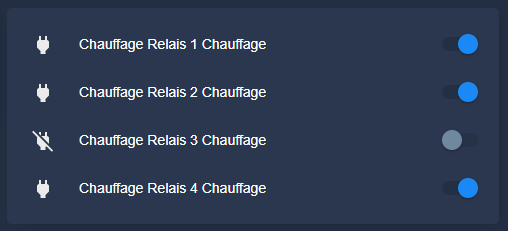
I create _select input
It is in the configuration.yaml file that I declare the two entities of the zones by allowing them to have 4 possible states.
input_select: heating_etage_mode: name: Heating Zone Floor - Mode options: - "Comfort" - "Eco" - "Out of Gel" - "Off" icon: mdi:help-circle-outline heating _rdc _mode: name: Heating Zone Ground floor - Mode options: - "Comfort" - "Eco" - "Out of Gel" - "Off" icon: mdi:help-circle-outline
This adds the two entities:
- input_select.heating_rdc_mode
- input_select.heating_etage_mode
I customize input_select
I always try to make visually pleasing the tiles of the dasboard, for this, to put color and put beautiful icons that correspond to the states seems indispensable.
Customization is achieved by adding these lines in customize.yaml
input_select.heating_etage_mode: templates: icon: > if (state == 'Comfort') return 'mdi:fire'; if (state == 'Eco') return 'mdi:leaf'; if (state == 'Hors Gel') return 'mdi:snowflake-thermometer'; if (state == 'Off') return 'mdi:power'; return 'mdi:help-circle-outline'; icon_color: > if (state == 'Comfort') return 'yellow'; if (state == 'Eco') return 'green'; if (state == 'Outside Gel') return '#2196f3'; if (state == 'Off') return 'red'; input_select.heating_rdc_mode: templates: icon: > if (state == 'Comfort') return 'mdi:fire'; if (state == 'Eco') return 'mdi:leaf'; if (state == 'Hors Gel') return 'mdi:snowflake-thermometer'; if (state == 'Off') return 'mdi:power'; return 'mdi:help-circle-outline'; icon_color: > if (state == 'Comfort') return 'yellow'; if (state == 'Eco') return 'green'; if (state == 'Outside Gel') return '#2196f3'; if (state == 'Off') return 'red';
I drive relays from input_select
The correspondence between the Zones (Etage and Ground Floor) must be done in Home Assistant, the choice of relays to control the zone mode must be transparent for the user.
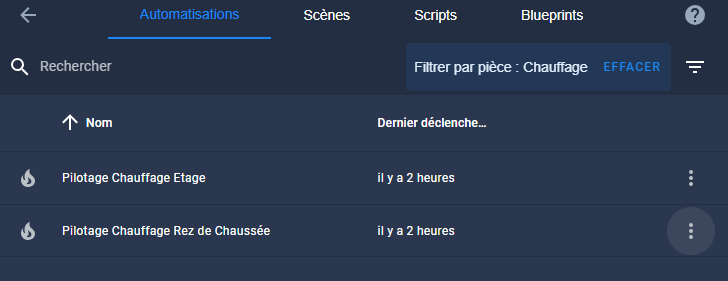
For this, an automation will be triggered by a change of state of input_select.heating_rdc_mode and another by input_select.heating_etage_mode.
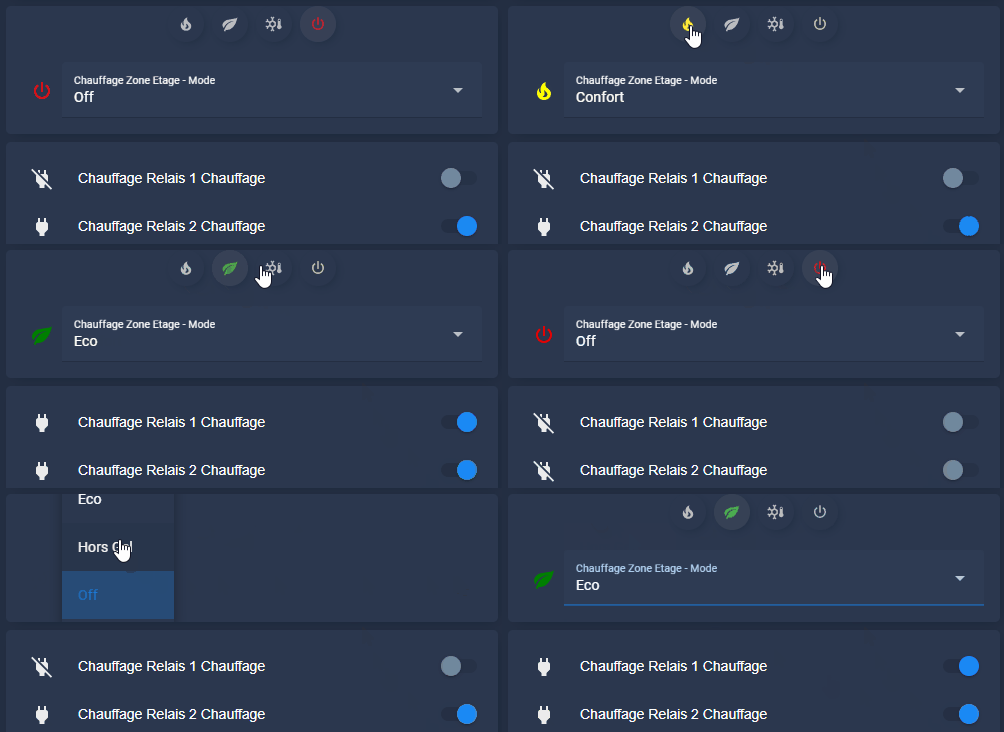
This automation will change the status of the relays in order to send the order that corresponds to the coding of the pilot wire. This is explained here.
Automation Pilotage Heating Ground Floor
alias: Pilotage Heating Ground Floor description: "" trigger: - platform: state entity _id: - input_select.heating_rdc_mode condition: [] action: - if: - condition: state entity _id: input_select.heating_rdc_mode state: Comfort then: - service: switch.turn _off data: {} entity _id: - switch.heating_relais_3_heating - switch.heating_relais_4_heating - stop: "" - if: - condition: state entity _id: input_select.heating_rdc_mode state: Eco then: - service: switch.turn_on data: {} entity _id: - switch.heating_relais_3_heating - switch.heating_relais_4_heating - stop: "" - if: - condition: state entity _id: input_select.heating_rdc_mode state: Excluding Gel then: - service: switch.turn _off data: {} entity _id: - switch.heating_relais_4_heating - service: switch.turn_on data: {} entity _id: - switch.heating_relais_3_heating - stop: "" - if: - condition: state entity _id: input_select.heating_rdc_mode state: "Off" then: - service: switch.turn _off data: {} entity _id: - switch.heating_relais_3_heating - service: switch.turn_on data: {} entity _id: - switch.heating_relais_4_heating - stop: "" mode: single
Automation Pilotage Heating Floor
alias: Pilotage Heating Floor description: "" trigger: - platform: state entity _id: - input_select.heating_etage_mode condition: [] action: - if: - condition: state entity _id: input_select.heating_etage _mode state: Comfort then: - service: switch.turn _off data: {} entity _id: - switch.heating_relais_2_heating - switch.heating_relais_1_heating - stop: "" - if: - condition: state entity _id: input_select.heating_etage _mode state: Eco then: - service: switch.turn_on data: {} entity _id: - switch.heating_relais_2_heating - switch.heating_relais_1_heating - stop: "" - if: - condition: state entity _id: input_select.heating_etage _mode state: Excluding Gel then: - service: switch.turn _off data: {} entity _id: - switch.heating_relais_2_heating - service: switch.turn_on data: {} entity _id: - switch.heating_relais_1_heating - stop: "" - if: - condition: state entity _id: input_select.heating_etage _mode state: "Off" then: - service: switch.turn _off data: {} entity _id: - switch.heating_relais_1_heating - service: switch.turn_on data: {} entity _id: - switch.heating_relais_2_heating - stop: "" mode: single
I make a nice map for the dashboard
Here is the result of what I want as a card:
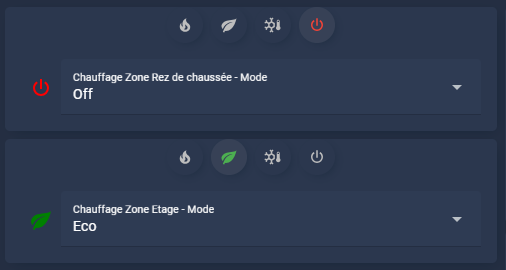
At this point, I don't know if I'll keep the drop-down list or the buttons/selectors, both work.
Map code for the ground floor area
Type: custom:stack-in-card mode: vertical cards: - type: custom:auto-entities show _empty: false card: Type: custom:mushroom-chips-card view_layout: grid-area: chips alignment: center card_param: chips filter: template: > {% set ns = namespace(select=[],entity="input_select.heating_rdc_mode") %} {% for opt in state_attr(ns.entity, 'options') %} {% set icon = iif(opt== 'Comfort', 'mdi:fire', icon) %} {% set icon_color _select = iif(opt== 'Comfort', 'yellow', icon_color _select) %} {% set icon = iif(opt== 'Off', 'mdi:power', icon) %} {% set icon_color _select = iif(opt== 'Off', 'red', icon_color _select) %} {% set icon = iif(opt== 'Eco', 'mdi:leaf', icon) %} {% set icon_color _select = iif(opt== 'Eco', 'green', icon_color _select) %} {% set icon = iif(opt== 'Out of Gel', 'mdi:snowflake-thermometer', icon) %} {% set icon_color _select = iif(opt== 'Out of Gel', 'blue', icon_color _select) %} {% set ns.select = ns.select + [ { "type": "template", "icon": icon, "entity": ns.entity, "icon _color": '{{ iif(is _state("' ~ ns.entity ~ '", "' ~ opt ~ '"), "' ~ icon_color _select ~ '", "disabled") }', "tap _action": { "action": "call-service", "service": "input_select.select _option", "_data service": { "entity _id": ns.entity, "option": opt } }, "card _mod": { "style": 'ha-card { {% if is _state( "' ~ ns.entity ~ '" , "' ~ opt ~ '" ) %} --chip-background: rgba(var(--rgb-grey), 0.1); {% else %} --chip-background: rgba(var(--mush-rgb-state-entity), 0.3); {% endif %} }' } } ] %} {% endfor %} {{ ns.select }} - type: entities entities: - entity: input_select.heating_rdc_mode
Map code for the Floor area
Type: custom:stack-in-card mode: vertical cards: - type: custom:auto-entities show _empty: false card: Type: custom:mushroom-chips-card view_layout: grid-area: chips alignment: center card_param: chips filter: template: > {% set ns = namespace(select=[],entity="input_select.heating_etage _mode") %} {% for opt in state_attr(ns.entity, 'options') %} {% set icon = iif(opt== 'Comfort', 'mdi:fire', icon) %} {% set icon_color _select = iif(opt== 'Comfort', 'yellow', icon_color _select) %} {% set icon = iif(opt== 'Off', 'mdi:power', icon) %} {% set icon_color _select = iif(opt== 'Off', 'red', icon_color _select) %} {% set icon = iif(opt== 'Eco', 'mdi:leaf', icon) %} {% set icon_color _select = iif(opt== 'Eco', 'green', icon_color _select) %} {% set icon = iif(opt== 'Out of Gel', 'mdi:snowflake-thermometer', icon) %} {% set icon_color _select = iif(opt== 'Out of Gel', 'blue', icon_color _select) %} {% set ns.select = ns.select + [ { "type": "template", "icon": icon, "entity": ns.entity, "icon _color": '{{ iif(is _state("' ~ ns.entity ~ '", "' ~ opt ~ '"), "' ~ icon_color _select ~ '", "disabled") }', "tap _action": { "action": "call-service", "service": "input_select.select _option", "_data service": { "entity _id": ns.entity, "option": opt } }, "card _mod": { "style": 'ha-card { {% if is _state( "' ~ ns.entity ~ '" , "' ~ opt ~ '" ) %} --chip-background: rgba(var(--rgb-grey), 0.1); {% else %} --chip-background: rgba(var(--mush-rgb-state-entity), 0.3); {% endif %} }' } } ] %} {% endfor %} {{ ns.select }} - type: entities entities: - entity: input_select.heating_etage_mode
Conclusion
I am finishing here an important step in the integration of my heating with Home Assistant. I will now tackle the control of this heating depending on who is present or not, hours, days and periods of absence (… holidays)
 English
  French
  Spanish
  Chinese
  German