

Objective:
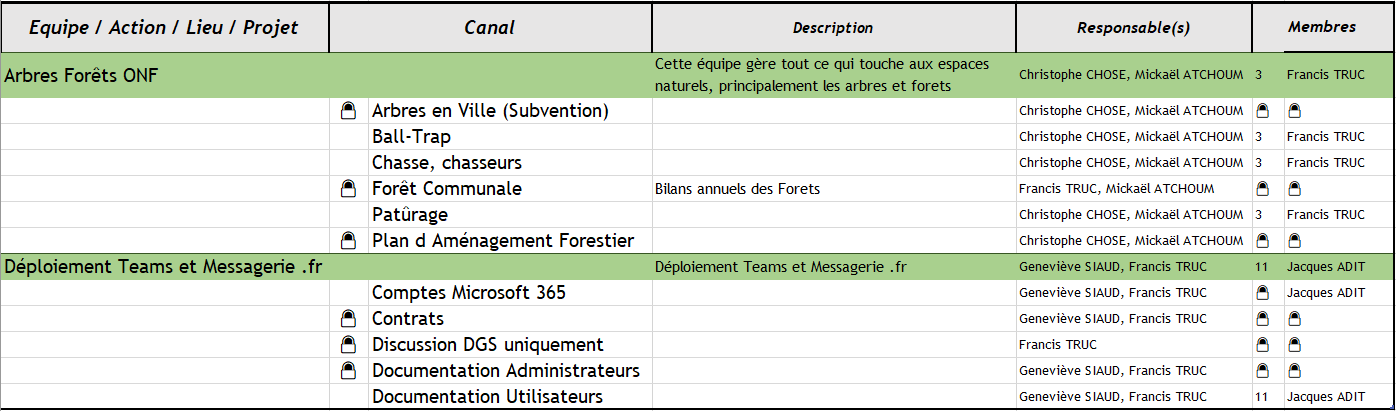
I wanted to generate this type of list:
First try, with Power Automate

I embarked on the implementation of the generation of an excel with Power Automate, it looked like this:
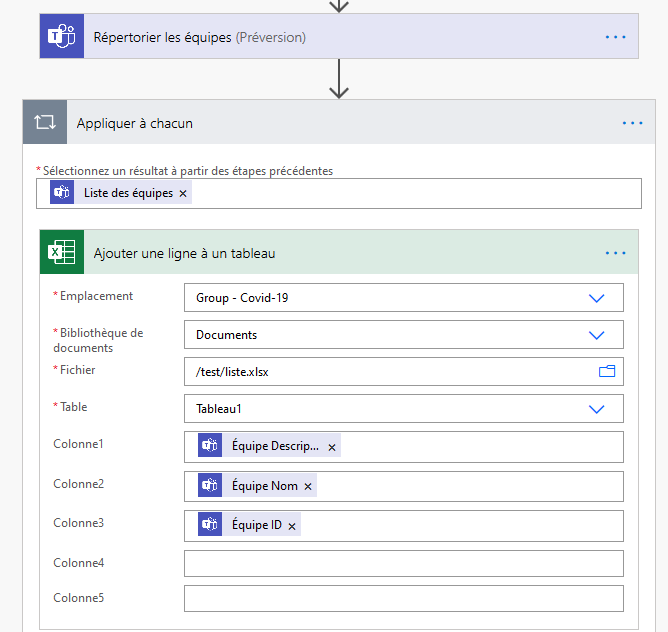 |
To draw up the list, this may be enough, but at the time of writing this tutorial, Power Automate doesn't know yet extract members, owners or whether the channel or team is private. So it does not suit me, I looked for another solution.
Second try, use PowerShell
Returning to powerful command-line tools is often the reflex of IT professionals, and I was not disappointed with the MicrosoftTeams Module for PowerShell.
Using Jeedom, I tried to test PowerShell adapted to Raspbian. This is to install it on a Raspi3B+ that already hosts Jeedom.
I have two Jeedoms, one in prod and one in dev, one in sous Stretch and a sub Buster. In the Microsoft Docs, it is specified to use Stretch, at home it works on both (for what I tested).
Installing PowerShell Core
Asking whether you install a 32bits or 64bits version is the first step, for this, type:
uname -m
Any value below ARMv7 are in 32 bit.
64-bit version starts at AMRv8.
The latest version of powershell can be found on https://github.com/PowerShell/PowerShell for Raspbian.Version 7.1.0 on the day of writing this tutorial.
If an old or worrying version is already installed, it must be deleted by:
rm -rf ~/powershell
Launch installation (update version number)
sudo su - apt-get install '^libssl1.0.[0-9]$' libunwind8 -y wget https://github.com/PowerShell/PowerShell/releases/download/v7.1.0/powershell-7.1.0-linux-arm32.tar.gz mkdir ~/powershell tar -xvf ./powershell-7.1.0-linux-arm32.tar.gz -C ~/powershell sudo ~/powershell/pwsh -c New-Item -ItemType SymbolicLink -Path "/usr/bin/pwsh" -Target "$PSHOME/pwsh" -Force
~/powershell/pwsh
$psversiontable
In PowerShell, install MicrosoftTeams Module
Uninstall-Module -Name MicrosoftTeams Install-Module -Name MicrosoftTeams -AllowPrerelease Import-Module MicrosoftTeams
Do the first tests on the command line
To check the version and correct installation of MicrosoftTeams:
get-module | ft name, version
Try it out by retrieving the Teams list
Connect-MicrosoftTeams
Note: : Recently, an xdg-open error blocks the identification, I had to identify myself by a script using Credential
View the list of MiscrosoftTeams Module commands
get-command -MicrosoftTeams module
Follow the instructions in yellow to identify yourself
$AllTeams = Get-Team Write-Output $AllTeams
The list of teams must be displayed
Install PSFTP
To send a Powershell-generated file to an FTP server, the easiest way is to install PSFTP (In PowerShell)
apt-get install PSFPT
Run a command line script
To launch the script _sigalou Teams.ps1, use this command:
~/powershell/pwsh -File "teams_sigalou.ps1"
Generate a CSV with the Teams list
After multiple tests, here is the last script, do not hesitate to adapt it.
# Script to generate the Teams list and export to a CSV file and then send this file by FTP to be exploited by an Excel file # Directed by Sigalou 06/12/2020 sigalou@@@sigalou-domotique.fr # Use GitHub or email for any questions, requests for improvement and do not hesitate to propose improvements # Please leave these lines # Source: http://jeedom.sigalou-domotique.fr/generate-a-list-teams-teams-their-channels-owners-members # or https://github.com/sigalou/MicrosoftTeamstoCSV # FPT identification param([string]$UserName, [string]$Password, [switch]$MFA,[int]$Action) $passwordFTP = ConvertTo-SecureString -AsPlainText "xxxxx" -Force $credentialsFTP = New-Object System.Management.Automation.PSCredential "xxxxx _ftp", $passwordFTP Import-Module PSFTP # Identification M365 $UserName = "[email protected]" $Password = "xxxx" #Connect to Microsoft Teams $Module=Get-Module -Name MicrosoftTeams -ListAvailable if($Module.count -eq 0) { Write-Host MicrosoftTeams module is not available -ForegroundColor yellow $Confirm= Read-Host Are you sure you want to install module? [Y] Yes [N] No if($Confirm -match "[yY]") { Install-Module MicrosoftTeams } else { Write-Host MicrosoftTeams module is required.Please install module using Install-Module MicrosoftTeams cmdlet. Exit } } Write-Host ’n’n’n’n’n’nLaunch ... -ForegroundColor Yellow #Authentication using MFA if($mfa.IsPresent) { $Team=Connect-MicrosoftTeams } #Authentication using non-MFA else { #Storing credential in script for scheduling purpose/ Passing credential as parameter if(($UserName -ne "") -and ($Password -ne "")) { $SecuredPassword = ConvertTo-SecureString -AsPlainText $Password -Force $Credential = New-Object System.Management.Automation.PSCredential $UserName,$SecuredPassword $Team=Connect-MicrosoftTeams -Credential $Credential } else { $Team=Connect-MicrosoftTeams } } #Check for Teams connectivity If($Team -ne $null) { Write-host „nConnected successfully to Microsoft Teams -ForegroundColor Green } elsewhere { Write-Host Error occurred while creating Teams session. Please try again -ForegroundColor Red exit } # Putting $True to have a debug on the screen to follow the generation $modeDEBUG=$False $Result="" $Results=@() $Path="./TeamsData.csv" If (Test-Path $Path){ Remove-Item $Path } Write-Host Data Recovery... $Count=0 $Teams=Get-Team -Visibility Private $nbTeamsPrivate=$Teams.Count #$Teams=Get-Team -Visibility Public -User [email protected] $Teams=Get-Team -Visibility Public $nbTeams=$Teams.Count $ColA=$nbTeams.ToString()+"-"+$nbTeamsPrivate.ToString() $Result=@{'ColA'=$ColA;'ColB'="Updating of the $((Get-Date -format 'dd-MM-yyyy` HH:mm').ToString())";} $Results= New-Object psobject -Property $Result $Results | select 'ColA', 'ColB' | Export-Csv $Path -NoTypeInformation -Append Write-Host `nData processing... $Teams | Sort-Object DisplayName | foreach { $counterLines=0 $TeamName=$_.Display $Description=$_.Description $GroupId=$_.GroupId $TeamUser=Get-TeamUser -GroupId $GroupId $TeamMemberCount=$TeamUser.Count $TeamPrefix=""" $putVirgule=0 $NameProprio="" $AllProprios=$TeamUser | Where-Object { $_.Role -eq 'Owner' } $TouslesProprios | foreach { if ($putVirgule -eq 1) { $putVirgule=0 $NameProprio=$NameProprio+", " } $NameProprio=$NameProprio+$_.Name $putVirgule=1 } $NameProprio=$NameProprio+" and "+$TeamMemberCount+" members" if ($TeamMemberCount -gt 80) { $NameProprio="" $TeamPrefix="🌐 " } if ($_.Archived -eq "True") { $TeamPrefix="🗄" $NameProprio="[ Archived ]" } If($Description -eq $TeamName) {$Description=""} Write-Progress -Activity " $Count/$nbTeams $TeamName " if$modeDEBUG) { Write-Host `n ╔═══════[$TeamName] $Description -ForegroundColor green} $Count++ Get-TeamChannel -MembershipType Standard -GroupId $GroupId | foreach { $ChannelName=$_.DisplayName If($ChannelName -ne "general") { Write-Progress -Activity " $Count/$nbTeams $TeamName // $ChannelName" #$Description=$_.Description if ($modeDEBUG) { Write-Host ╠═══> [$ChannelName] $ChannelMemberCount $Description} $Result=@{'ColA'="";'ColB'=$ChannelName;} } else { $Result=@{'ColA'=$TeamPrefix+$TeamName;'ColB'=$NameProprio;} } $Results= New-Object psobject -Property $Result $Results | select 'ColA', 'ColB' | Export-Csv $Path -NoTypeInformation -Append $MeterLines++ } $channelsprives=Get-TeamChannel -MembershipType Private -GroupId $GroupId $channelsprivescount=$canalprives.Count If($channelsprivescount -eq "1") { if ($modeDEBUG) { Write-Host ╠═══> +$canalprivescount private channel } $Result=@{'ColA'="";'ColB'="+1 private channel";'ColC'="";'ColD'="";} $Results= New-Object psobject -Property $Result $Results | select 'ColA', 'ColB' | Export-Csv $Path -NoTypeInformation -Append $counterLines++ } elseIf($channelsprivescount -gt 1) { if ($modeDEBUG) { Write-Host ╠═══> +$Private canalsprivescount Private canals } $Result=@{'ColA'="";'ColB'="+$private channelsprivescount channels";} $Results= New-Object psobject -Property $Result $Results | select 'ColA', 'ColB' | Export-Csv $Path -NoTypeInformation -Append $MeterLines++ } if ($counterLines -eq '1') { if ($modeDEBUG) { Write-Host ╠═══> Add an empty } line $Result=@{'ColA'="";'ColB'=" ";} $Results= New-Object psobject -Property $Result $Results | select 'ColA', 'ColB' | Export-Csv $Path -NoTypeInformation -Append } if ($modeDEBUG) { Write-Host ╚══════════════════════════════════════════════════════ -ForegroundColor green } } Write-Progress -Activity "“n Processed Teams count: $Count ““n” Currently Processing: $TeamName `n Currently Processing Channel: $ChannelName" -Completed if((Test-Path -Path $Path) -eq "True") { Write-Host “nReport available in $Path -ForegroundColor Green } Disconnect-MicrosoftTeams # Send the TeamsData.csv file in ftp Set-FTPConnection -Credentials $credentialsFTP -Server ftp.xxxx.org -Session FloFTP -ignoreCert -UseBinary -KeepAlive $Session = Get-FTPConnection -Session FloFTP Get-ChildItem ".\TeamsData.csv" | Add-FTPItem -Session $Session -Path /Teams/ -Overwrite
 English
  French
  Spanish
  Chinese
  German