

⚠New version of this tutorial available
For example, I use this method to connect a non-WIFI IP camera to the wireless Wi-Fi network in my home. The same technique can be used to connect a TV or any Ethernet equipment, non-wifi.
Here is the principle:
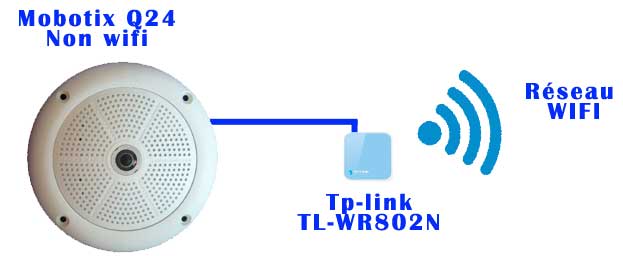
Configuring the Ethernet Camera
The easiest way is obviously to configure it in DHCP, which is the default mode in principle. The router will assign it an IP address
Configuration of the TL-WR802N
192.168.1.80 at home
This tiny box has 5 possible modes:

You have to choose the mode Customer, in this mode, it behaves like a Wi-Fi client and links to the equipment connected to it over Ethernet.
Configuration Box Network
Mode smart IP is the simplest:

For everything else, follow the automatic tp-link installer, it is very simple once the mode Customer is chosen.
Relaunch everything
And there it is, the camera is accessible on the Wifi network as if it were in "wifi". Everything is transparent and works perfectly.
I even chose to use my camera in https, on port 443 and everything works well.
 English
  French
  Spanish
  Chinese
  German