

Monitoring the consumption and cycles of the dishwasher
To accurately track the condition, duration, consumption and cost of my dishwasher cycles, I have set up a series of sensors and automations in Home Assistant. Here is how I did it step by step.
1. Dishwasher status sensor
I created a sensor named sensor.etat _lave _ dishes This allows me to know the current state of the device: Turned off, Watch or On the move. This state is determined according to the power consumed, measured by sensor.lave _ dishes _power, which comes from a connected socket.
Empirically, I have defined the following thresholds:
- Turned off : less than 1 W
- Watch : between 1 W and 20 W
- On the move : more than 20 W
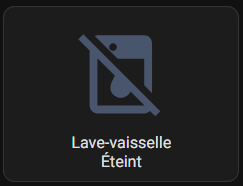
Turned off |
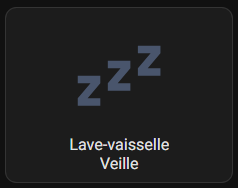
Watch |
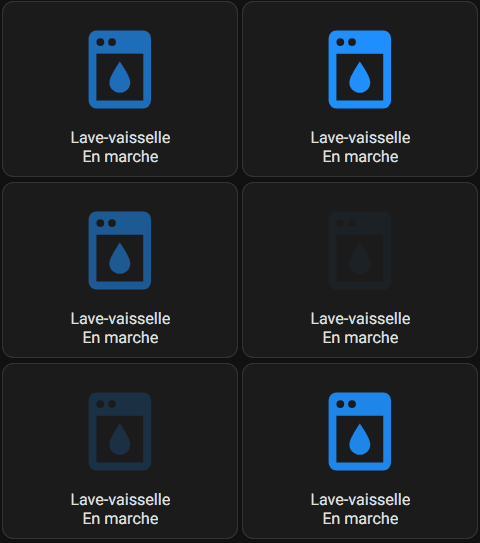
On the move |
Here is the template I added to my file templates.yaml to create this sensor:
- name: Single _id Dishwasher State: sensor.etat _lave _ dishes state: > {% set power = states('sensor.lave _ dishes _power') | float(0) %} {% if power < 1 %} Off {% elif power < 20 %} Watch {% else %} On {% endif %} icon: > {% if is_state('sensor.etat _lave _ dishes', 'End') %} mdi:power-plug-off {% elif is_state('sensor.etat _lave _ dishes', 'Veille') %mdi:sleep {% elif is_state('sensor.etat _lave _ dishes', 'En marche') %} mdi:dishwasher {% else %mdi:help-circle {% endif %}
2. Start and end of cycle sensors
To record the start and end times of the last cycle, I created two sensors: input_datetime via Settings/Devices and Services/Inputs :
- input_datetime.last _cycle _lave _ dishes_debut
- input_datetime.last _cycle _lave _ dishes _fin
These sensors are configured in the format Date and time.
3. Consumption sensors at the beginning and end of the cycle
To calculate the energy consumption during a cycle, I created two type sensors input_number :
- input_number.last _cycle_lave_dishes_conso_au_debut : records the consumption in kWh at the beginning of the cycle.
- input_number.last _cycle_lave_dishes _conso_a_la_fin : records the consumption in kWh at the end of the cycle.
I put 1000000 in maximum value (we will see).
4. Cycle time sensor
This sensor calculates the cycle time in hours and minutes, based on the recorded start and end times. Here is the template used in templates.yaml :
- name: Single _id Duration Dishwasher Cycle: sensor.duree _cycle _lave _ dishes state: > {% set start = states('input_datetime.last _cycle _lave _ dishes_debut') %} {% set end = states('input_datetime.last _cycle _lave _ dishes _fin') %} {% if start not in ['unknown', 'unavailable', 'none', 'None'] and end not in ['unknown', 'unavailable', 'none', 'None'] %} {% set start_t = as_timestamp(strptime(start, '%Y-%m-%d %H:%M:%S')) %} {% set end_t = as_timestamp(strptime(end, '%Y-%m-%d %H:%M:%S')) %} {% if end_t < start_t %} Current cycle {% else %} {% set total_seconds = end_t - start_t %} {% set hours = (total _seconds // 3600) | int %} {% set minutes = ((total _seconds % 3600) // 60) | int %} {{ "%dhd" | format(hours, minutes) }} {% endif %} {% endif %} icon: mdi:clock-outline
5. Cycle Consumption Sensor
This sensor calculates the total cycle consumption in kWh, subtracting the consumption at the beginning of the one at the end. It also takes into account cases where the meter has been reset.
- name: Single _id "Dishwasher Cycle Consumption": sensor.consumption _cycle _lave _ dishes unit _of _measurement: "kWh" device _class: energy state_class: measurement state: > {% set debut = states('input_number.last _cycle _lave _ dishes _conso_au_debut') | float(0) %} {% set fin = states('input_number.last _cycle _lave _ dishes _conso_a_la_fin') | float(0) %} {% set consumption = end - start %} {% if consumption < 0 %} 0 {% else %} {{consumption | round(3) }} {% endif %} icon: mdi:lightning-bolt-circle
6. Cycle cost sensor
To calculate the cost of the cycle, I use a sensor that multiplies the consumption in kWh by the price per kWh, defined in input_number.prix_manuel_du_kwh. Here is the template:
- name: Single _id Dishwasher Cycle Cost: sensor.cout _cycle _lave _ dishes unit _of _measurement: "€" device _class: monetary state: > {{ states('sensor.consumption _cycle _lave _ dishes') | float(0) * states('input _number.prix _manuel _du _kwh') | float(0) | round(4) }} icon: mdi:currency-eur
7. Current cycle sensor
To avoid detection errors, I added a type sensor input_boolean :
- input_boolean.cycle_lave_ dishes_en_cours : indicates whether a cycle is in progress.
8. Automation for cycle tracking
Finally, I created three automations to:
- Detect the start of a cycle and record consumption and start time.
- Detect the end of a cycle and record consumption and end time.
- Reset tracking if cycle exceeds 6 hours (security).
alias: Dishwasher cycle - Start description: "" triggers: - entity_id: - sensor.etat _lave _ dishes to: On Trigger: state from: Extinct for: hours: 0 minutes: 0 seconds: 20 conditions: - condition: state entity _id: input_boolean.cycle_lave_ dishes_en_cours state: "off" alias: If we don't already have a cycle in progress actions: - action: input_boolean.turn_on target: entity_id: input_boolean.cycle_lave_ dishes_en_cours data: {} alias: Ongoing cycle goes to ON - action: input_number.set _value data: entity_id: input_number.last _cycle _lave _ dishes _conso_au _debut value: "{{ states('sensor.lave _ dishes _energy') | float }}" aka: Save the value of the conso kWh at the beginning - action: input_datetime.set_datetime data: entity_id: input_datetime.last _cycle _lave _ dishes_debut datetime: "{{ now().strftime('%Y-%m-%d %H:%M:%S') }}" alias: Save time and date of cycle start alias: Dishwasher cycle - End description: "" triggers: - trigger: numeric _state entity _id: - sensor.lave _ dishes _power for: hours: 0 minutes: 5 seconds: 0 below: 20 conditions: - condition: state entity _id: input_boolean.cycle_lave_ dishes_en_cours state: "on" actions: - action: input_number.set _value data: entity_id: input_number.last _cycle _lave _ dishes _conso _a_la_fin value: "{{ states('sensor.lave _ dishes _energy') | float }}" aka: Save the conso at the end - action: input_datetime.set_datetime data: entity_id: input_datetime.last _cycle _lave _ dishes _fin datetime: "{{ now().strftime('%Y-%m-%d %H:%M:%S') }}" alias: Backup Time and Date of End of Cycle - action: input_boolean.turn_off target: entity_id: input_boolean.cycle_lave_ dishes_en_cours data: {} alias: Disable Current cycle alias: Dishwasher cycle - Too long cycle description: "Reset flag if cycle exceeds 6h" trigger: - platform: state entity _id: input_boolean.cycle_lave_ dishes_en_course to: "on" for: "06:00:00" action: - service: input_boolean.turn_off target: entity_id: input_boolean.cycle_lave_ dishes_en_cours
Creation of a dedicated view for household appliances
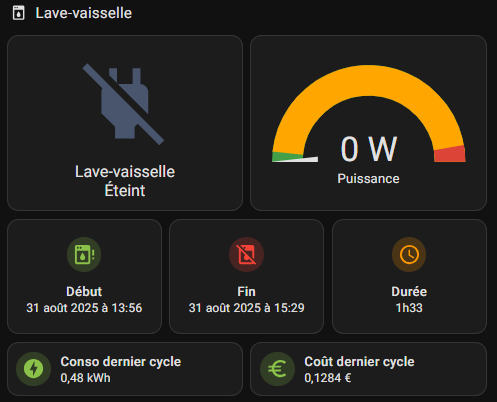
To clearly visualise the status and data of my dishwasher, I created a custom map in Home Assistant. This card allows me to monitor in real time the power consumed, the state of the device, as well as the information on the last cycle carried out. Here is the final result and a detailed explanation of the code used.
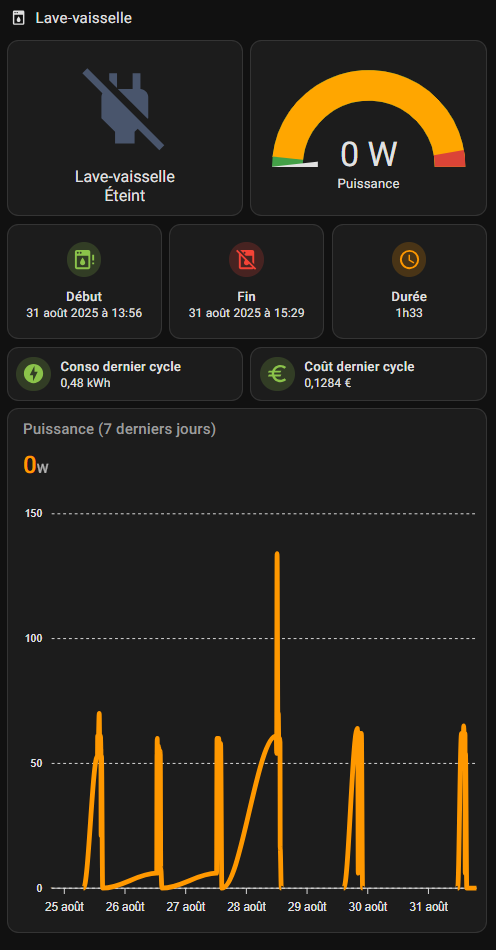
Explanation of the card code
The code below defines a view organized into sections to display the information related to my dishwasher. Here is a description of each element:
type: max _columns sections: 4 title: Electro path: electro icon: mdi:washing-machine sections: - type: grid cards: - type: heading heading: Dishwasher heading _style: title icon: mdi:dishwasher
Explanation: This section defines a view named "Electro" with a washing machine icon. The main title of the section is "Dishwasher", displayed with a dishwasher icon. The structure is of type grid, This allows the maps to be organised in a flexible grid.
- type: custom:button-card entity: sensor.etat _lave _ dishes name: Dishwasher show_state: true show_icon: true color_type: icon styles: card: - height: 183px state: -value: On Color: "#1e90ff" styles: icon: - animation: blink 2s ease infinite - operator: default color: "#49556c" grid_options: columns: 6 rows: 3
Explanation: This card uses the component custom:button-card to display the current state of the dishwasher (sensor.etat _lave _ dishes). It shows both the icon and the status. If the dishwasher is ‘On’, the icon will blink blue (#1e90ff). Otherwise, it remains grey (#49556c). The card occupies 6 columns and 3 rows in the grid.
- type: gauge entity: sensor.lave _ dishes _power min: 0 needle: true severity: green: 0 yellow: 60 red: 1700 grid_options: columns: 6 rows: 3 name: Unit power: W max: 1800
Explanation: This card is an indicator of type gauge (jauge) which displays the current power consumed by the dishwasher (sensor.lave _ dishes _power). The gauge is graduated from 0 to 1800 W, with colour zones to indicate the severity: green for low consumption, yellow for moderate consumption, and red for high consumption. The gauge also occupies 6 columns and 3 rows in the grid.
- type: custom:mushroom-entity-card entity: input_datetime.last _cycle _lave _ dishes _debut icon_color: light-green name: Start grid_options: columns: 4 rows: 1 layout: vertical
Explanation: This card uses the component custom:mushroom-entity-card to display the start time of the last cycle (input_datetime.last _cycle _lave _ dishes_debut). The icon is in light green and the map is organised vertically. It occupies 4 columns and 1 line in the grid.
- type: custom:mushroom-entity-card entity: input_datetime.last _cycle _lave _ dishes _fin icon_color: red name: "End" grid _options: columns: 4 rows: 1 layout: vertical
Explanation: This map shows the end time of the last cycle (input_datetime.last _cycle _lave _ dishes _fin). The icon is in red for better visibility. It occupies 4 columns and 1 line in the grid.
- type: custom:mushroom-entity-card entity: sensor.duree _cycle _lave _ dishes icon _color: orange name: Duration grid_options: columns: 4 rows: 1 layout: vertical
Explanation: This map shows the duration of the last cycle (sensor.duree _cycle _lave _ dishes). The icon is in orange and the map is arranged vertically. It occupies 4 columns and 1 line in the grid.
- type: custom:mushroom-entity-card icon_color: light-green name: Conso last cycle entity: sensor.consumption _cycle _lave _ dishes
Explanation: This map shows the energy consumption of the last cycle (sensor.consumption _cycle _lave _ dishes). The icon is in light green. It uses the default settings for the size in the grid.
- type: custom:mushroom-entity-card icon_color: light-green name: Last entity cycle cost: sensor.cout _cycle _lave _ dishes
Explanation: This card shows the cost of the last cycle (sensor.cout _cycle _lave _ dishes). The icon is also in light green. It uses the default settings for the size in the grid.
- type: custom:apexcharts-card header: show: true title: Power (7 last days) show_states: true colorize _states: true graph_span: 7d series: - entity: sensor.lave _ dishes _power name: " " apex _config: chart: height: 450 stroke: curve: stepline
Explanation: This card uses the component custom:apexcharts-card to display a graph of the power consumed over the last 7 days (sensor.lave _ dishes _power). The graph is colorized and displays the states. The height of the graph is set to 450 pixels for better readability.
Advantages of this view
- Centralisation of information : All dishwasher data is grouped in one place, making it easy to track.
- Clear visualization : Customised maps and colours make it possible to quickly distinguish between status and important data.
- Real-time monitoring : The power consumed and the status of the device are updated in real time.
- Accessible history : The graph shows the change in consumption over a week.
This view is ideal for effectively monitoring the consumption and use of my dishwasher, while keeping an eye on energy costs.
 English
  French
  Spanish
  Chinese
  German