

Objective
Alexa, good night
- Alexa reports an unclosed shutter, an open … garage
- Alexa answers a nice phrase wishing you good night
- The house is safe
Method used
- to keep the house safe, I use a Jeedom Scenario check that the shutters are closed, that the garage has not remained open, that the front door is locked … and then activate a check that nothing opens while sleeping. This scenario is not the subject of this tutorial.
- one routine Alexa (programmed on the Amazon server via the internet or the Alexa app) will be triggered
- one Alexa plugin scene launch the scenario presented in the first paragraph
The aim here is to use an Alexa routine and then a scene from the Alexa plugin and then a screenplay.
Configure the scene in the Alexa plugin
To launch a script by voice, you need to create a scene in the Alexa plugin.
Here the scene is called Watch the house, She launches the scenario that launches the control of the access closure and monitors the house all night.

For the recording of this scene to be taken into account, in the Alexa app on the phone or on the https://alexa.amazon.fr:
Connected home then Detect
Configure the routine on the Amazon server
Routines are not configurable on https://alexa.amazon.fr (or I couldn’t find it), you have to use the Alexa app
The routine will be launched by Alexa, good night
She'll launch the scene. monitors the house which is programmed on Jeedom (in the Alexa plugin)
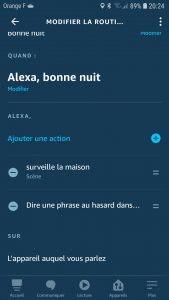
Then she will answer A Random Sentence in Good Night (this is proposed by the Alexa app)
Result
Before going to bed, say:
- Alexa, good night
 English
  French
  Spanish
  Chinese
  German