


I wrote this article after grilling my lawn and putting my pool pump at risk of death.
Indeed, home automation is awesome, when it works …
I thought I was thinking about everything and this summer, while travelling abroad, I lost contact with my local network, because the Freebox had crashed and so nothing could be reached anymore. You just had to do an Off/On on the Freebox and everything would have worked out again.
So I looked for a system completely independent of the internet connection, the box, the … router that allows me to make an off/on of my main equipment.
Information, Update of this tutorial to 03/07/2022
The CL4-GSM presented below has doubled its price, it is no longer the ideal equipment.
I left this tutorial for archive but I advise you to consult the following tutorial, based on RTU5024:
In my research, I wanted something that does not cost me a subscription and that is not excessive, here is my solution:
* CL4-GSM (less than 30€)
* Lebara SIM card (0.19€ per SMS, subscription 0€, SIM 0€)
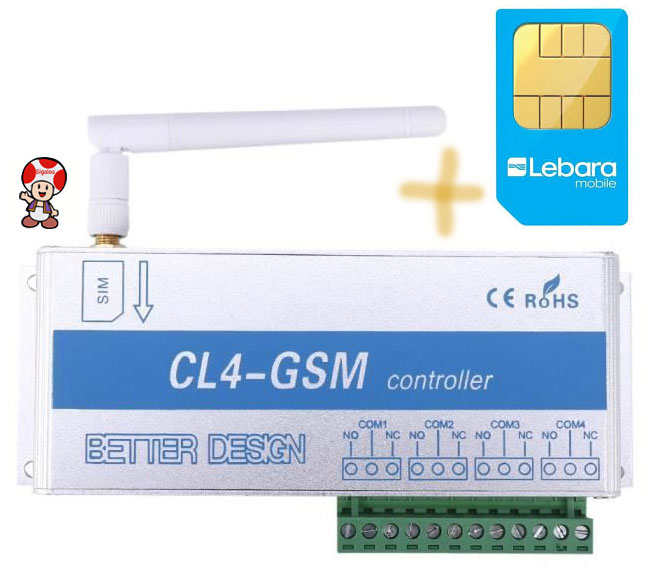
The principle is therefore to use the mobile network to send an SMS to the CL4-GSM, ask him to cut off for a few seconds the power supply to the equipment altered by one of the relays of the CL4-GSM.
Note that the CL4-GSM is able to manage 4 equipment individually, in this tutorial, I will manage them at the same time but everything seems possible, cf.doc of the product. If you only need one piece of equipment, there is CL1-GSM (less than 20€).
For the telephone subscription, there are many options at a few euros per month, but look no further, 2 € per month, it's fast 24 € / year, I looked for what there was to meet my needs.
Finally Lebara offers the free SIM card (no shipping costs) and you only pay 0.19 € by SMS sent by the card (receipt of SMS obviously free), an account charging system is convenient (you put 5 € for example). Note that if you no longer have a top-up on your account, the card continues to receive SMS messages and the box continues to execute … orders but in this case, you do not have the … order validation up to you.
After reading the doc correctly, I found out how to make an Off/Tempo/On in a single order.
Connecting equipment to the terminal block
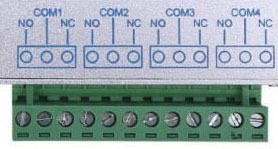
I noticed that the terminal block made it possible to use the Normally Open or Normally Closed states.
In order not to unnecessarily solicit relays, I decided to solicit them only during the Off/On. Thus, the SMS command that will have to be launched to do the hard reset will be On/Pause/Off.
The power supplies to be controlled are therefore to be connected between the terminal COMx and the bollard NC
Order to be sent to the SIM card (by SMS)
The order to be sent by sms will be as follows:
SN0000T5CCCC
- 0000 is the code, if you are paranoid, you can change it
- T5 this is to set the tempo to 5s
- CCCC it is to close the 4 relays (use X instead of C so as not to touch a relay)
This command will cause:
- Relay closure (So OFF for equipment connected between Com and NC)
- Break of 5s
- Relay Release (So ON)
Result
The box will answer you by SMS (this is what costs you 19cts):
SW1 SW2 SW3 SW4 IS INCHING
The Off/Pause/ON performed well.
Comparative price of CL4-GSM:
My purchase:
Other traders:
Amazon
Banggood
- CL1-GSM 27.33€ (+1.18€ port) Delivery 7-12 days
- CL2-GSM Delivery 7-12 days
- CL4-GSM 33.41€ (+1.15€ port) Delivery 7-12 days
 English
  French
  Spanish
  Chinese
  German