

正如我解释的那样:
由于飞行员的电线,我控制了两个区域的供暖。 作为从 Jeedom 到 Home Assistant 转换的一部分,我必须使用 Home Assistant 管理这些继电器。

目前,Sonoff 4CH Pro由ESP Easy驱动,我将很快将其切换到ESP Home,但现在ESP Easy允许您通过MQTT与Jeedom ET Home Assistant进行交互。
对于配置,我参考此 Retex :
我通过MQTT驱动继电器
正如在《 上面的RETEX, 有必要配置允许在Home Assistant中恢复中继的实体,这是在mqtt.yaml文件中完成的。
姓名: "Relay 1 Heating" 唯一 _id: switch.heating.relais1 command_topic : "heating/gpio/12" state_topic: "Heating/Relay1/Relay1" payload_on: "1"有效载荷_off: "0"保留: true device_class : Outlet 设备 : 姓名: 『加热』标识符: 『热』 - 名称: "Relay 2 Heating" 唯一 _id: switch.heating.relais2 command_topic : "heating/gpio/5" state_topic: "Heating/Relay2/Relay2" payload_on: "1"有效载荷_off: "0"保留: true device_class : Outlet 设备 : 姓名: 『加热』标识符: 『热』 - 名称: "Relay 3 Heating" 独特 _id: switch.heating.relais3 command_topic : "heating/gpio/4" state_topic: "Heating/Relay3/Relay3" payload_on: "1"有效载荷_off: "0"保留: true device_class : Outlet 设备 : 姓名: 『加热』标识符: 『热』 - 名称: "Relay 4 Heating" 独特 _id: switch.heating.relais4 command_topic : "heating/gpio/15" state_topic: "Heating/Relay4/Relay4" payload_on: "1"有效载荷_off: "0"保留: true device_class : Outlet 设备 : 姓名: 『加热』标识符: 『热』
在HA中,这4个实体很容易恢复
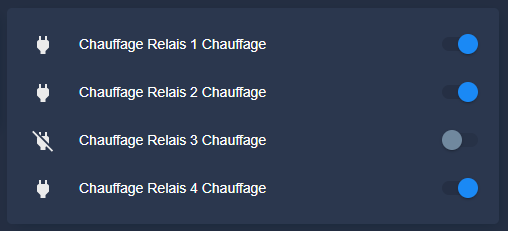
创建 _select input
在config.yaml文件中,我通过允许它们具有4种可能的状态来声明区域的两个实体。
input_select : 加热_etage_mode : 姓名: 加热区地板 - 模式选项: - "舒适" - "Eco" - "Out of Gel" - "Off"图标: MDI:help-circle-outline 加热 _rdc _mode: 姓名: 加热区地面地板 - 模式选项: - "舒适" - "Eco" - "Out of Gel" - "Off"图标: mdi:help-circle-outline
这增加了两个实体:
- input_select.heating_rdc_mode
- input_select.heating_etage_mode
自定义 input_select
我总是试图在视觉上取悦dasboard的瓷砖,为此,放置颜色并放置与各州相对应的美丽图标似乎是必不可少的。
自定义是通过在 customize.yaml 中添加这些行来实现的
input_select.heating_etage_mode : 模板 : 图标 : 如果(state == 'Comfort')返回 'mdi:fire'; 如果(state == 'Eco')返回 'mdi:leaf'; 如果(state == 'Hors Gel')返回 'mdi:snowflake-thermometer'; 如果(state == 'Off')返回 'mdi:power'; 返回 'mdi:help-circle-outline'; 图标_color : 如果(state == 'Comfort')返回 'yellow'; 如果(state == 'Eco')返回 'green'; if(state == 'Outside Gel')返回#2196f3'; 如果(state == 'Off')返回 'red'; input_select.heating_rdc_mode : 模板 : 图标 : 如果(state == 'Comfort')返回 'mdi:fire'; 如果(state == 'Eco')返回 'mdi:leaf'; 如果(state == 'Hors Gel')返回 'mdi:snowflake-thermometer'; 如果(state == 'Off')返回 'mdi:power'; 返回 'mdi:help-circle-outline'; 图标_color : 如果(state == 'Comfort')返回 'yellow'; 如果(state == 'Eco')返回 'green'; if(state == 'Outside Gel')返回#2196f3'; 如果(state == 'Off')返回 'red';
我驱动来自 input_select 的继电器
区域(面积和地面)之间的对应必须在家庭助理中完成,控制区域模式的继电器的选择必须对用户透明。
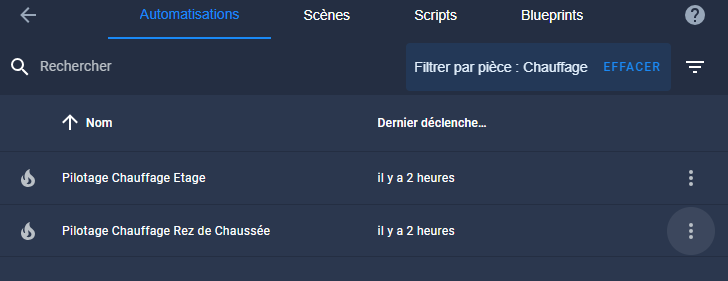
为此,由 input_select.heating_rdc_mode 状态的变化触发自动化,另一个由 input_select.heating_etage_mode 触发。
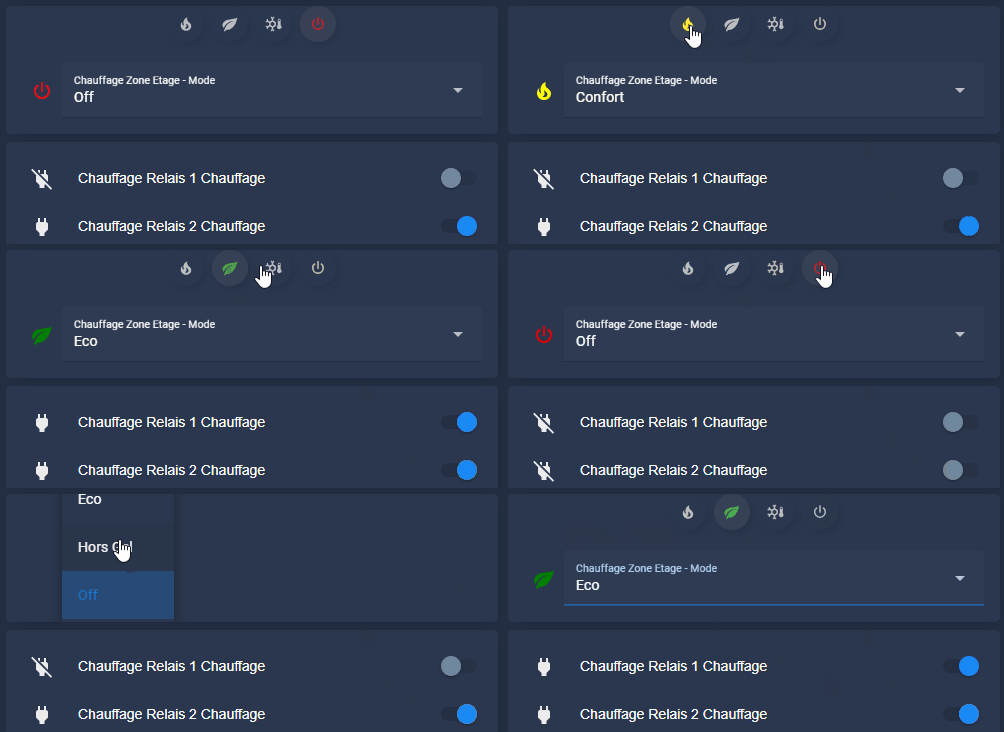
这种自动化将改变继电器的状态,以便发送对应于引线编码的订单。 对此有解释 在这里.
自动 试验 供热 地面 地板
化名 : 引航供暖地面楼层描述: 触发器: 平台: 国家实体_id: input_select.heating_rdc_mode 条件: [] 行动: 如果: 条件: 国家实体_id: input_select.heating_rdc_mode 状态: 那么舒适: 服务: switch.turn _off 数据: {} 实体 _id : switch.heating_relais_3_heating - switch.heating_relais_4_heating - 停止: -如果: 条件: 国家实体_id: input_select.heating_rdc_mode 状态: 生态: 服务: switch.turn_on 数据 : {} 实体 _id : switch.heating_relais_3_heating - switch.heating_relais_4_heating - 停止: -如果: 条件: 国家实体_id: input_select.heating_rdc_mode 状态: 不包括Gel: 服务: switch.turn _off 数据: {} 实体 _id : switch.heating_relais_4_heating - 服务: switch.turn_on 数据 : {} 实体 _id : switch.heating_relais_3_heating - 停止: -如果: 条件: 国家实体_id: input_select.heating_rdc_mode 状态: 然后『关闭』: 服务: switch.turn _off 数据: {} 实体 _id : switch.heating_relais_3_heating - 服务: switch.turn_on 数据 : {} 实体 _id : switch.heating_relais_4_heating - 停止: 模式: 单 人 单
自动 试验 供热 地板
化名 : 引航供暖地板描述: 触发器: 平台: 国家实体_id: input_select.heating_etage_mode 条件: [] 行动: 如果: 条件: 国家实体_id: input_select.heating_etage _mode 状态: 那么舒适: 服务: switch.turn _off 数据: {} 实体 _id : switch.heating_relais_2_heating - switch.heating_relais_1_heating - 停止: -如果: 条件: 国家实体_id: input_select.heating_etage _mode 状态: 生态: 服务: switch.turn_on 数据 : {} 实体 _id : switch.heating_relais_2_heating - switch.heating_relais_1_heating - 停止: -如果: 条件: 国家实体_id: input_select.heating_etage _mode 状态: 不包括Gel: 服务: switch.turn _off 数据: {} 实体 _id : switch.heating_relais_2_heating - 服务: switch.turn_on 数据 : {} 实体 _id : switch.heating_relais_1_heating - 停止: -如果: 条件: 国家实体_id: input_select.heating_etage _mode 状态: 然后『关闭』: 服务: switch.turn _off 数据: {} 实体 _id : switch.heating_relais_1_heating - 服务: switch.turn_on 数据 : {} 实体 _id : switch.heating_relais_2_heating - 停止: 模式: 单 人 单
我为仪表板制作了一张漂亮的地图
以下是我想要的一张卡片的结果:
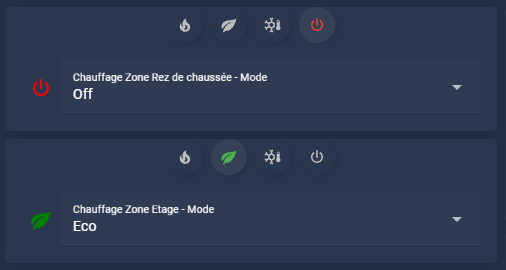
在这一点上,我不知道我是否会保留下拉列表或按钮/选择器,两者都有效。
一楼区域的地图代码
类型 : 自定义:stack-in-card 模式 : 垂直卡片: 类型: Cust:auto-entities show _empty : 假卡 : 类型 : 自定义:mushroom-chips-card view_layout: 网格区域: 芯片对齐: 中心卡_param : 芯片滤波器 : Template: > {% 设置 ns = namespace(select=[],entity="input_select.heating_rdc_mode") %} {% 选择 state_attr(ns.entity, 'options') %} {% 设置图标 = iif(opt== 'Comfort', 'mdi:fire', icon) %} {% 设置 icon_color _select = iif(opt== 'Comfort', 'yellow', icon_color _select) %} {% 设置图标 = iif(opt== 'Off', 'mdi:power', icon) %} {% 设置 icon_color _select = iif(opt== 'Off', 'red', icon_color _select) %} {% 设置图标 = iif(opt== 'Eco', 'mdi:leaf', icon) %} {% 设置 icon_color _select = iif(opt== 'Eco', 'green', icon_color _select) %} {% 设置图标 = iif(opt== 'Out of Gel', 'mdi:snowflake-thermometer', icon) %} {% 设置 icon_color _select = iif(opt== 'Out of Gel', 'blue', icon_color _select) %} {% 设置 ns.select = ns.select + [{ "type"): "模板","icon": 图标,『实体』: NS.entity,"icon _color": {{ IIF(is_state(is _state(')' ~ ns.entity ~ ', "'' ~ ~ opt ~ ''", "' ~ icon_color _select ~ ', "disabled"}, "tap _action": 『行动』: "呼叫服务"、"服务": "input_select.select _option","_data service": { "entity _id" : NS.entity, "option": "card _mod": 『风格』: 哈卡 { {% if is _state(" ~ ns.entity ~ '", ">" ~ opt ~ '") %} --chip-background : RGBA(var(-rgb-grey),0.1); {% 其他 其它 %} --chip-background : RGBA(var(-mush-rgb-state-entity),0.3); {% Endif 的 %} } } } %} {% 结束 于 %} { ns.select } - 类型: 实体: - 实体: input_select.heating_rdc_mode
地板区域地图代码
类型 : 自定义:stack-in-card 模式 : 垂直卡片: 类型: Cust:auto-entities show _empty : 假卡 : 类型 : 自定义:mushroom-chips-card view_layout: 网格区域: 芯片对齐: 中心卡_param : 芯片滤波器 : Template: > {% 设置 ns = namespace(select=[],entity="input_select.heating_etage _mode") %} {% 选择 state_attr(ns.entity, 'options') %} {% 设置图标 = iif(opt== 'Comfort', 'mdi:fire', icon) %} {% 设置 icon_color _select = iif(opt== 'Comfort', 'yellow', icon_color _select) %} {% 设置图标 = iif(opt== 'Off', 'mdi:power', icon) %} {% 设置 icon_color _select = iif(opt== 'Off', 'red', icon_color _select) %} {% 设置图标 = iif(opt== 'Eco', 'mdi:leaf', icon) %} {% 设置 icon_color _select = iif(opt== 'Eco', 'green', icon_color _select) %} {% 设置图标 = iif(opt== 'Out of Gel', 'mdi:snowflake-thermometer', icon) %} {% 设置 icon_color _select = iif(opt== 'Out of Gel', 'blue', icon_color _select) %} {% 设置 ns.select = ns.select + [{ "type"): "模板","icon": 图标,『实体』: NS.entity,"icon _color": {{ IIF(is_state(is _state(')' ~ ns.entity ~ ', "'' ~ ~ opt ~ ''", "' ~ icon_color _select ~ ', "disabled"}, "tap _action": 『行动』: "呼叫服务"、"服务": "input_select.select _option","_data service": { "entity _id" : NS.entity, "option": "card _mod": 『风格』: 哈卡 { {% if is _state(" ~ ns.entity ~ '", ">" ~ opt ~ '") %} --chip-background : RGBA(var(-rgb-grey),0.1); {% 其他 其它 %} --chip-background : RGBA(var(-mush-rgb-state-entity),0.3); {% Endif 的 %} } } } %} {% 结束 于 %} { ns.select } - 类型: 实体: - 实体: input_select.heating_etage_mode
结论 结论
我在这里完成了我与家庭助理的加热整合的重要一步。 我现在将根据谁在场,小时,天和缺勤时间(…假期)来解决这种加热的控制。
 Chinese
 French
 English
 Spanish
 German