

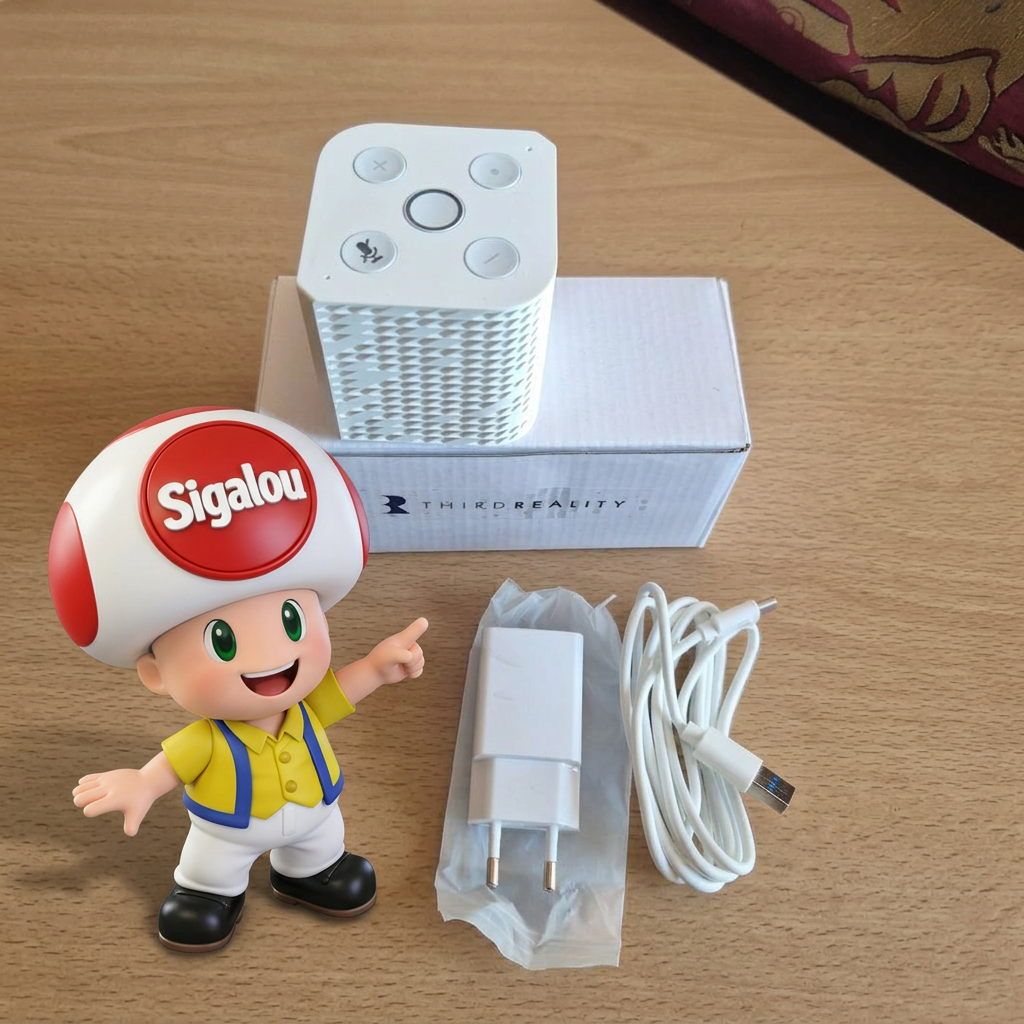
When we think of voice assistant for the house, we still think very quickly about Alexa, Google Home or, on the open home automation side, at Home Assistant Voice Preview Edition from Nabu Casa.
That is precisely why the THIRDREALITY Voice & Music Assistant Dev Edition intrigued me. It promises both voice, home assistant integration and a real audio role with Music Assistant.
I therefore did not want to test it only as a voice satellite. What I wanted to know was whether it could really become a useful little audio player in a Home Assistant installation, able to play a local MP3, broadcast an internet radio and drive cleanly from Home Assistant. In short, check whether it is a simple curious product or a device that really deserves a place in the current home automation ecosystem.
In this article, I take the whole route, from unpacking to commissioning, then to the first concrete audio uses with Music Assistant, RadioBrowser and a station launch in YAML. This test is also an opportunity to replace this box in front of the official product of Nabu Casa, but also in the face of wider public solutions such as Alexa and Google Home.
The product
📦 Voice & Music Assistant Dev Edition Discovery
I start by opening the box of the Voice & Music Assistant Dev Edition and I discover a very stripped-down content.
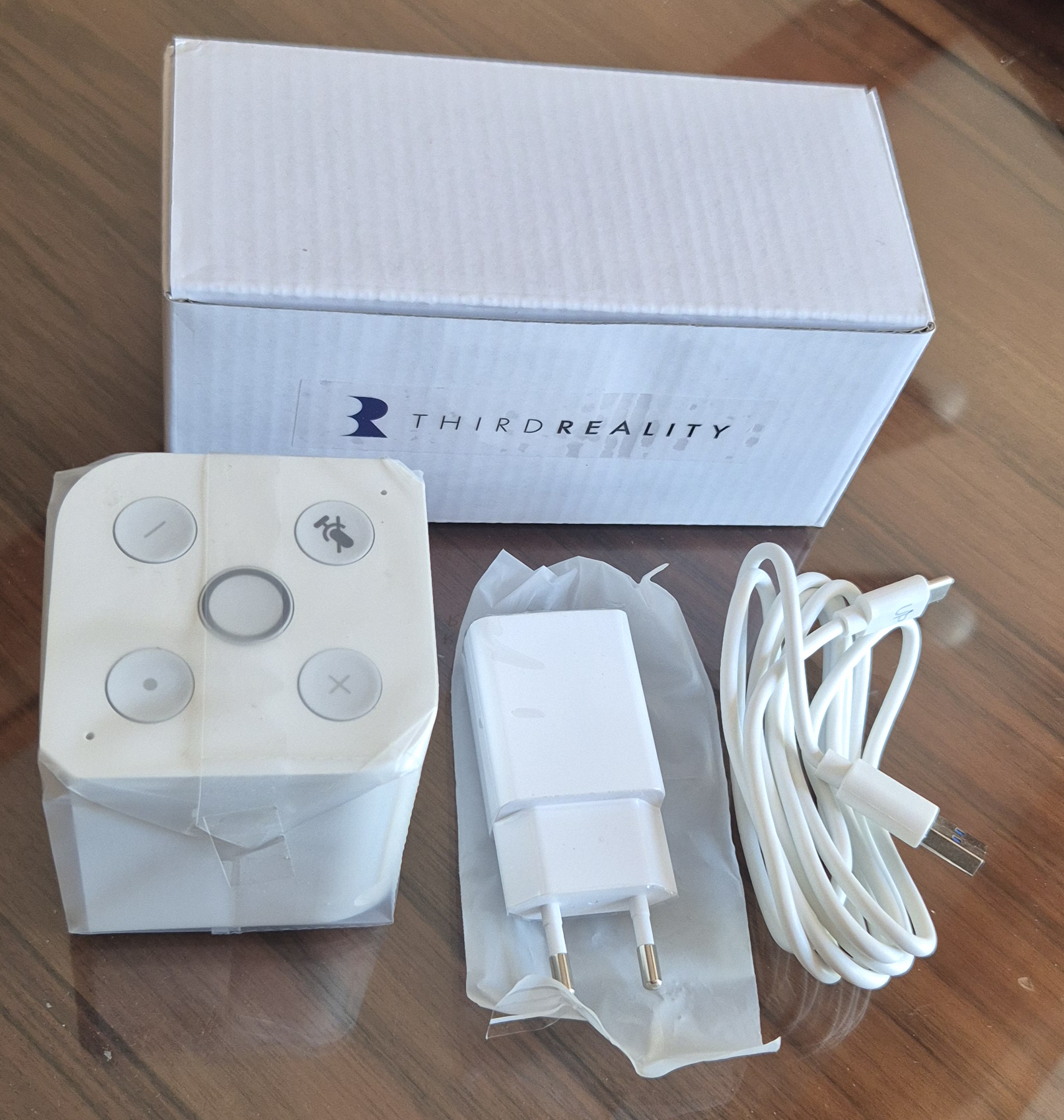
I find:
- the the Enclosure Voice & Music Assistant himself,
- one 220 V / 5 V transformer (2 A – 10 W), white,
- one USB to USB ‑C Cable to feed it,
- and no notice, no paper, no document in the box.
The case is compact, sober, with two fronts reserved for the speaker and microphones (holes) on the upper part as well as five buttons. The whole gives the impression of a simple, almost minimalist product, designed to go quickly to the essentials.
I also note that there is no Ethernet cable at all. There are no exposed RJ45 sockets or cables provided, which immediately makes it clear that the network connection is made by Wi‑Fi, without direct wired link.
I understand quite quickly that THIRDREALITY puts here on a turnkey product on the material side, but very minimalist in terms of paper support.
It will therefore be necessary to rely on the online documentation for configuration and use, in particular the GitHub page dedicated to the project.
Online documentation: https://github.com/thirdreality/voice-music-assistant
🧠 What THIRDREALITY officially proposes
Before I even plugged in the device, I wanted to look at what the manufacturer actually puts forward about this Voice & Music Assistant Dev Edition.
And this is interesting, because THIRDREALITY does not present this product as a simple small connected speaker or as a banal micro deportee.
On the contrary, the mark describes it as a device preloaded with Home Assistant Voice Assistant and Music Assistant, designed from the outset to fit into a Home Assistant-oriented environment local-first.
In other words, the idea is not just to talk to a voice assistant. The housing is designed to play a dual role:
- capture the voice the user,
- and render audio, whether it is voice, TTS or music playback.
Moreover, the official documentation insists on a type of operation. satellite.
The box serves as a voice entry point into the house: it listens, transmits the audio to Home Assistant’s voice pipeline, and then renders the response via its built-in speaker.
It is therefore not a fully autonomous assistant living in its corner, but rather a voice and audio terminal designed to work hand-in-hand with Home Assistant.
From a material point of view, THIRDREALITY puts forward several elements that explain this positioning:
- two digital microphones, for the capture of the voice,
- one Built-in Speaker 3 W / 4 Ω, provided for voice responses, TTS and audio playback,
- operation on Light Linux System,
- with a processor ARM A53 quad-core, 256 MB RAM and 512 MB of flash.
We are not simply faced with a minimalist voice accessory: rather, there is a small specialised terminal, designed to link the user, Home Assistant and the audio functions of the house.
The manufacturer also indicates that this model may be suitable for voice access points throughout the house and to additional audio endpoints. In other words, one can quite easily imagine several boxes of this type in different rooms, each playing both the role of voice satellite and small sound broadcast point.
On paper, the promise is therefore quite ambitious. THIRDREALITY clearly seeks to offer a device capable of going beyond the mere use of “desktop voice assistant” to become a real component of the Home Assistant ecosystem, halfway between voice satellite, small local connected speaker and entry point to Music Assistant.
This is precisely what made me want to go further with this test: check whether this marketing promise really holds up once the box is plugged in, integrated into Home Assistant, and then used daily as an audio player and voice satellite.
🛒 Where to buy this equipment?
Here is the link to the page dedicated to THIRDREALITY Voice & Music Assistant Dev Edition in the Sigalou lab.
I referenced the sellers and prices.
Commissioning
📶 Wifi connection via the Home Assistant app
For the procedure to work, it is necessary to use well the Home Assistant app on the smartphone, not the web browser on a PC.
At first, I behaved a bit confusingly: when the case was first powered on, it did not automatically switch to Wi‑Fi connection mode.
In practice, it is therefore not always enough to plug it in so that it immediately appears as a device ready to be configured in Home Assistant.
In my case, I had to trigger the entry into the network configuration mode by long press of the central button several seconds.
That is when I got the expected behaviour, with the Central LED that flashes yellow, sign that the case is ready to be discovered by the Home Assistant app in Improv via BLE.
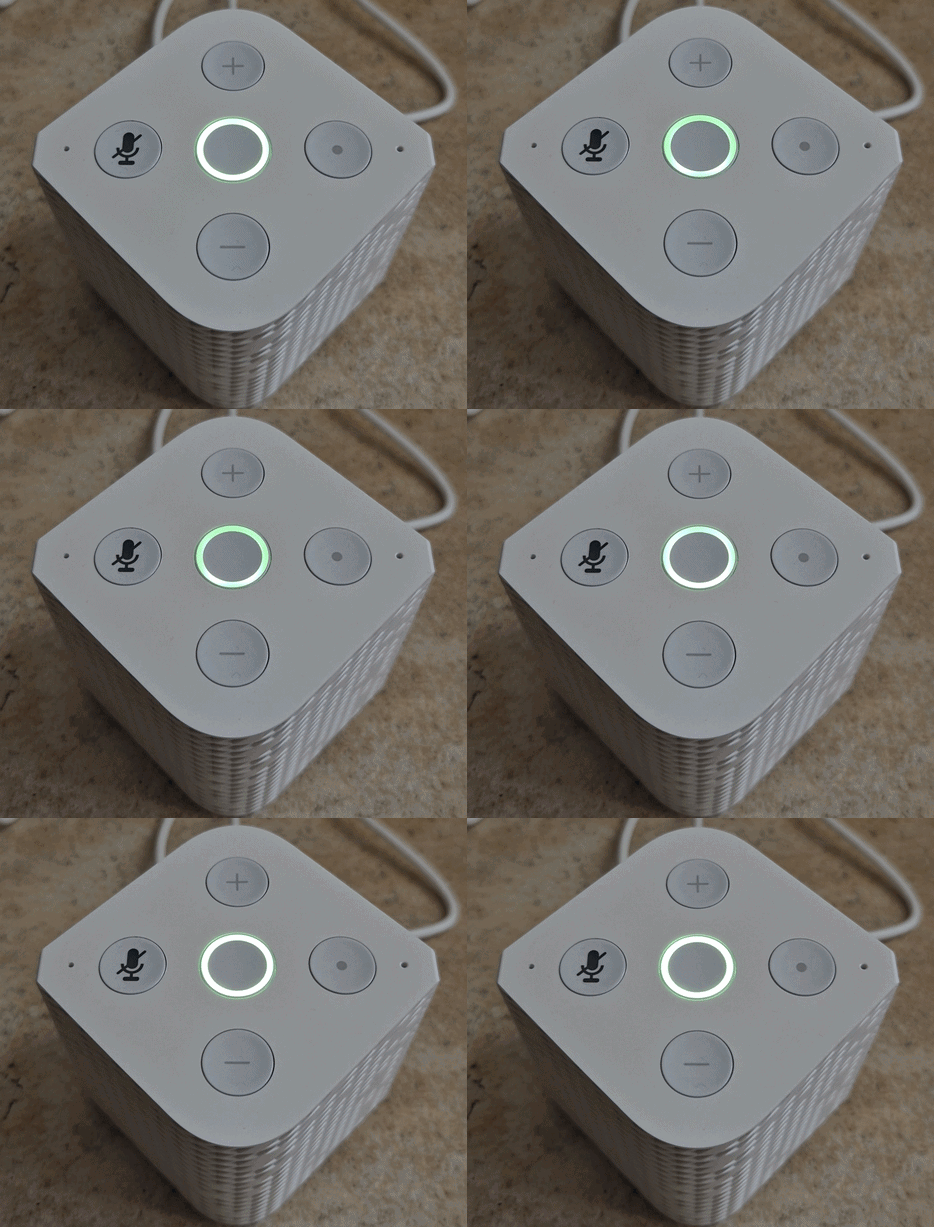
Once this mode was activated, I was able to resume the procedure normally from the Home Assistant Android app.
Attention should also be paid to the account used in the application. I had tried first with a user without administrative rights, and the tab Settings did not appear. So I couldn't access Devices & services nor in the section Discoveries.
After logging in with an administrator account on the Android app, I was able to access Settings → Devices & services, then in the section Discoveries Locate the device “3RSPK‑5225C3 Improv via BLE”.
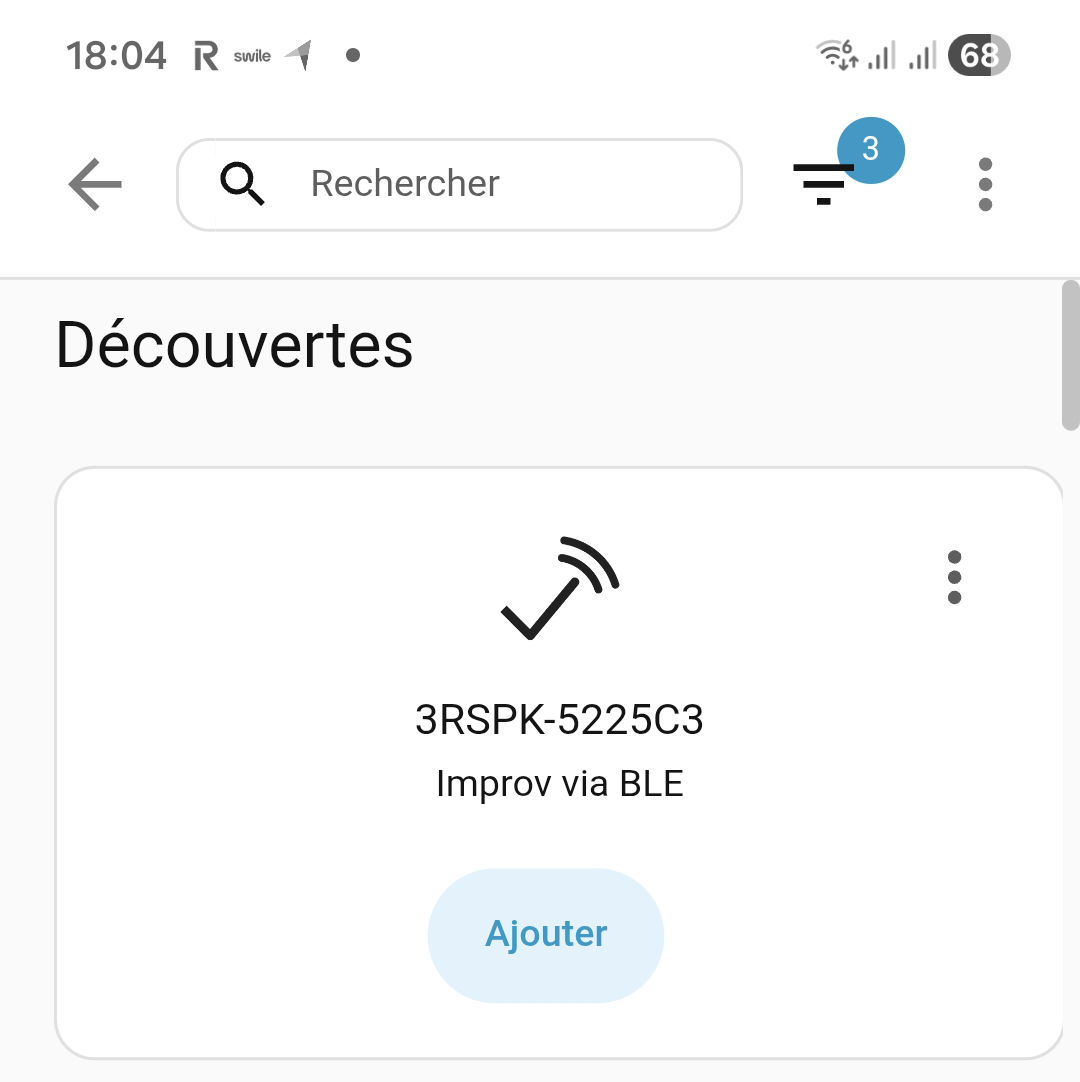
I clicked on Add, enter the name and password of my Wi‑Fi network in 2.4 GHz, and then validate.
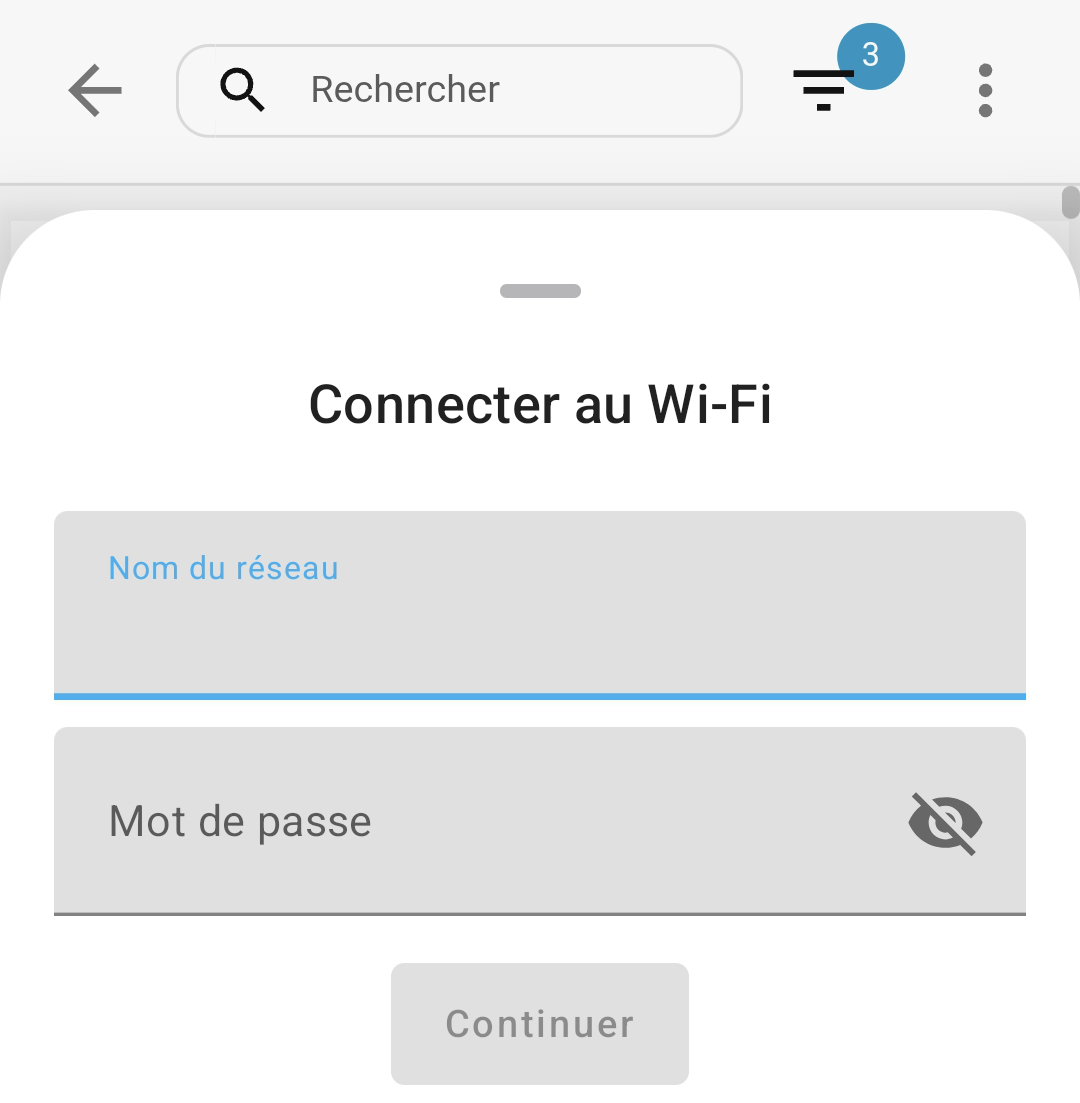
A few seconds later, the Voice & Music Assistant started speaking in English to confirm the connection, and the yellow central LED stopped flashing to move to a more stable state.
🏠 Discovered in Home Assistant and ESPHome Integration
From the computer, after the Wi‑Fi connection of the box, I opened the Home Assistant interface and consulted the section Discoveries.
I found a new device called “3RSPK ‑A8E2915225C3 ESPHome”, with a button Add.
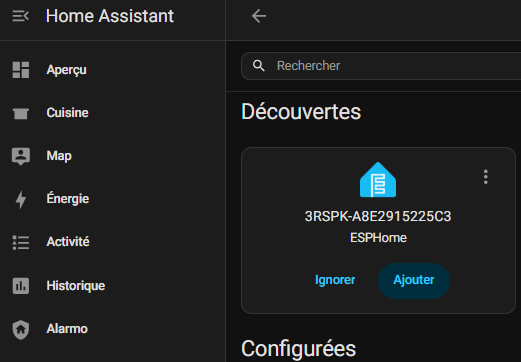
I clicked on Add to finalise the integration. I had a temporary error on the first attempt, but after restarting the validation, the process ended correctly.
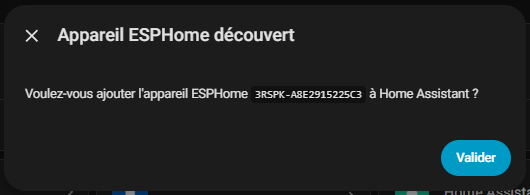
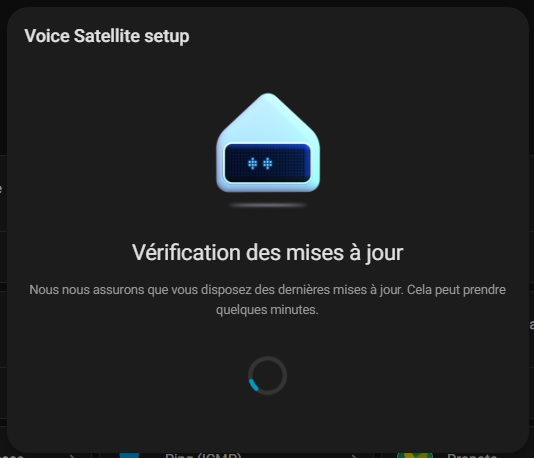
Integration then continued with:
- one OTA Update the housing,
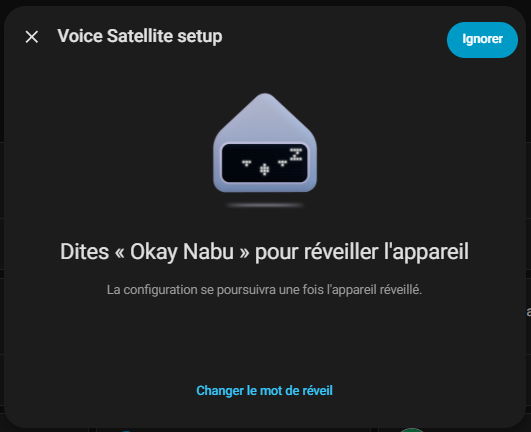
- a Configuration Screen Voice Satellite with the wake word “Okay Nabu”, which I initially chose to ignore,
- a Configuration ESPHome with the IP address of the enclosure in
192.168.1.46:6053.
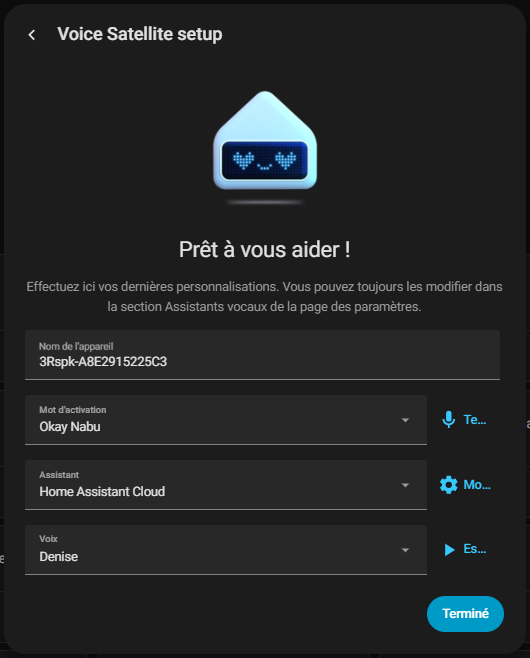
The configuration continued with a screen of Voice Satellite Configuration where I was able to:
- choose the ‘Mauritius’ voice,
- rename the device with a more telling name ‘Small white speaking device’,
- assign a coin to this satellite.
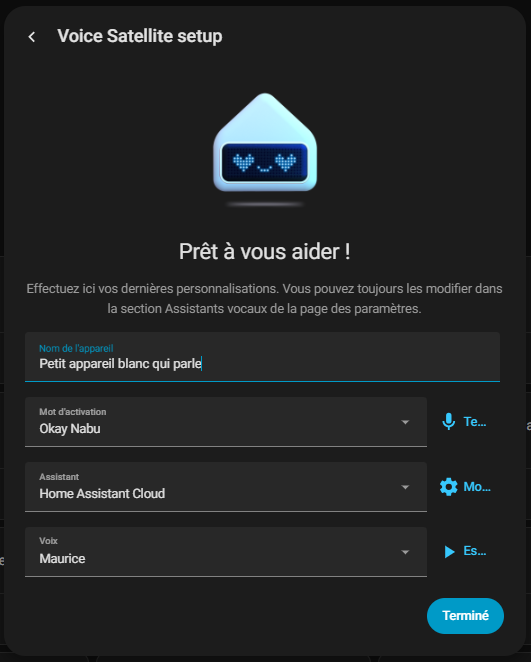
At this point, the case was fully integrated as a voice satellite and as an audio output in Home Assistant.
🔍 I check what goes back Home Assistant
Once the integration is complete, I will immediately see what Home Assistant has actually created around the case.
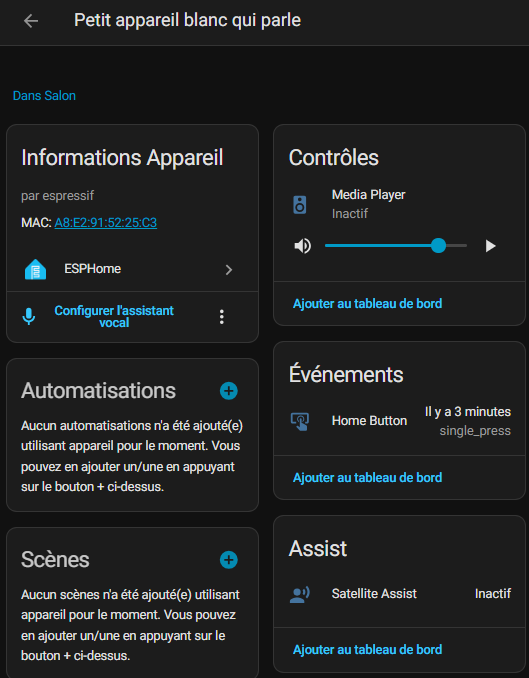
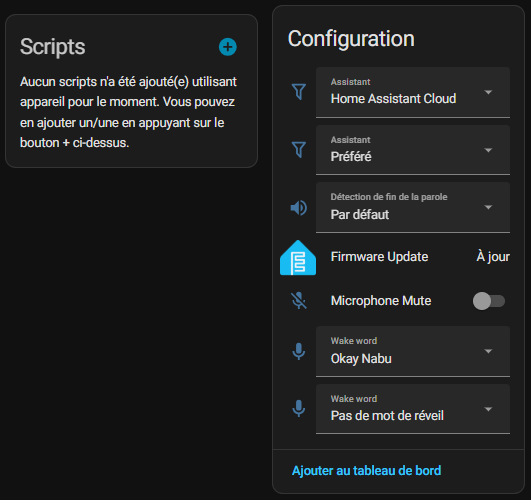
The most important point for the future is of course the presence of an entity media_player, because it will make it possible to use the box as an audio player, both for the first MP3 tests and later with Music Assistant.
In my case, I find my reader in the form of:
media_player.petit_instrument_blanc_qui_talk _media_player
But Home Assistant doesn't just pull up that drive. By opening the device’s plug, I find several interesting elements.
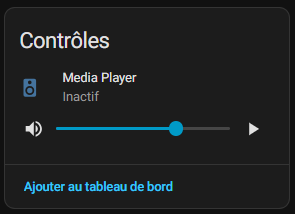
First of all, in the block Controls, Home Assistant exhibits the Media Player with:
- the state of the reader, here Inactive,
- a Bar of volume,
- and a button of reading, This confirms that the device can be controlled as an audio output.
I also find a block Assist with a Satellite Assist, also displayed as inactive at that time.
This confirms that the case is not only seen as a loudspeaker, but as a complete Home Assistant voice satellite.
In the part Configuration, I also see several parameters directly exposed by the integration:
- the choice ofassistant, here Home Assistant Cloud,
- l’preferred assistant,
- the end-of-speech detection,
- the state of the firmware update, indicated here as up-to-date,
- the Button Mute Microphone,
- the Main Awakening Word Okay Nabu,
- and a second setting of wake word, here disabled with No wake-up call.
I also see a block going up Events with the event Home Button. In my case, Home Assistant tells me a recent trigger of type _press single, which shows that the physical interactions with the housing also go back into the system.
Finally, in the general information of the device, Home Assistant displays:
- the Manufacturer Espressive,
- address MAC,
- integration ESPHome,
- and the link Configure the voice assistant.
I find this view very reassuring, as it shows that we have not simply integrated an “opaque” device.
On the contrary, you get a very detailed device, with a real audio part, a voice assistant part, hardware events, wake word settings and the classic elements of an ESPHome device.
From there, I know that Home Assistant already correctly sees the case as a controllable drive and as a complete voice satellite. This is an excellent basis for the future, and in particular for its use in Music Assistant.
♻ Updating the equipment
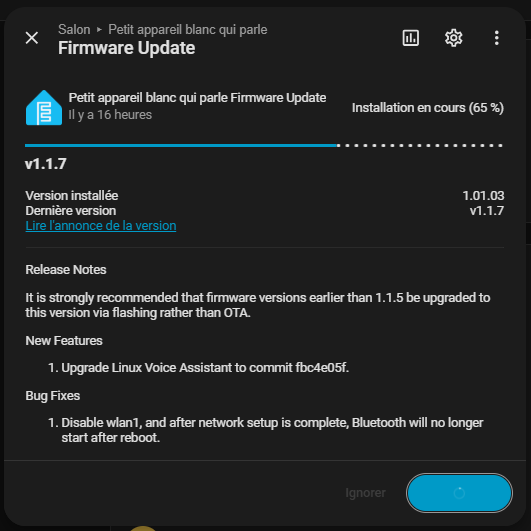
I have been asked about the updates and I am now coming across an update.
Yes, the updates work perfectly, I just upgraded to a new version. 😁
First audio tests
🎶 First audio tests: MP3 playback
Even before installing Music Assistant, I wanted to check the most basic point: Is the box capable of reading simple media sent from Home Assistant?
Instead of going right away on a radio, I preferred to start with a very simple test with a local MP3 file.
The objective was clear: validate that the media_player responds correctly, that the audio output works, and that Home Assistant is well able to send media to the box without still relying on Music Assistant.
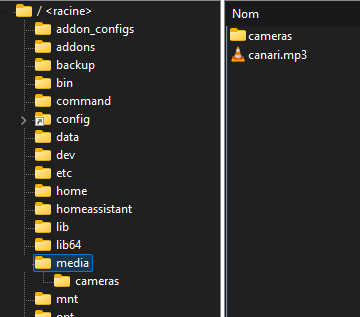
To do this, I have chosen to submit a file canari.mp3 in the file media Home Assistant. In my case, I did this with WinSCP, simply because it is the tool I usually use to browse the tree of my installation. Of course, everyone can do otherwise according to their habits.
So I put my file here:
/media/canari.mp3
On my capture, we can see the file canari.mp3 present in the file media, next to a subfolder cameras.
Once the file is copied, I return to the card of my device in Home Assistant. In the block Controls, I click on Media Player to open the reader.
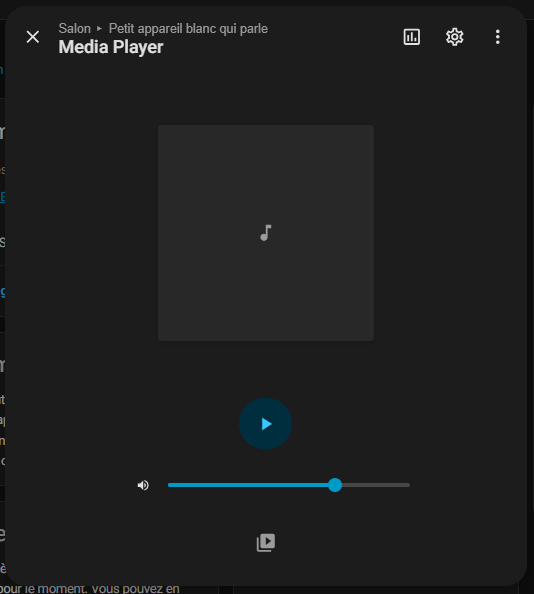
The reader panel will then open. Downstairs, there's a small logo with a play button and folders This makes it possible to search for a media source. This button should be used to manually launch a file stored in Home Assistant.
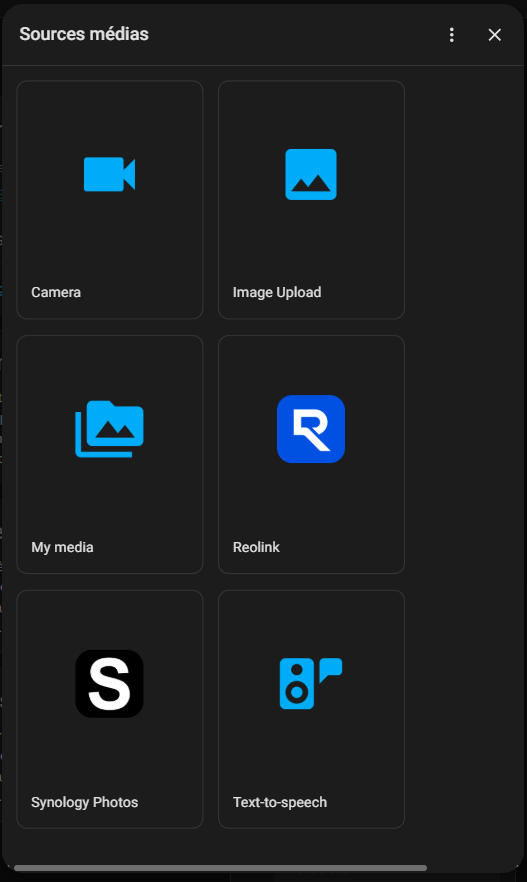
I click on it and then I arrive on the screen Media sources. Home Assistant then offers me several entries like Camera, Image Upload, My media, Reolink, Synology Photos or Text-to-speech.
In my case, it is of course My media which must be chosen.
So I open My media, then I enter the file media. Here I find exactly what I copied just before: the file cameras and the file canari.mp3.
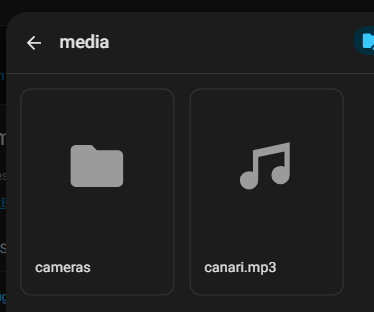
All that remains is to click on canari.mp3 to start playback on the case.
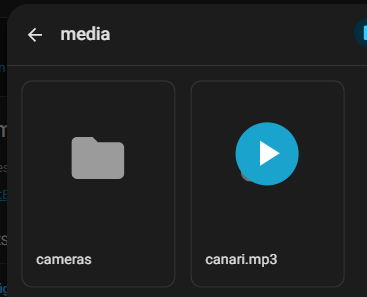
Once the file is selected, the Home Assistant player displays the current media with its generic cover, play button and volume bar. This confirms that the case can perfectly play a local audio file sent from Home Assistant.
I find this step very important in a logic of feedback, because it makes it possible to separate two subjects:
- the capacity of the housing to read a local media,
- and more advanced integration with Music Assistant.
In my case, this first MP3 test perfectly fulfilled its role.
Even before installing Music Assistant, I already had confirmation that the audio playback part was operational, that the media_player He answered correctly, and that Home Assistant could control the case like a real audio player.
Note that it almost surprised me to be able to read a local MP3 file as simply as possible.
I had not regained that freedom of use for a long time. Consumer voice assistants have gradually accustomed their users to much more closed environments, where reading personal content becomes secondary behind online services, partner platforms and imposed journeys.
I am not saying that it is impossible elsewhere, but it is often more complicated, more constrained, and much less natural.
Here, on the contrary, we find something simple: a local audio file, a player visible in Home Assistant, and immediate playback.
For me, it is almost a pleasure to rediscover this logic.
Music Assistant
🧩 I install the Music Assistant app

Once the box has been recognised and the first audio tests have been validated, I proceed to the following step: installation of Music Assistant.
Music Assistant documentation recommends running the server as app / add-on Home Assistant When using Home Assistant OS.
This is the recommended method, as it greatly simplifies installation and integration with Home Assistant.

So in Home Assistant, I go to the app/add-ons shop and install Music Assistant Server. The installation takes place without any particular difficulty.

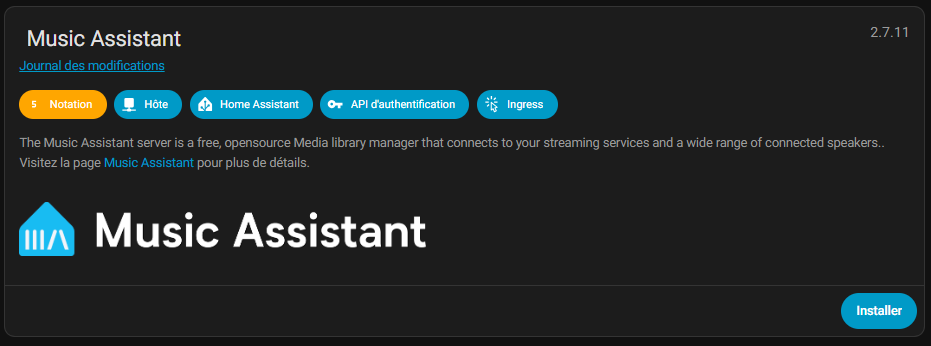
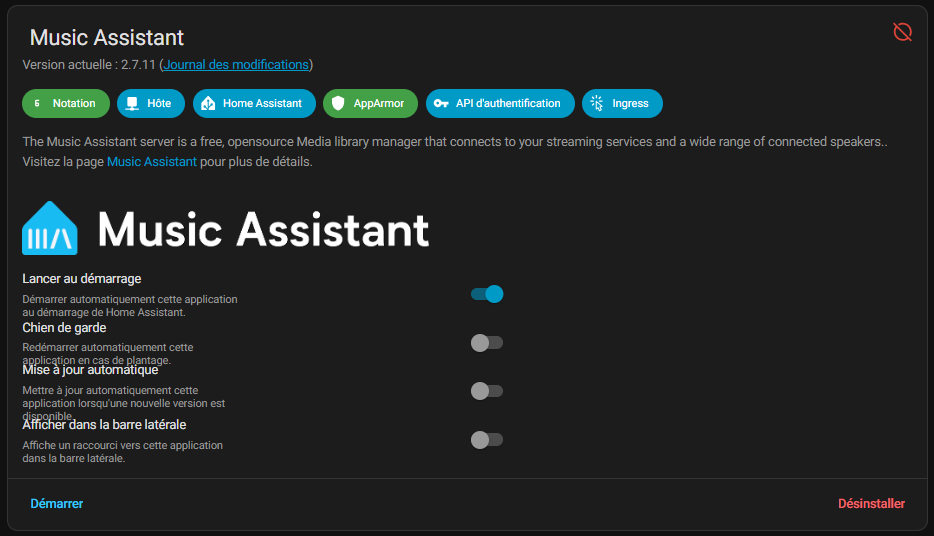
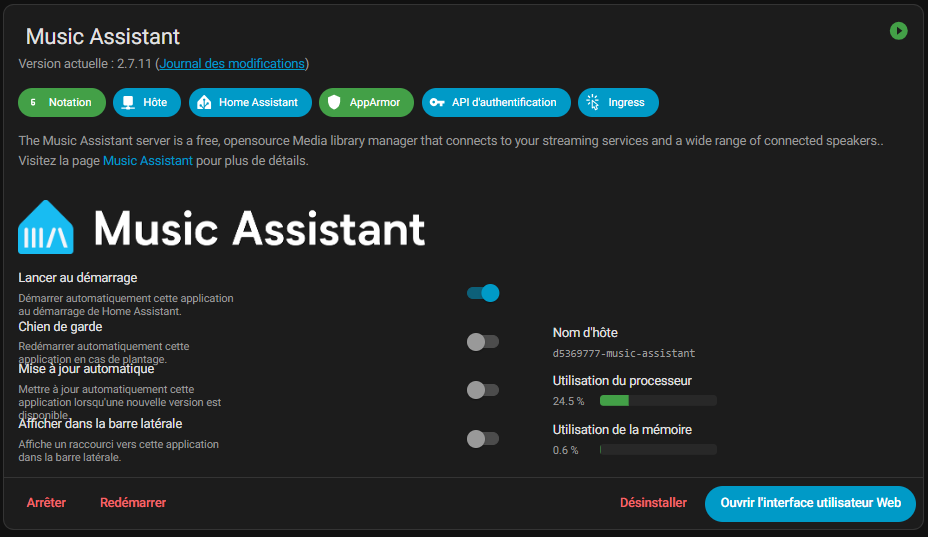
Once the server has been installed and started, we have not yet finished. You have to click on Open the web user interface at the bottom right and if this has not been done, create an administrator profile in Music Assistant.
I'm thinking of ticking Show in sidebar to save time for testing.
Home Assistant has yet to find out.Music Assistant Integration itself to connect Home Assistant to the Music Assistant server. The official documentation specifies that, in most cases, the Music Assistant server is automatically discovered by Home Assistant in the section Discoveries.
🔎 Home Assistant automatically discovers the Music Assistant integration
After starting the Music Assistant server, I go back to Settings → Devices & services.
At that time, Home Assistant offers me well Music Assistant as a new integration discovered automatically.
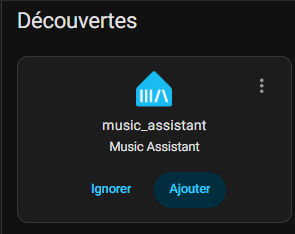
This is an important step, because a clear distinction must be made between:
- l’application / add-on Music Assistant Server,
- andHome Assistant Music Assistant Integration, which connects to it.
So I click on Add, then I validate the configuration.
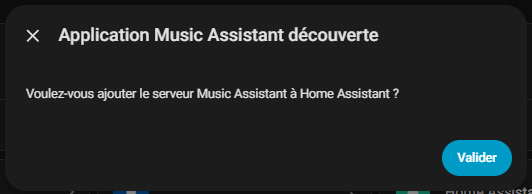
It is this integration that will then allow Home Assistant to see the Music Assistant players and expose their controls.
The official documentation clearly indicates that, once configured, the integration brings up MA players in Home Assistant as entities media_player.
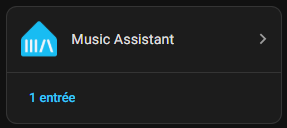
I find this distinction very important to explain because it is not always obvious when you discover Music Assistant.
There is a tendency to believe that installing the server is enough, whereas it is often necessary to validate the integration discovered in Home Assistant.
⚙ Snapcast or Home Assistant MediaPlayers?
At this point, you have to go back to Music Assistant (I added the direct link in my left sidebar) and then continue working on the Music Assistant link ☀ Home Assistant.
Music Assistant needs a player at this stage, so I have to choose the one I will use.
Before choosing, I looked at what the documentation and user feedback around Music Assistant offered.
The name that often comes back is Snapcast, because it is a known solution for synchronized multiroom audio.
So I tested it, and I can confirm that it works. Then I uninstalled it to stay on the Home Assistant-oriented solutions only.
In my installation where the case is already reassembled as an entity media_player, I found it more logical to use directly Home Assistant MediaPlayers.
In my case, this choice has several advantages:
- I directly reuse the entity already exposed by Home Assistant,
- I avoid adding an extra layer,
- I remain in a logic simpler to understand and maintain.
I think we really need to present this as a choice of context.
Snapcast makes sense, especially if you are aiming for more advanced multiroom.
But for my immediate need, with a single case and a very Home Assistant logic, the provider Home Assistant MediaPlayers seemed much more natural to me.
🔗 I add the player in Music Assistant
So I go to the Music Assistant providers and add the provider Home Assistant MediaPlayers.
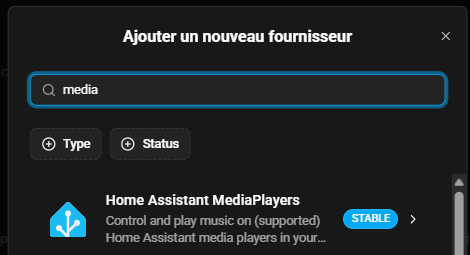
In the configuration screen, I select my entity:
media_player.small apparatuswhitewho speaks _media_player
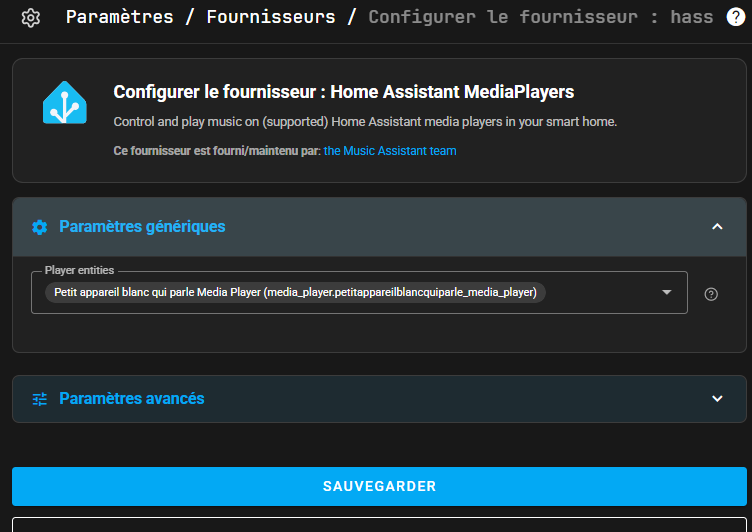
I save, then I check that the reader appears in the section Readers Music Assistant.

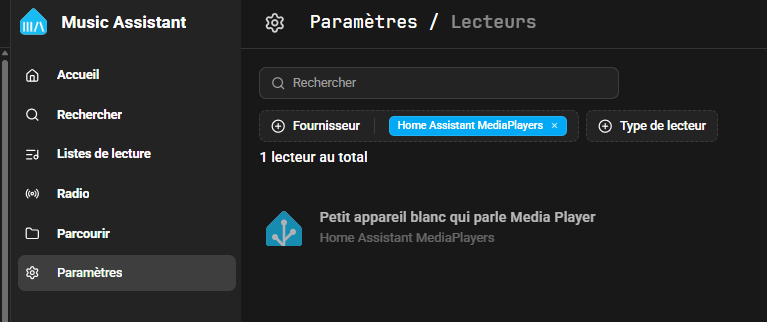
This is when integration becomes concrete: the box is no longer just a Home Assistant device, it also becomes a player available in Music Assistant.
🎵 Having a reader is not enough: I add an audio source
Once the player is visible in Music Assistant, the content part is still missing.
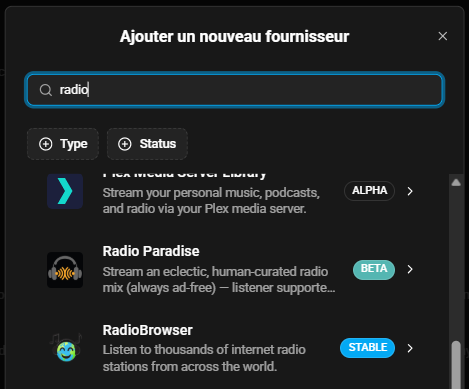
To listen to the radio, I chose to add RadioBrowser as a musical supplier. The procedure is simple:
- I'm going into Settings → Suppliers → Add a new supplier,
- I'm looking for RadioBrowser,
- I leave the default settings,
- Then I validate.
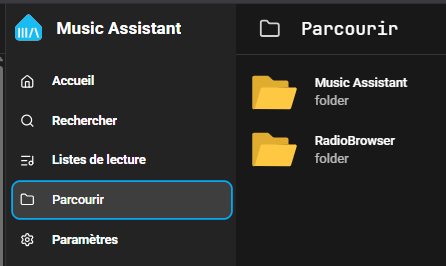
Once this step is finished, I find well RadioBrowser in the menu Browse Music Assistant.
📻 First real test: I launch France Info
Once RadioBrowser is added, I go into Browse → RadioBrowser, then in French stations.
I can easily find several known radio stations:
- FIP,
- France Inter,
- France Culture,
- and …France Info.
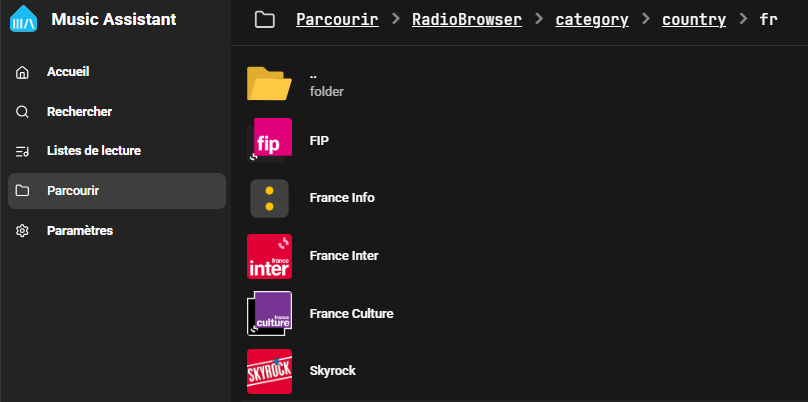
I then launch the station and this is a really satisfying moment: the radio is well played on the case.
This test validates the entire chain:
- Home Assistant sees the case as a
media_player, - Music Assistant reuses it as a player,
- RadioBrowser provides the content,
- and Voice & Music Assistant broadcast the radio well.
We are no longer in the theory: we are on a real and functional use.
🔍 What Home Assistant Backs Up During Playback
I've been in Development Tools → States in Home Assistant to see what the entity was up to media_player while a radio was playing.
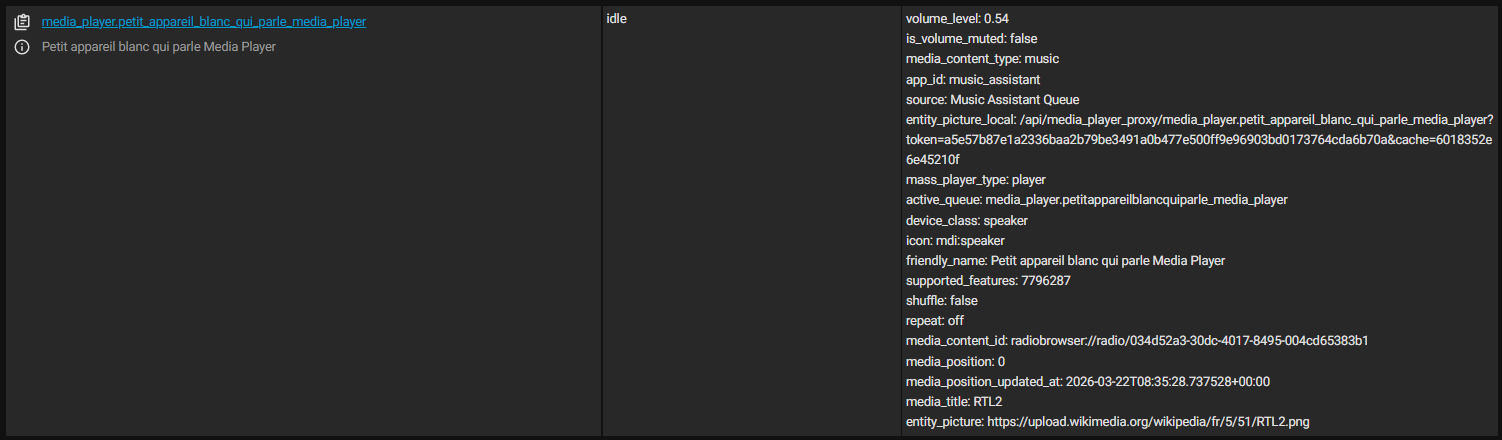
And here we get very useful information, for example:
media_content _type: musicapp_id: music_assistantsource: Music Assistant Queuemedia_title: RTL2media_content _id: radiobrowser://radio/034d52a3-30dc-4017-8495-004cd65383b1
I find this particularly interesting, as Home Assistant does not just display ‘RTL2’ or ‘France Info’ as human-readable information.
It also displays a reusable identifier to then control playback in addition to information such as the station logo, its name, …
💡 The useful tip: retrieve the ID from a current reading
To get the exact identifier of a radio, I did not need to search the URL of the stream on the web, nor did I need to search in complicated internal configurations. I simply:
- launched the station from Music Assistant,
- opened the reader’s entity in Development Tools → States,
- then retrieved the value of
media_content _id.
In my case, this value is a URI in the format:
radiobrowser://radio/034d52a3-30dc-4017-8495-004cd65383b1
I find this method very elegant, because it allows you to capitalize on an already functional reading and then make it a reusable command in Home Assistant.
🧪 I relaunch radio in YAML from Home Assistant
As a good DIY Home Assistant, I want to be able to launch my favorite radio without going through the media interface.
Once the ID has been retrieved, all that remains is to use it in the tab Development Tools → Actions Home Assistant.
Here is the example that worked for me:
action: media_player.play _media target: entity_id: media_player.petit_instrument_blanc_qui_spoke _media_player data: media_content _id: "radiobrowser://radio/034d52a3-30dc-4017-8495-004cd65383b1" media _content _type: music
This then opens the door to many uses:
- launch a radio at a fixed time in the morning,
- trigger a station according to a button on the dashboard,
- create a script “kitchen radio”, “office radio” or “wake-up radio”.
♻ Updating Music Assistant
Music Assistant is simply updated via the Home Assistant interface, it is really well done and well thought out, so very practical.

Feedback
🧠 What Home automation communities are saying
Reading the forums and discussions shows that the experience is not completely uniform.
Some users report that Music Assistant does not immediately see the HA player, others that they have to go through the Home Assistant integration to get it back up as a player correctly.
There are also more mixed returns, where audio playback is considered inconsistent, or much less convincing via certain methods.
Conversely, other users say they do not encounter any particular problems and use the case as a small acceptable audio endpoint in their installation.
I find this important to say in honest feedback: we are clearly on an ecosystem that is moving fast, with material still positioned in evolution, integrations that are progressing, and uses that also depend a lot on the local context, the network and the method chosen.
🔊 What I remember from the audio on this case
The Voice & Music Assistant Dev Edition can indeed play audio via Music Assistant, and that is already very good news.
On the other hand, I prefer to remain realistic: it is clear that this box was first designed as a voice assistant, while incorporating a real audio dimension. It can be used as an audio player, yes, but I see it above all as:
- a small radio or booster player,
- a simple audio endpoint in Home Assistant,
- or a practical diffusion point in a secondary room.
If the aim is to use it more intensively to listen to music or radio, the use of an external audio output is probably still the best approach.
⚖ Facing the Home Assistant Voice Preview Edition, Alexa and Google Home
Moving forward in this test, I quickly thought that it was necessary to situate this box in relation to the other voice solutions on the market.
⚙In terms of functionalities
The most natural comparison, in the Home Assistant universe, is of course the Home Assistant Voice Preview Edition Official Nabu Casa. But it is also interesting to put it back in front of the larger public speakers like Alexa or Google Home.
We must first recall one important thing: the THIRDREALITY Voice & Music Assistant Dev Edition is not the official Home Assistant product.
The Home Assistant Voice Preview Edition is the official material designed as a reference for voice in the Home Assistant ecosystem, with a strong focus on Assist, privacy and local control. The THIRDREALITY model, on the other hand, adopts a more hybrid approach, more directly oriented voice + music.
In fact, the two devices meet on several points: Embedded microphones, Home Assistant integration, use as a voice satellite, and the possibility to go further on the audio side. But their philosophy is not quite the same.
The official product Nabu Casa seems to me more conceived as a reference platform for local voice, while the THIRDREALITY model assumes more clearly its role as a small multipurpose terminal, capable of acting as both a voice satellite and an audio player.
This difference becomes even clearer when comparing this case to Alexa or Google Home.
These consumer solutions retain a clear advantage over simplicity: we plug in, we open the application, and everything is quickly functional. On the other hand, we then enter much more closed ecosystems, very dependent on the cloud, on home services and on the paths decided by the publisher.
This is precisely where the THIRDREALITY housing associated with Home Assistant becomes interesting. He asked for a little more implementation, but in return he gave back freedom: fine integration in Home Assistant, reading local media, advanced automations, use with Music Assistant, and a logic much more open than that of a consumer connected speaker.
In terms of confidentiality, the philosophical gap is also real.
Home Assistant emphasizes a user control and data respect oriented approach. Conversely, consumer assistants like Alexa rely heavily on cloud processing, and Amazon has even recently removed an option that allowed some Echo users to further limit sending voice data to the cloud.
Here is how I would situate things at this stage:
| Criterion | NABUCASA Home Assistant Voice Preview Edition | THIRDREALITY Voice & Music Assistant Dev Edition | AMAZON Echo Alexa / Google Home |
|---|---|---|---|
| Positioning | Official Home Assistant product, focused on Assist and local voice. | Voice + music-oriented third-party product, integrated into the Home Assistant ecosystem. | Consumer voice speakers, simplicity oriented and cloud services. |
| Philosophy | Confidentiality, openness, user control. | Practical versatility: voice, audio, home automation experimentation. | Simplicity, assistant owners, high dependence on the manufacturer’s ecosystem. |
| Installation | Natural integration in Home Assistant. | Integration Home Assistant quite direct, but more technical than a consumer device. | Very simple to start, often the most accessible to the general public. |
| Voices | Very clearly optimized for Assist. | Compatible local voice, with a more hybrid approach. A latency that seemed to me a little more noticeable in my use. | Very mature on the vocal use side, but especially cloud. |
| Audio / music | Possible, especially with Music Assistant. | Audio use put forward from the start, which my test confirms well. | Very simple with partner services, but less free for personalized local uses. |
| Custom Local Reading | Good flexibility in the Home Assistant ecosystem. | Good flexibility too, with local MP3, radio via Music Assistant and YAML steering in my test. | Often more constrained, more dependent on supported services. In other words, oriented towards partner services and subscriptions. |
| Confidentiality | Approach oriented towards local control and respect for data. | Take advantage of the Home Assistant logic, which is more open and more manageable. | Strong reliance on cloud and vendor policies. |
In the end, I don't necessarily see these devices as perfect direct competitors.
- The Home Assistant Voice Preview Edition represents, in my view, the official Home Assistant voice channel.
- The THIRDREALITY Voice & Music Assistant Dev Edition seems more attractive to me for hybrid voice + audio use in a Home Assistant environment. Great gadget for DIYers like me.
- As for Alexa and Google Home, they retain an advantage over immediate simplicity, but at the cost of much more limited freedom and greater reliance on their cloud.
🔊On the listening plan (sound)
| Product | Audio configuration | Voice / TTS | Radio / podcasts | Ambient music | Listening to music | Grave / magnitude | Perceived power | Large room | Position against THIRDREALITY | Overall audio score |
|---|---|---|---|---|---|---|---|---|---|---|
| THIRDREALITY Voice & Music Assistant Dev Edition | 1 speaker 3 W / 4 Ω | Very suitable – 8/10 | Correct – 6/10 | Limited – 5/10 | Low – 3/10 | Very limited – 2/10 | Low – 3/10 | No – 2/10 | Departure reference | 4,5/10 |
| Amazon Echo Plus 2 | Woofer 3″ + tweeter 0.8″ | Very good – 8.5/10 | Good – 7.5/10 | Good – 7/10 | Correct to Good - 6.5/10 | Significantly higher, clearer and more enveloping – 6.5/10 | Correct — 6.5/10 | Yes, for normal part – 6/10 | Highly above | 6,8/10 |
| Amazon Echo 4 | Woofer 3″ + 2 tweeters 0.8″ | Very good – 8.5/10 | Good – 8/10 | Good to very good – 7.5/10 | Correct for good, nice but not perfectly neutral – 7/10 | More bass and more aperture, with possible hardness at high volume – 7/10 | Good – 7/10 | Yes, better than small smart speakers – 6.5/10 | Clearly above | 7,2/10 |
| Google Nest Audio | Woofer 3″ + tweeter 0.75″ | Very good – 8.5/10 | Good – 8/10 | Good – 7.5/10 | Correct to Good - 7/10 | Superior to THIRDREALITY but under Echo Studio — 6.5/10 | Correct — 6.5/10 | Average part – 6/10 | Clearly above | 7,1/10 |
| Bose SoundTouch 20 | Compact music-oriented speaker | Good – 8/10 | Good – 8/10 | Very good – 8.5/10 | Very good – 8/10 | Very good – 8/10 | Good – 7.5/10 | Yes, comfortably – 7/10 | Very clearly above | 8/10 |
| Amazon Echo Studio | Woofer 5.25″ + 3 mediums 2″ + tweeter 1″ | Excellent - 9/10 | Excellent – 8.5/10 | Excellent - 9/10 | Good to very good, with true consumer hi-fi ambition – 8.5/10 | Very strong advantage in terms of seriousness, width and dynamics – 9/10 | Very good – 9/10 | Yes, easily – 8.5/10 | Very far ahead | 8,7/10 |
| Google Home Max | 2 woofers 4.5″ + 2 tweeters 0.7″ | Very good – 9/10 | Very good – 8.5/10 | Excellent - 9/10 | Good to very good, very powerful — 8.5/10 | Very large – 9/10 | Very good – 9/10 | Yes – 9/10 | Very far ahead | 8,8/10 |
| Devialet Phantom II | Multi-transducers, 400 W RMS | Excellent - 9/10 | Excellent - 9/10 | Excellent – 9.5/10 | Very high level – 9.5/10 | Huge advantage – 9.5/10 | Very good – 9/10 | Yes – 9/10 | Out of category | 9,3/10 |
| Devialet Phantom I | Very powerful premium architecture | Excellent - 9/10 | Excellent - 9/10 | Excellent – 9.5/10 | Very high level – 9.5/10 | Selection reference – 10/10 | Selection reference – 10/10 | Yes, very easily – 9.5/10 | Out of category, far above | 9,5/10 |
This painting allows me to put this product back in its rightful place.
For me, THIRDREALITY Voice & Music Assistant Dev Edition is not intended to replace a real music-oriented connected speaker. I see it rather as a voice satellite Home Assistant able, in addition, to broadcast sound.
And in this usage, I find that he is doing quite well. To chat with Home Assistant, hear TTS feedback, start a radio or put a small sound background, I find the result consistent and sufficient in a room.
We really feel that the product has been thought of as a practical voice access point, more than as a speaker made to impress on the audio level.
On the other hand, as soon as I compare it to more ambitious speakers, the difference quickly becomes obvious. There is a lack of safe, breadth and comfort when you really want to listen to music.
For me, this is not a reproach to the product itself, but rather a logical consequence of its positioning: Here, priority is clearly given to voice, home assistant integration and ease of use.
In the end, if I am looking for a device to extend the voice use of Home Assistant in the house, this Voice & Music Assistant Dev Edition seems relevant to me.
If I am looking above all for a good sound quality, I would consider it more as a complementary equipment than as a main speaker.
🚧 What I haven’t explored yet
Even if the core of the test is validated, there are still several interesting avenues that I have not yet taken to the end:
- volume adjustment, mute and shutdown via classic Home Assistant actions,
- Piper installation and testing to avoid using Nabu Casa cloud,
- the behaviour of the pause and replay on a continuous-stream radio,
- voice announcements and TTS in the middle of a radio,
- integration into Assist like other voice assistants,
- more advanced multiroom scenarios, where Snapcast could regain all its interest.
I prefer to make this clear, because it helps to distinguish what has really been tested from what remains to be documented later.
💬 What I have seen
✅ The Voice & Music Assistant Dev Edition can be used as a player in Music Assistant.
✅ The Supplier Home Assistant MediaPlayers is a simple and consistent solution when the case is already visible as media_player in Home Assistant.
✅ Addition of RadioBrowser makes it very easy to listen to stations such as France Info.
✅ It is possible to retrieve a reusable ID from a current playback and then restart the station in YAML from Home Assistant.
✅ The Wi‑Fi integration with the Home Assistant app is quite simple, provided you use an administrator account.
❌ The documentation is really minimalist at the moment.
❌ The complete absence of Ethernet requires Wi‑Fi.
💬 My verdict
Che test convinced me that it is entirely possible to transform the Voice & Music Assistant Dev Edition in small connected radio player with Music Assistant. But it would be almost reductive to stop at this conclusion alone, as this product seems to open up many other perspectives. I have explored only part of it here, and I will clearly continue my investigations.
I particularly appreciated the simplicity of the path chosen in my installation: integration into Wi‑Fi via the Home Assistant application, appearance of the housing as media_player, first tests MP3 conclusive, addition in Music Assistant via Home Assistant MediaPlayers, then playback of radios with RadioBrowser or launch local audio files. This journey is both logical, gradual and reassuring, as it makes it possible to validate each step without starting from the outset on a complex configuration.
Where this box becomes really interesting is that the link with Music Assistant greatly expands the user experience. Music Assistant is not limited to reading a radio or a few songs: it can unify local libraries and online sources, aggregate several music providers, search all sources at the same time, display its readers in Home Assistant, and make it manageable by dashboards, scripts, automations and voice assistants.
In other words, once the housing is integrated into this ecosystem, it can potentially go far beyond the simple role of a small radio speaker. It can become a real audio access point in Home Assistant, able to stream local music, internet radios, content from compatible services, TTS voice announcements, or even participate in more advanced multiroom streaming scenarios depending on the players and providers used.
This is also what I liked about this test: I have rediscovered an open and evolving logic. Where many consumer connected speakers lock the user into a frozen path, the combination of this box with Home Assistant and Music Assistant suggests a much wider playing field, with real freedom of experimentation. We feel that we can go much further, whether it is to control home audio, create smart automations, centralise several music sources or reuse this box as a voice and audio interface in different rooms.
In summary, this first feedback already validates an essential point: the Voice & Music Assistant Dev Edition is not just a curious voice satellite or a test gadget. It is a device that can already provide real services in a Home Assistant installation, and above all seems to promise much more as we take the time to explore its possibilities.
Finally, and to conclude really, I would like to welcome the involvement of THIRDREALITY in this ecosystem. It is not so common to see a manufacturer offering such a oriented product Home Assistant, preloaded for voice and music, and designed for a more open logic than that of conventional connected speakers. I do not see it as bad competition for Nabu Casa, On the contrary: The more serious actors around local voice and audio in Home Assistant, the more the ecosystem will progress. And in the face of solutions like Alexa or Google Home, very practical but much more closed, I find it rather gratifying to see this kind of alternative emerge for users who want to keep their hands on their connected home.
 English
  French
  Spanish
  Chinese
  German